Keyword targeting and on-page SEO are the foundation of ranking any page on Google. In simple terms, keyword targeting means choosing the exact words people search for, while on-page SEO means placing those words in the right spots on your page so search engines can understand and rank your content.
When both are done correctly, your page becomes easier for Google to read and more useful for users to click and stay on. That’s what leads to better rankings.
What Keyword Targeting and On-Page SEO Mean (Simple Explanation)
Think of keyword targeting as choosing the right topic, and on-page SEO as presenting that topic clearly on your page.
- Keyword targeting = finding what people are searching
- On-page SEO = optimizing your page for that search
For example:
- If someone searches “best SEO tools”
- Your page should:
- Clearly focus on that keyword
- Include it in important places like the title, headings, and content
- Provide useful information that matches the search
This alignment is what helps your page rank.
Why Visual Understanding Makes It Easier
SEO can feel confusing when it’s explained only in text. But when you see how everything connects, it becomes much easier.
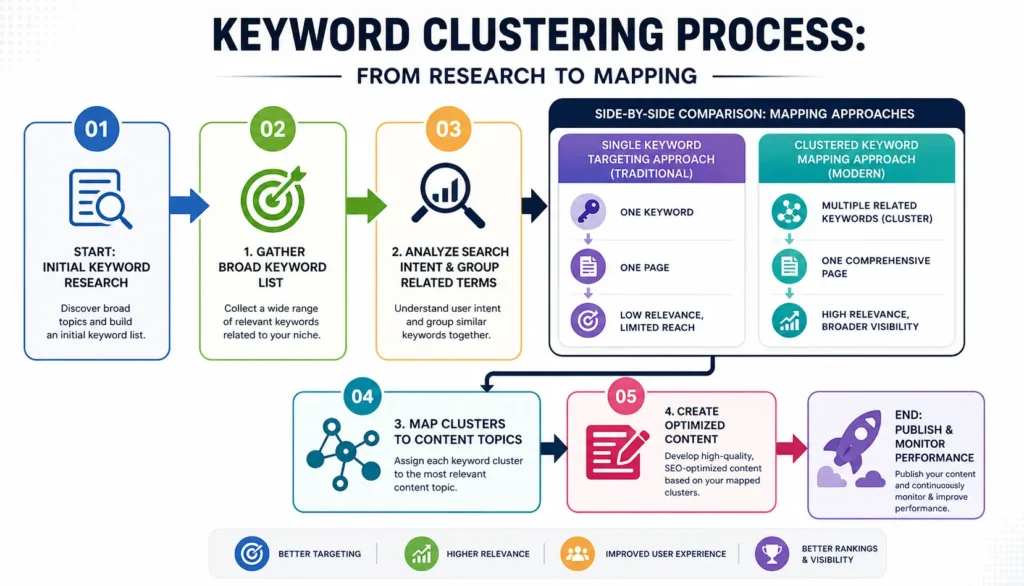
A simple visual flow looks like this:
Search Query → Keyword Targeting → On-Page Optimization → Google Ranking
Instead of guessing where to place keywords, visuals help you:
- Understand the structure of a well-optimized page
- See exactly where keywords should go
- Avoid common mistakes like overusing or misplacing keywords
Quick Example: How One Page Ranks Using Proper Keyword Placement
Let’s take a simple example.
Target keyword: “on page SEO checklist”
Here’s how a well-optimized page uses it:
- Title: On Page SEO Checklist (Complete Guide)
- URL: /on-page-seo-checklist
- H1: On Page SEO Checklist for Beginners
- First paragraph: Mentions the keyword naturally
- Subheadings: Include variations like “SEO checklist steps”
- Images: Use alt text with related keywords
Because the keyword is placed clearly and naturally across the page, Google understands:
- what the page is about
- who it is for
- when to show it in search results
That clarity is what helps the page rank higher compared to pages that are not properly optimized.
What is Keyword Targeting in SEO? (Simple Visual Explanation)
Keyword targeting in SEO means choosing the exact words and phrases your audience is searching for, and then building your page around those terms so search engines clearly understand your content.
In simple words, it’s about:
- Picking the right search terms
- Using them in the right way
- Helping Google match your page with user searches
If you target the wrong keyword, your page may never rank. If you target the right one but use it poorly, it still won’t perform well. Both selection and placement matter.
Types of Keywords You Need to Know
To do keyword targeting properly, you need to understand how different types of keywords work together.
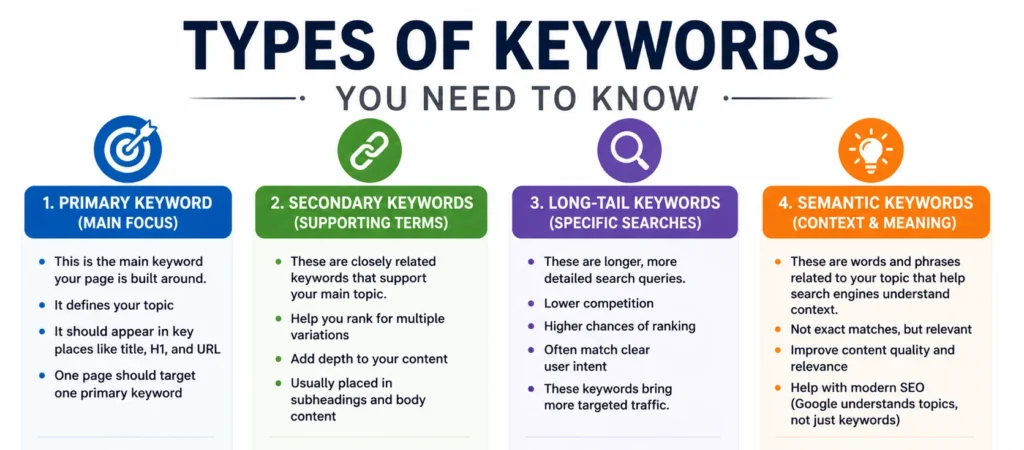
1. Primary Keyword (Main Focus)
This is the main keyword your page is built around.
- It defines your topic
- It should appear in key places like title, H1, and URL
- One page should target one primary keyword
Example:
Primary keyword → “on page SEO checklist”
2. Secondary Keywords (Supporting Terms)
These are closely related keywords that support your main topic.
- Help you rank for multiple variations
- Add depth to your content
- Usually placed in subheadings and body content
Example:
- SEO checklist for beginners
- website SEO checklist
- technical SEO checklist
3. Long-Tail Keywords (Specific Searches)
These are longer, more detailed search queries.
- Lower competition
- Higher chances of ranking
- Often match clear user intent
Example:
- “on page SEO checklist for blog posts”
- “step by step SEO checklist for beginners”
These keywords bring more targeted traffic.
4. Semantic Keywords (Context & Meaning)
These are words and phrases related to your topic that help search engines understand context.
- Not exact matches, but relevant
- Improve content quality and relevance
- Help with modern SEO (Google understands topics, not just keywords)
Example:
- meta tags
- internal linking
- keyword placement
- content optimization
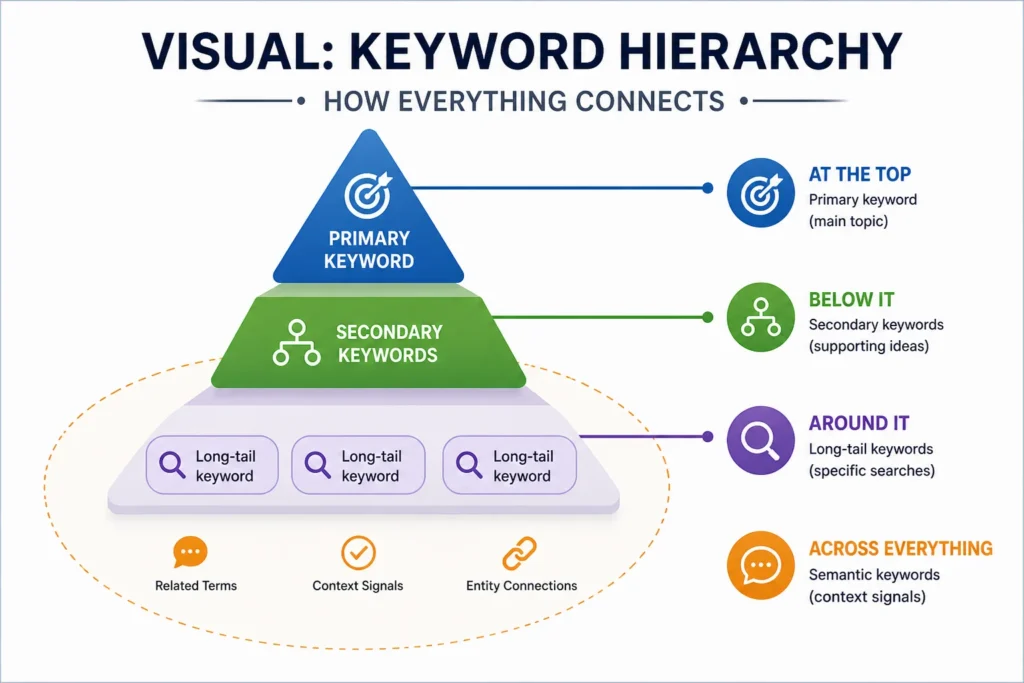
Visual: Keyword Hierarchy (How Everything Connects)
Think of keyword targeting like a structure:
- At the top → Primary keyword (main topic)
- Below it → Secondary keywords (supporting ideas)
- Around it → Long-tail keywords (specific searches)
- Across everything → Semantic keywords (context signals)
This structure helps you:
- Cover a topic completely
- Rank for multiple search terms
- Avoid thin or incomplete content
Why This Matters for Rankings
Google doesn’t rank pages just because a keyword is mentioned. It ranks pages that:
- Fully cover a topic
- Match search intent
- Use keywords naturally
When you combine all keyword types correctly, your page becomes:
- More relevant
- More useful
- More likely to rank
What is On-Page SEO? (With Real Page Example)
On-page SEO means optimizing everything inside your webpage so search engines can understand your content and rank it for the right keywords.
In simple terms, it’s how you:
- Structure your content
- Use your keywords
- Improve user experience
The goal is clear: help Google understand your page and help users find exactly what they need.
Definition and Purpose
On-page SEO focuses on improving elements within your page to:
- Match search intent
- Increase visibility in search results
- Improve user engagement (time on page, clicks, etc.)
If keyword targeting is about what to target, then on-page SEO is about how to present it properly.
Difference Between On-Page and Off-Page SEO
Many people confuse these two, but the difference is simple:
| Factor | On-Page SEO | Off-Page SEO |
|---|---|---|
| Focus | Your website | External websites |
| Control | Fully in your control | Limited control |
| Examples | Content, headings, links | Backlinks, mentions |
| Goal | Improve relevance | Build authority |
- On-page SEO = optimizing your page
- Off-page SEO = building trust through other sites
Both are important, but on-page SEO is where everything starts.
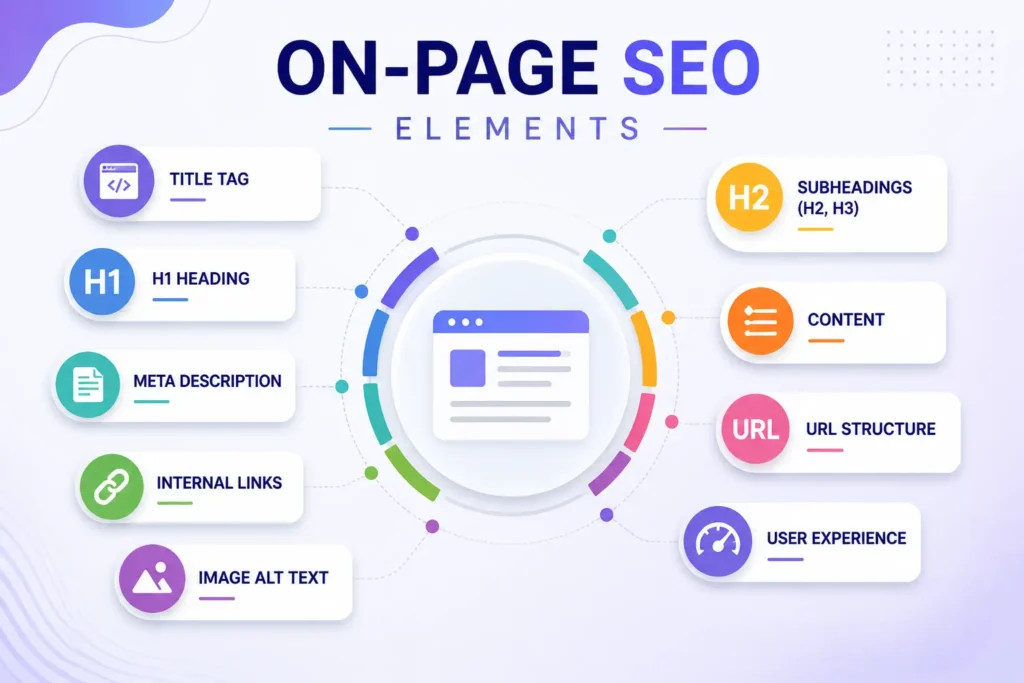
Key Elements of On-Page SEO
To rank a page, you need to optimize multiple elements together. Missing even one can reduce your chances of ranking.
1. Content (The Core of SEO)
Content is the most important part of on-page SEO.
- It should match the keyword and search intent
- It should be clear, useful, and easy to read, especially when supporting multimedia formats such as video content.
- It should naturally include your primary and secondary keywords
Example:
If your keyword is “on page SEO checklist,” your content should actually provide a checklist, not just talk about SEO in general.
2. HTML Tags (Structure for Search Engines)
HTML tags help search engines understand your page structure.
Important tags include:
- Title tag → appears in search results
- H1 tag → main heading of your page
- H2, H3 tags → organize sections
- Meta description → summary for users
These tags should include your keywords in a natural way.
3. Internal Links (Connecting Your Content)
Internal links connect one page of your website to another.
They help:
- Search engines crawl your site
- Pass authority between pages
- Keep users engaged longer
Example:
Linking from a blog post about keyword research to a post about on-page SEO helps both pages perform better.
4. User Experience (UX Signals)
Google also looks at how users interact with your page.
Important factors include:
- Page speed
- Mobile friendliness
- Easy navigation
- Clear layout
If users leave quickly, your rankings may drop. If they stay and engage, your rankings can improve.
Visual Example of an Optimized Page
A properly optimized page looks like this:
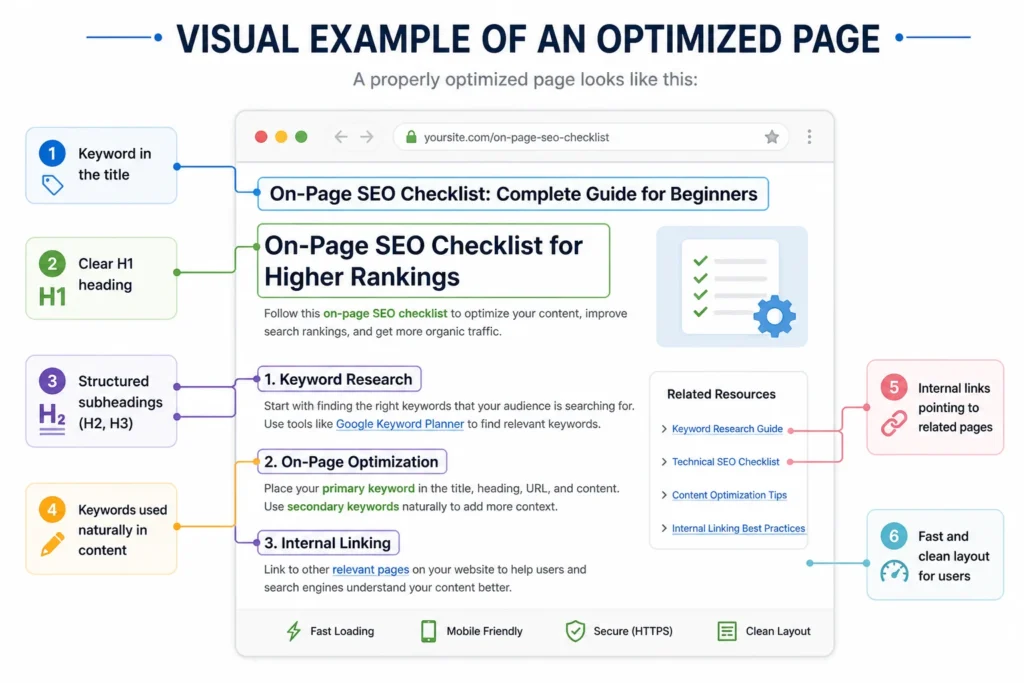
- Keyword in the title
- Clear H1 heading
- Structured subheadings (H2, H3)
- Keywords used naturally in content
- Internal links pointing to related pages
- Fast and clean layout for users
Why On-Page SEO Matters
Without proper on-page SEO:
- Google may not understand your page
- Your content may not rank
- Users may leave quickly
With proper optimization:
- Your page becomes clear and relevant
- Rankings improve
- Traffic grows consistently
How Keyword Targeting and On-Page SEO Work Together
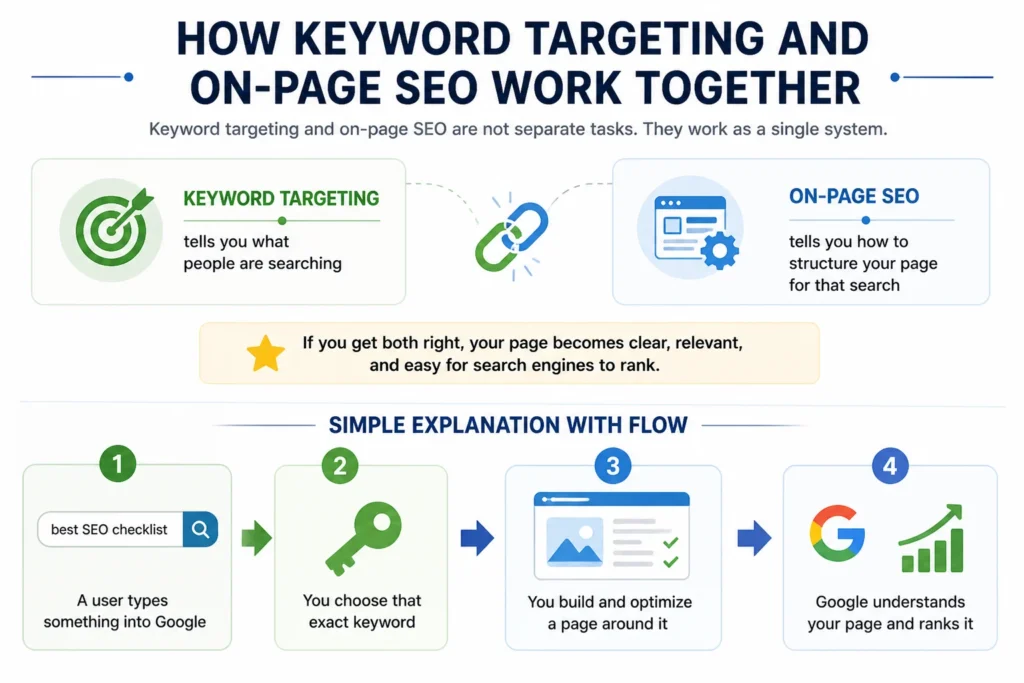
Keyword targeting and on-page SEO are not separate tasks. They work as a single system.
- Keyword targeting tells you what people are searching
- On-page SEO tells you how to structure your page for that search
If you get both right, your page becomes clear, relevant, and easy for search engines to rank.
Simple Explanation with Flow
Here’s the easiest way to understand it:
- A user types something into Google
- You choose that exact keyword
- You build and optimize a page around it
- Google understands your page and ranks it
Flow:
Search Query → Keyword Targeting → On-Page Optimization → Ranking
Each step depends on the previous one. If one breaks, the whole process fails.
What Happens When Everything Works Correctly
Let’s say someone searches:
“on page SEO checklist for beginners”
Now here’s how both work together:
Step 1: Keyword Targeting
You identify:
- Primary keyword → on page SEO checklist
- Long-tail keyword → on page SEO checklist for beginners
Step 2: On-Page SEO
You optimize your page:
- Title includes the keyword
- H1 matches the topic
- Content answers the exact query
- Subheadings cover related points
Step 3: Google Understanding
Google now sees:
- Your page matches the search
- Your content is relevant
- Your structure is clear
Step 4: Ranking
Your page starts appearing in search results and gains traffic.
Why Poor Targeting Leads to No Rankings
This is where most people fail.
Even if your content is good, poor keyword targeting can stop it from ranking.
Common Problems:
1. Wrong Keyword Choice
- Targeting keywords nobody searches
- Or keywords too competitive
2. Mismatch with Search Intent
- User wants a checklist
- Your page gives a general article
3. Weak On-Page Optimization
- Keyword not in title or headings
- Poor structure
4. Trying to Target Too Many Keywords
- Confuses search engines
- Reduces clarity
Simple Example (Good vs Bad)
Bad Approach
- Keyword: “SEO” (too broad)
- No clear structure
- Random content
Result: No ranking
Good Approach
- Keyword: “on page SEO checklist for beginners”
- Clear title, headings, and structure
- Content matches intent
Result: Higher chances of ranking
Key Takeaway
Keyword targeting and on-page SEO must work together.
- Keyword targeting gives direction
- On-page SEO gives structure
When both align, your page becomes:
- Easy for Google to understand
- Useful for users
- More likely to rank
Step-by-Step Keyword Targeting Process (Visual Workflow)
Keyword targeting works best when you follow a clear process instead of guessing. This section breaks it down into practical steps you can apply to any page.
Step 1 – Find the Right Keywords
The first step is to discover what people are actually searching for. This is where keyword research tools help you get real data instead of assumptions.
Tools You Can Use
- Google Keyword Planner
Best for beginners. It gives search volume and keyword ideas directly from Google. - Ahrefs
Great for detailed insights like keyword difficulty, traffic potential, and competitor analysis. - SEMrush
Useful for keyword research, competitor tracking, and content planning.
You don’t need all tools at once. Start with one and expand as needed.
How to Choose the Right Keywords
Not every keyword is worth targeting. You need to filter them based on a few key factors.
1. Search Volume
This shows how many people search for a keyword each month.
- High volume = more traffic potential
- Low volume = easier to rank but less traffic
Tip:
Don’t chase only high-volume keywords. Many low-volume keywords combined can bring steady traffic.
2. Keyword Difficulty
This tells you how hard it is to rank for a keyword.
- High difficulty → strong competition
- Low difficulty → easier to rank
Best approach:
- New sites → target low to medium difficulty
- Established sites → go for higher competition keywords
3. Search Intent (Most Important)
Search intent means why someone is searching.
There are three main types:
- Informational → looking for information
- Transactional → ready to buy or act
- Navigational → looking for a specific site
Your content must match the intent.
Example:
- Keyword: “on page SEO checklist”
- Intent: informational
- Best content: step-by-step guide or checklist
If your content doesn’t match intent, it won’t rank — even if everything else is correct.
Visual Workflow: How Keyword Research Leads to Ranking
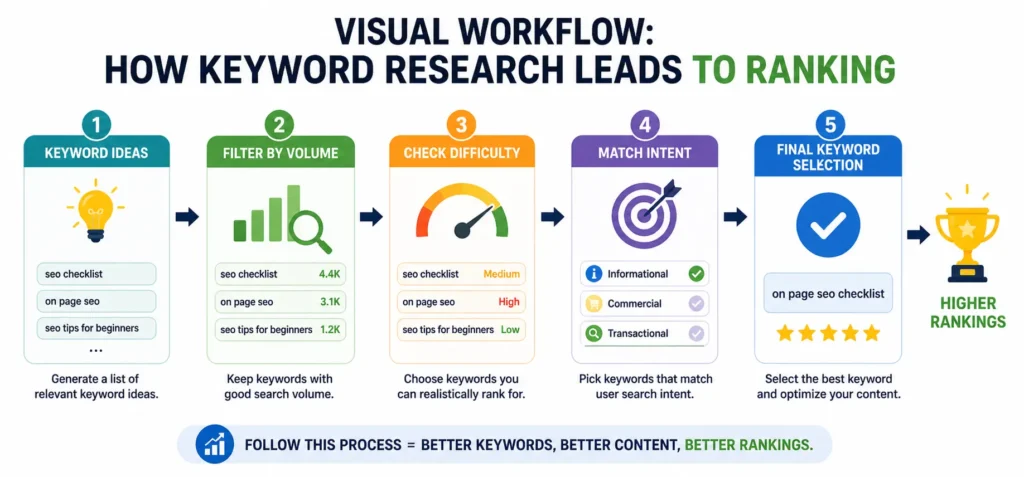
Once you select the right keyword, the next step is to understand its intent in detail and map it properly to your page.
Step 2 – Understand Search Intent
Search intent is the reason behind a search. If your content doesn’t match this intent, your page won’t rank — even if your keyword is correct.
Types of Search Intent
There are three main types you should focus on:
1. Informational Intent
The user wants to learn something.
- Examples:
- “what is on page SEO”
- “how to do keyword research”
- Best content:
- Guides, tutorials, blog posts
2. Transactional Intent
The user is ready to take action (buy, sign up, download).
- Examples:
- “best SEO tools pricing”
- “buy keyword research tool”
- Best content:
- Landing pages, product pages, comparisons
3. Navigational Intent
The user wants to go to a specific website or brand.
- Examples:
- “Ahrefs login”
- “SEMrush dashboard”
- Best content:
- Homepage or specific brand pages
Matching Content with Intent
This is where most pages fail.
If intent and content don’t match, rankings drop.
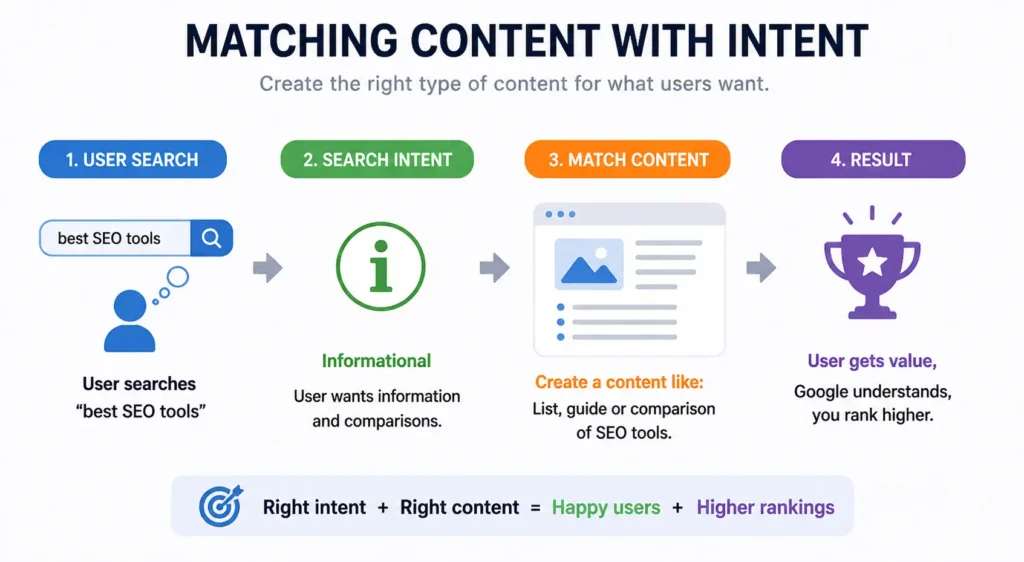
Simple rule:
- Informational keyword → write a helpful guide
- Transactional keyword → create a sales or comparison page
- Navigational keyword → provide direct access to the brand/page
Quick Example
Keyword: “on page SEO checklist”
- Intent: Informational
- Correct content: Step-by-step guide
Keyword: “best SEO tools pricing”
- Intent: Transactional
- Correct content: Comparison or product page
Step 3 – Map Keywords to Pages
Once you have the right keywords and understand their intent, the next step is to assign them properly across your website.
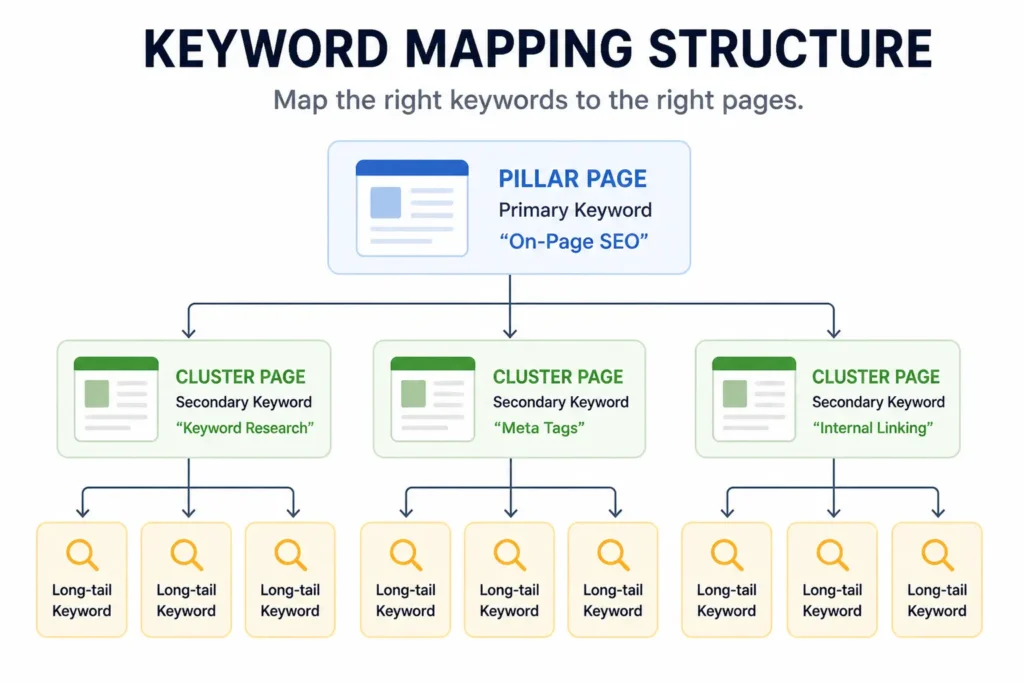
One Page = One Main Keyword
Each page should focus on one primary keyword.
- Keeps your page clear and focused
- Helps search engines understand your topic
- Improves ranking chances
You can still use:
- Secondary keywords
- Long-tail variations
But everything should support one main topic.
Example of Keyword Mapping
- Page 1 → “on page SEO checklist”
- Page 2 → “keyword research guide”
- Page 3 → “technical SEO basics”
Each page targets a different keyword.
Avoid Keyword Cannibalization
Keyword cannibalization happens when multiple pages target the same keyword.
This causes:
- Confusion for search engines
- Lower rankings
- Pages competing with each other
Bad Example
- Page A → “SEO checklist”
- Page B → “SEO checklist for beginners”
Both pages target similar intent → they compete
Good Example
- Page A → “on page SEO checklist”
- Page B → “technical SEO checklist”
Clear separation → better rankings
Visual Idea: Keyword Mapping Structure
Visual Guide to Perfect Keyword Placement (On-Page SEO Checklist)
Placing keywords correctly is what turns a well-written page into a rankable page. It’s not about using keywords everywhere, it’s about using them in the right positions so search engines and users both understand your content.
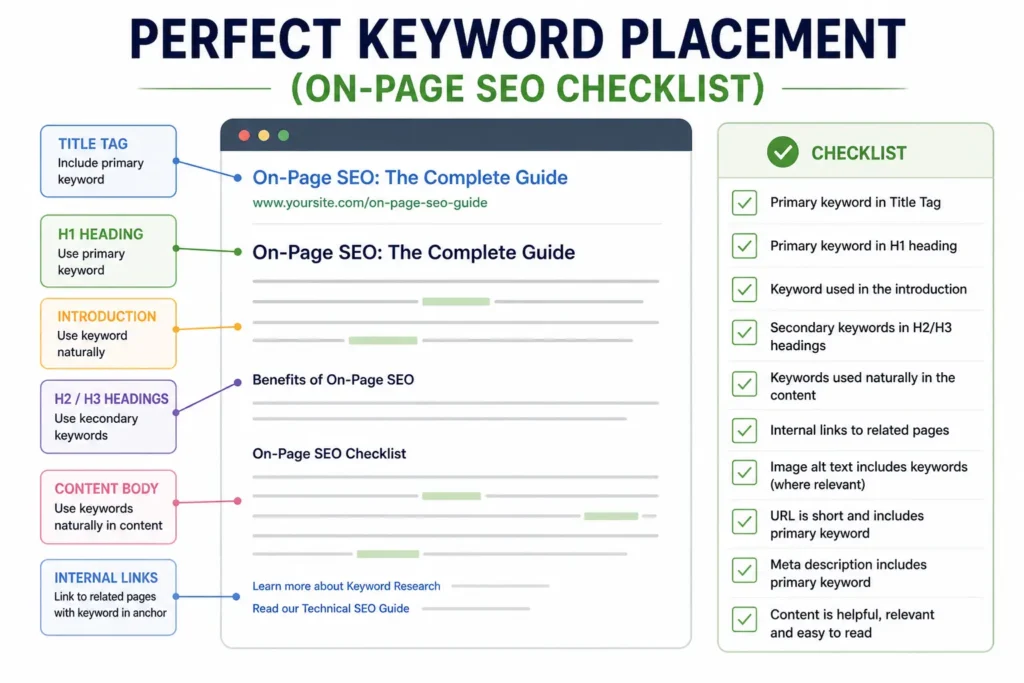
Where to Place Your Primary Keyword
Your primary keyword is the main signal for your page. It should appear in the most important areas.
1. Title Tag (SEO Title)
- Include your primary keyword naturally
- Keep it clear and relevant
- Place the keyword closer to the beginning if possible
Example:
“On Page SEO Checklist (Step-by-Step Guide)”
2. H1 Heading
- Your main heading should clearly reflect the keyword
- Usually similar to your title, but can be slightly different
Example:
“On Page SEO Checklist for Beginners”
3. First 100 Words
- Mention your keyword early in the content
- Helps search engines quickly understand your topic
Tip:
Keep it natural, don’t force it.
4. URL
- Keep it short and clean
- Include the primary keyword
Example:/on-page-seo-checklist
5. Meta Description
- Include the keyword naturally
- Focus on improving clicks, not just SEO
Tip:
Think of this as your “ad copy” in search results.
Visual Example of Primary Keyword Placement
Where to Place Secondary Keywords
Secondary keywords help you rank for variations and make your content more complete.
1. Subheadings (H2, H3)
- Use variations of your keyword
- Helps structure your content
- Improves readability and SEO
Example:
- “SEO Checklist for Beginners”
- “Website SEO Checklist Steps”
2. Image Alt Text
- Describe your images using relevant keywords
- Helps with accessibility and image SEO
Example:
Alt text: “on page SEO checklist example”
3. Body Content (Natural Use)
- Add keywords naturally throughout the content
- Avoid repeating the same phrase too often
Tip:
Write for users first, then optimize.
Where to Use LSI / Semantic Keywords
Semantic keywords help search engines understand your topic in depth.
1. Throughout the Content
- Use related terms naturally
- Helps cover the topic fully
Examples:
- internal linking
- meta tags
- content optimization
2. FAQ Section
- Great place to include variations and related queries
- Helps target “People Also Ask” results
3. Internal Anchor Text
- Use descriptive anchor text when linking to other pages
- Include relevant keywords where appropriate
Example:
Instead of “click here” → use “on-page SEO guide”
On-Page SEO Elements You Must Optimize (Complete Checklist)
This is your complete checklist of on-page SEO elements that directly impact rankings. Each element plays a role in helping search engines understand your page and improving user experience.
Title Tag Optimization
The title tag is one of the strongest ranking signals. It also decides whether users click your page.
Best Practices
- Include your primary keyword
- Keep it clear and relevant
- Add a benefit or value to attract clicks
Character Limits
- Ideal length: 50–60 characters
- Avoid cutting off in search results
CTR-Focused Writing
- Use numbers, power words, or brackets
- Make it feel useful and specific
Example:
“On Page SEO Checklist (Step-by-Step Guide for Beginners)”
Meta Description Optimization
The meta description doesn’t directly affect rankings, but it improves click-through rate (CTR).
How to Improve Clicks
- Clearly explain what the page offers
- Add a simple benefit or outcome
- Make it action-focused
Use of Keywords Naturally
- Include your primary keyword once
- Keep it natural and readable
Ideal Length:
- Around 150–160 characters
Header Tags (H1–H6) Structure
Headers organize your content for both users and search engines.
Proper Hierarchy
- H1 → Main heading (only one)
- H2 → Main sections
- H3 → Subsections
Keep a clean structure. Don’t skip levels randomly.
SEO Impact
- Helps search engines understand content structure
- Improves readability and user experience
- Allows better keyword placement
URL Structure
Your URL should be simple and easy to understand.
Best Practices
- Keep it short
- Include your primary keyword
- Avoid unnecessary words or numbers
Example:/on-page-seo-checklist
Internal Linking Strategy
Internal links connect your pages and improve overall SEO.
Why It Matters
- Helps search engines crawl your site
- Passes authority between pages
- Keeps users engaged longer
How to Link Correctly
- Link to relevant pages only
- Use descriptive anchor text
- Avoid over-linking
Example:
Use “keyword research guide” instead of “click here”
Image Optimization
Images can improve both SEO and user experience when optimized properly.
Alt Text Usage
- Describe the image clearly
- Include keywords naturally
Example:
“on page SEO checklist example”
File Naming
- Use descriptive names
- Avoid generic names like IMG123.jpg
Example:on-page-seo-checklist.png
Compression
- Reduce file size without losing quality
- Improves page speed (important ranking factor)
Content Optimization
Content is the core of on-page SEO. Everything else supports it.
Keyword Density (Natural Use)
- Use keywords naturally
- Avoid repeating the same phrase too often
Tip:
Focus on clarity, not keyword count.
Readability
- Use short paragraphs
- Add headings and lists
- Keep language simple
This improves user engagement and reduces bounce rate.
Content Depth
- Cover the topic completely
- Answer related questions
- Add examples where needed
Google prefers content that fully satisfies the search query.
Visual Checklist: On-Page SEO Elements
Common Keyword Targeting Mistakes to Avoid
Even small mistakes in keyword targeting can stop a page from ranking. Most of these issues are easy to fix once you know what to look for.
1. Keyword Stuffing
Keyword stuffing means repeating the same keyword too many times in your content.
Example (bad):
“On page SEO checklist is the best on page SEO checklist because this on page SEO checklist…”
Why this is a problem:
- Makes content hard to read
- Looks unnatural to users
- Search engines may ignore or penalize the page
Better approach:
- Use your keyword naturally
- Add variations and related terms
- Focus on clarity, not repetition
2. Ignoring Search Intent
You might choose the right keyword, but if your content doesn’t match what users want, it won’t rank.
Example:
- Keyword: “on page SEO checklist”
- Your page: general SEO theory
Mismatch = low rankings
Why this matters:
- Google prioritizes pages that satisfy the user’s goal
- Content must match what the user expects
Fix:
- Study top-ranking pages
- Match your content format (guide, list, comparison, etc.)
3. Targeting Too Many Keywords on One Page
Trying to rank one page for too many keywords creates confusion.
What happens:
- No clear topic
- Weak keyword signals
- Lower ranking potential
Example (bad):
One page targeting:
- SEO checklist
- keyword research
- technical SEO
- link building
Too broad = unclear focus
Better approach:
- One page = one primary keyword
- Support it with related keywords only
4. Not Updating Content
SEO is not a one-time task. If your content becomes outdated, rankings can drop.
Common issues:
- Old information
- Broken links
- Missing new trends or updates
Why this matters:
- Search engines prefer fresh and updated content
- Competitors may publish better versions
Fix:
- Update your content regularly
- Add new sections or examples
- Improve based on performance data
Visual: Common SEO Mistakes Overview
Advanced On-Page SEO Techniques (2026 Strategy)
Basic on-page SEO helps you get indexed and compete. These advanced techniques help you stand out and rank higher, especially in competitive niches.
Entity-Based SEO
Search engines no longer rely only on keywords. They try to understand entities — real-world concepts like people, tools, topics, and relationships.
What this means for you:
- Don’t just repeat keywords
- Clearly define topics and concepts
- Use related terms that explain your subject
Example:
If your topic is “on-page SEO,” include related entities like:
- meta tags
- internal linking
- page speed
- content optimization
This helps search engines understand the full context of your page.
Topical Authority
Topical authority means covering a subject in depth across multiple pages.
Instead of writing one article, you build a complete content system around a topic.
Example structure:
- Main page → On Page SEO Guide
- Supporting pages:
- Keyword research
- Technical SEO basics
- Internal linking strategy
Why this works:
- Shows expertise
- Builds trust with search engines
- Improves rankings across multiple keywords
Content Clustering
Content clustering is how you organize your content to build topical authority.
You create:
- One pillar page (main topic)
- Multiple cluster pages (related subtopics)
Then connect them using internal links.
Visual: Content Cluster Structure
Example:
Pillar page:
- On Page SEO Guide
Cluster pages:
- Keyword targeting
- SEO checklist
- Meta tags guide
All pages link to each other, creating a strong structure.
Schema Markup Basics
Schema markup is code that helps search engines better understand your content.
It can also improve how your page appears in search results.
Common types:
- FAQ schema
- Article schema
- How-to schema
Benefits:
- Rich results (extra visibility)
- Higher click-through rates
- Better understanding of your content
NLP Optimization (Natural Language Processing)
Search engines use NLP to understand meaning, not just exact keywords.
This means your content should:
- Answer questions clearly
- Use natural language
- Include related terms and phrases
How to optimize for NLP:
- Write like you speak
- Cover topics completely
- Include variations of keywords
Key Takeaway
Modern SEO is not just about keywords anymore.
To rank in 2026, focus on:
- Building topic depth (topical authority)
- Structuring content (clustering)
- Adding context (entities + NLP)
- Enhancing visibility (schema markup)
When you combine these with strong on-page SEO basics, your content becomes much more competitive.
Tools to Simplify Keyword Targeting and On-Page SEO
You don’t have to manage keyword targeting and on-page SEO manually. The right tools can guide you, highlight issues, and speed up your workflow.
Here are three tools that make the process much easier.
Yoast SEO
Yoast SEO is one of the most widely used plugins for on-page optimization, especially for beginners.
What it helps you do:
- Set a focus keyword for each page
- Get real-time suggestions for keyword placement
- Optimize title tags and meta descriptions
- Improve readability with simple checks
- Generate XML sitemaps
Best for:
- Beginners who want step-by-step guidance
- Bloggers using WordPress
Rank Math
Rank Math offers more advanced features while still being easy to use.
What it helps you do:
- Optimize for multiple keywords
- Add schema markup easily
- Analyze on-page SEO issues
- Track keyword rankings inside WordPress
- Improve internal linking suggestions
Best for:
- Users who want more control and features
- Growing websites
Surfer SEO
Surfer SEO focuses on content optimization using real data from top-ranking pages.
What it helps you do:
- Analyze competitors for any keyword
- Get keyword suggestions and content structure
- Optimize keyword usage based on data
- Improve content depth and relevance
- Score your content in real time
Best for:
- Content writers and SEO professionals
- Users targeting competitive keywords
Quick Comparison
| Tool | Best For | Key Strength |
|---|---|---|
| Yoast SEO | Beginners | Simple guidance |
| Rank Math | Intermediate users | Advanced features |
| Surfer SEO | Content optimization | Data-driven insights |
Key Takeaway
These tools don’t replace SEO knowledge, they support it.
- Use Yoast SEO or Rank Math to handle on-page basics
- Use Surfer SEO to improve content quality and competitiveness
When combined, they help you:
- Save time
- Avoid mistakes
- Optimize pages more effectively
Real Case Study (Before vs After Optimization)
To see how keyword targeting and on-page SEO actually impact rankings, let’s walk through a simple real-world style example.
Scenario
A blog post was published targeting the keyword:
“on page SEO checklist”
But it wasn’t performing well.
Page Before Optimization
Issues Found
1. Poor Keyword Usage
- Main keyword missing from title
- Not included in H1
- Hardly used in content
2. No Clear Structure
- No proper headings (H2, H3)
- Long paragraphs
- No logical flow
3. Weak On-Page Elements
- Generic title: “SEO Tips for Websites”
- No meta description optimization
- No internal links
Result
- Page was not ranking in top 50
- Very low traffic
- High bounce rate
Page After Optimization
Improvements Made
1. Proper Keyword Targeting
- Primary keyword added to:
- Title
- H1
- First paragraph
- URL
2. Better Content Structure
- Added clear headings (H2, H3)
- Broke content into sections
- Improved readability
3. Strong On-Page SEO
- Optimized title for clicks
- Added meta description
- Included internal links to related pages
- Added relevant images with alt text
Result
- Ranked on page 1 within weeks
- Significant increase in organic traffic
- Better engagement (more time on page)
Side-by-Side Comparison
| Factor | Before Optimization | After Optimization |
|---|---|---|
| Keyword Usage | Weak | Strong and clear |
| Content Structure | Poor | Well-organized |
| Title & Meta | Generic | Optimized |
| Internal Links | None | Added |
| Rankings | Low | Page 1 |
| Traffic | Minimal | Increased |
Frequently Asked Questions (People Also Ask Section)
What is the best keyword placement for SEO?
The best keyword placement focuses on high-impact areas of your page where search engines look first.
You should place your primary keyword in:
- Title tag
- H1 heading
- First 100 words
- URL
- Meta description
For better results:
- Use secondary keywords in subheadings (H2, H3)
- Add related terms naturally in the content
The key is natural placement, not forced repetition.
How many keywords should I target per page?
The ideal approach is:
- 1 primary keyword per page
- 3–5 secondary keywords
- Multiple long-tail and semantic variations
Why this works:
- Keeps your page focused
- Makes it easier for search engines to understand
- Helps you rank for multiple related searches
Avoid targeting too many unrelated keywords on a single page.
What is the difference between primary and secondary keywords?
The difference is simple:
- Primary keyword = main topic of your page
- Secondary keywords = related terms that support the topic
Example:
- Primary keyword: “on page SEO checklist”
- Secondary keywords:
- SEO checklist for beginners
- website SEO checklist
- SEO optimization steps
Primary keyword defines the page, while secondary keywords add depth.
Does keyword density still matter in SEO?
Keyword density is no longer a strict ranking factor.
Search engines now focus on:
- Content relevance
- Search intent
- Topic coverage
What you should do instead:
- Use your keyword naturally
- Avoid overusing the same phrase
- Include related and semantic keywords
If your content reads well and covers the topic properly, you’re on the right track.
How do I optimize a page for multiple keywords?
You don’t target multiple main keywords, you structure your content around one main keyword and support it with others.
Steps:
- Choose one primary keyword
- Add secondary keywords in headings
- Use long-tail keywords in sections
- Include semantic keywords throughout
Example structure:
- H1 → primary keyword
- H2 → secondary keywords
- Content → variations and related terms
This way, your page ranks for multiple searches without losing focus.
Conclusion
Keyword targeting and on-page SEO are not separate tasks, they work together as a clear system.
Here’s a quick recap of the process:
- Find the right keyword based on search volume, difficulty, and intent
- Understand what the user is actually looking for
- Map that keyword to a single focused page
- Place it correctly in key areas like title, headings, and content
- Optimize all on-page elements (links, images, structure, UX)
When you follow this process, your page becomes easier for search engines to understand and more useful for users.