An SEO keyword ranking report is a simple but powerful way to track how your target keywords are performing on search engines like Google. It shows where your website ranks for each keyword, how those rankings change over time, and what impact that has on your traffic and visibility.
This matters because SEO is not just about getting rankings, it’s about tracking progress, finding opportunities, and fixing drops before they hurt your traffic. Without a proper report, you’re basically guessing what’s working and what’s not.
In this guide, you’ll learn:
- What a keyword ranking report includes
- Why it is important for SEO tracking
- The key metrics you should monitor
- Tools you can use to build reports
- A ready-to-use template and examples
A keyword ranking report tracks how your target keywords perform in search results over time, helping you measure visibility, traffic potential, and overall SEO success.
What Is an SEO Keyword Ranking Report?
An SEO keyword ranking report is a document or dashboard that shows where your website ranks for specific keywords on search engines like Google. It helps you track how your rankings move over time and how those changes affect your traffic and visibility.
In simple terms, it answers one key question:
“Are my target keywords moving up or down in search results?”
Free SEO Keyword Ranking Report Template (Excel)
Want to track your keyword rankings without building a report from scratch?
Download this ready-to-use Excel template and start tracking your SEO performance in minutes.
What’s included:
- Keyword position tracking
- Ranking change (up/down)
- Search volume data
- CTR and impressions tracking
- Clean dashboard-style layout
How It Differs from General SEO Reports
A keyword ranking report focuses only on keyword performance, while a full SEO report covers many areas like:
- Website traffic
- Backlinks
- Technical issues
- Page performance
Here’s the difference:
| Report Type | Focus |
|---|---|
| Keyword Ranking Report | Keyword positions, ranking changes |
| Full SEO Report | Traffic, backlinks, technical SEO, conversions |
If a full SEO report is a complete health check, a keyword ranking report is your ranking tracker.
Real-Life Example of a Ranking Report
Imagine you are tracking the keyword “SEO tools”:
| Keyword | Current Rank | Previous Rank | Change | Search Volume |
|---|---|---|---|---|
| SEO tools | 5 | 9 | +4 | 10,000 |
What this tells you:
- Your ranking improved from 9 → 5
- Your SEO efforts are working
- You are closer to the top results (more traffic potential)
Key Points
- Tracks keyword positions on search engine results pages (SERPs)
- Shows ranking changes over time
- Helps measure SEO progress and performance
These reports give you clear insights into keyword performance, rankings, CTR, and overall search visibility, so you can take action based on real data, not guesswork.
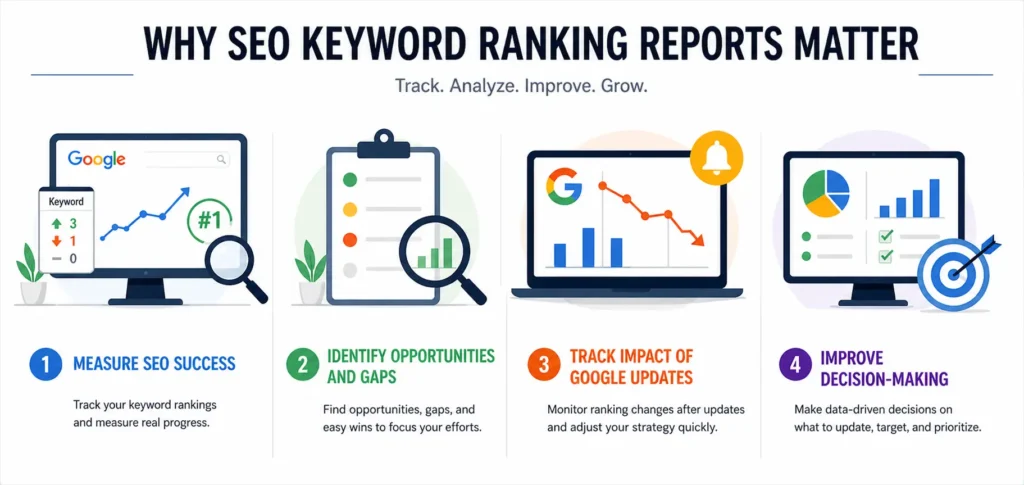
Why SEO Keyword Ranking Reports Matter
If you’re doing SEO without tracking keyword rankings, you’re missing the most important part, knowing whether your efforts are actually working. An SEO keyword ranking report gives you clear, data-backed answers instead of assumptions.
1. Measure SEO Success
Ranking reports show whether your keywords are moving up, staying stuck, or dropping on search engines like Google.
- Are your target keywords reaching page 1?
- Are your optimizations improving rankings?
Without this data, it’s impossible to measure real progress.
2. Identify Opportunities and Gaps
Not all keywords perform the same. A ranking report helps you find:
- Keywords close to page 1 (easy wins)
- Keywords that need improvement
- New keyword opportunities
These insights help you focus your effort where it brings the most results.
3. Track Impact of Google Updates
Search rankings often change after updates from Google.
With a ranking report, you can:
- Spot sudden ranking drops
- Identify which keywords were affected
- Adjust your strategy quickly
4. Improve Decision-Making
Instead of guessing what to do next, ranking reports give you clear direction:
- Which pages to update
- Which keywords to target more
- Where to invest your SEO time
Benefits of Using Keyword Ranking Reports
- Understand what’s working (and what’s not)
- Spot ranking drops early before traffic falls
- Find quick-win keywords that can grow fast
- Track long-term SEO performance
Rank reporting helps teams identify trends, opportunities, and underperforming content—so every SEO decision is based on real performance data, not guesswork.
Key Metrics to Include in a Keyword Ranking Report
To make your SEO keyword ranking report useful, you need more than just keyword positions. The right metrics help you understand not only where you rank on Google, but also why you rank there and what to improve next.
Core Metrics (Must-Have)
These are the basic metrics every ranking report should include:
- Keyword Position (Current Rank)
Shows your current ranking for each keyword on search results. - Ranking Change (Up/Down)
Tracks movement compared to the previous period (e.g., +3 or -2 positions). - Search Volume
Indicates how many people search for that keyword monthly. - Click-Through Rate (CTR)
Percentage of users who click your link after seeing it in search results. - Impressions
Number of times your page appears in search results.
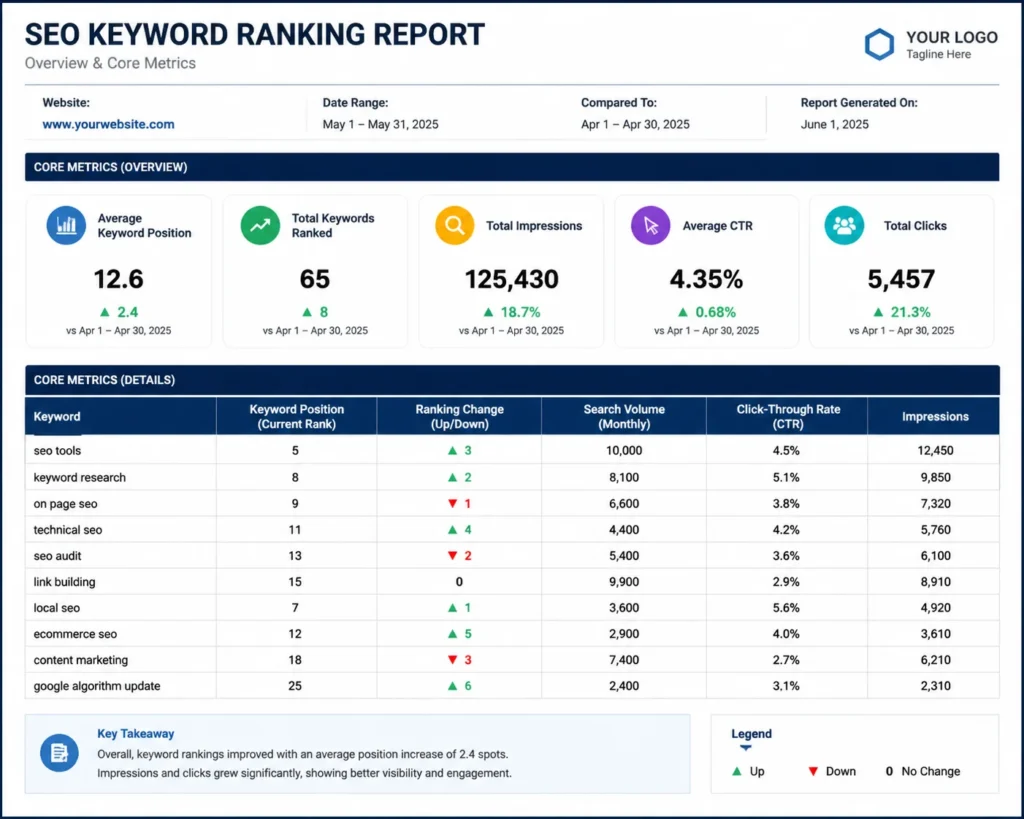
These metrics give you a clear view of visibility + performance at the keyword level.
Advanced Metrics (For Deeper Insights)
If you want to make your report more actionable, include these:
- Keyword Difficulty
Shows how hard it is to rank for a keyword based on competition. - Organic Traffic per Keyword
Estimates how much traffic each keyword brings to your site. - SERP Features
Tracks if your keyword triggers features like:- Featured snippets
- People also ask
- Local packs
- Conversion Data
Shows whether a keyword leads to:- Leads
- Sales
- Signups
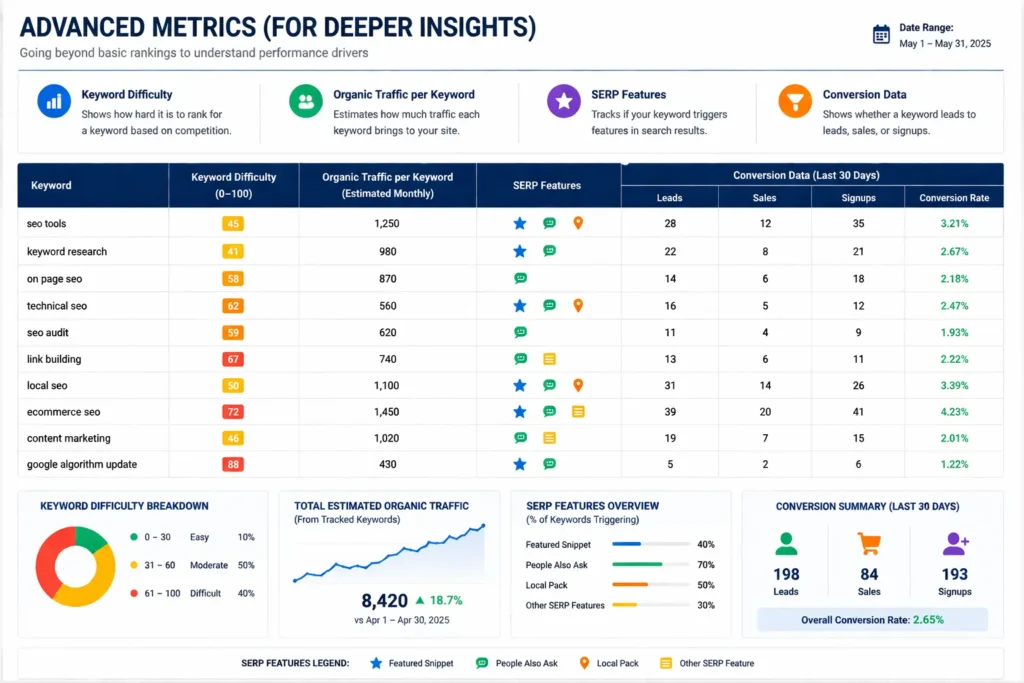
This helps connect SEO performance with actual business results.
Quick Example of Metrics in a Report
| Keyword | Rank | Change | Volume | CTR | Impressions | Traffic |
|---|---|---|---|---|---|---|
| SEO tools | 5 | +3 | 10,000 | 4.5% | 20,000 | 450 |
A strong keyword ranking report combines rankings, traffic data, and performance metrics—so you can move from data → insights → action without guesswork.
Essential Sections in a High-Quality SEO Keyword Ranking Report
A strong SEO keyword ranking report is not just a list of keywords, it’s a structured view of your performance. The sections below are based on what top SEO teams and tools use to track results on platforms like Google.
1. Overview Dashboard
This is the first section your client or team will see. Keep it simple and clear.
Include:
- Total keywords tracked
- Average keyword position
- Overall visibility trend (up/down)
This gives a quick snapshot of your SEO performance without going into details.
2. Keyword Ranking Distribution
This section shows how your keywords are spread across ranking positions.
Break it into groups:
- Top 3 keywords
- Top 10 keywords
- Top 20 keywords
- Top 100 keywords
This helps you understand how close your keywords are to high-traffic positions.
3. Brand vs Non-Brand Keywords
Split your keywords into:
- Branded (your business name)
- Non-branded (general search terms)
Why this matters:
- Branded keywords are usually easier to rank
- Non-branded keywords bring new traffic
Separating branded and generic keywords gives clearer insights into real SEO growth.
4. Keyword Movement Tracking
This section focuses on changes over time.
Include:
- Biggest ranking gains
- Biggest ranking losses
Helps you quickly identify what improved and what needs attention.
5. Top Performing Keywords
Highlight your best-performing keywords.
Look for:
- Keywords driving the most traffic
- Keywords with high CTR
These are your strongest assets, you can scale them further.
6. Underperforming Keywords
This is where optimization opportunities lie.
Focus on:
- Keywords stuck on page 2 (positions 11–20)
- Keywords with low CTR despite impressions
These are often quick-win opportunities with small improvements.
7. Page-Level Performance
Instead of only keywords, analyze pages.
Track:
- Which pages rank for which keywords
- Pages with multiple ranking keywords
This helps you understand which content is performing best and where to improve.
8. Competitor Keyword Comparison
SEO is always relative to competitors.
Include:
- Competitor keyword rankings
- Keyword gaps (keywords they rank for, but you don’t)
This shows where you are losing traffic and where you can compete better.
A well-structured report like this turns raw data into clear insights and actions, making it easier to grow your rankings and traffic consistently.
How to Create an SEO Keyword Ranking Report (Step-by-Step)
Creating an SEO keyword ranking report is not complicated—but it needs the right structure. Follow these steps to build a report that actually helps you make better SEO decisions on platforms like Google.
Step 1: Define Your Goals
Start with a clear purpose. Your report should match your SEO goals.
Common goals:
- Traffic growth
- Ranking improvement
- Lead generation
Your goal decides what metrics and keywords you focus on.
Step 2: Choose Keywords to Track
Not all keywords matter. Pick the ones that align with your business.
Include:
- Target keywords (main focus terms)
- Long-tail keywords (more specific, easier to rank)
- Branded keywords (your business name)
A good mix helps you track both growth and brand visibility.
Step 3: Collect Data
Now gather keyword performance data using reliable tools.
Use:
- Google Search Console
- Rank tracking tools like Ahrefs or SEMrush
Search Console provides clicks, impressions, CTR, and average position, making it a solid starting point.
Step 4: Organize Data
Raw data can get messy. Structure it properly.
Use:
- Spreadsheets (Excel, Google Sheets)
- Dashboards (Looker Studio, SEO tools)
Keep columns like keyword, rank, change, volume, CTR for clarity.
Step 5: Analyze Trends
Data alone is not useful unless you analyze it.
Look for:
- Ranking improvements or drops
- Traffic trends over time
- Keywords gaining or losing visibility
Compare time periods (weekly, monthly) to see real progress.
Step 6: Visualize Data
Make your report easy to understand.
Use:
- Charts for ranking trends
- Graphs for traffic growth
- Tables for keyword data
Visuals help clients or teams quickly understand performance.
Step 7: Add Insights & Recommendations
This is the most important step.
Answer:
- What changed?
- Why did it change?
- What should be done next?
Examples:
- Update content for keywords stuck on page 2
- Improve CTR with better titles
- Build links for competitive keywords
A good keyword ranking report is not just data—it’s clear insights + action steps that help improve your SEO results consistently.
SEO Keyword Ranking Report Template (Free Structure)
If you want to save time and keep your reports consistent, using a ready structure is the best approach. A good SEO keyword ranking report template helps you track performance clearly and present it in a way that’s easy to understand.
Table Example
Use a simple table format like this to track your keyword performance:
| Keyword | Current Rank | Previous Rank | Change | Search Volume | CTR |
|---|---|---|---|---|---|
| SEO tools | 5 | 8 | +3 | 10,000 | 4.5% |
This format makes it easy to compare keyword movements and spot trends quickly across search engines like Google.
Sections to Include in Your Template
To make your report complete and useful, include these sections:
1. Summary
- Total keywords tracked
- Overall ranking trend (up/down)
- Key highlights (big wins or losses)
This gives a quick overview without going into details.
2. Keyword Performance
- Current rankings for all keywords
- Ranking changes
- High-performing keywords
This is the core section where most of your data lives.
3. Trends
- Ranking changes over time (weekly/monthly)
- Traffic trends
- Visibility growth or decline
Helps you understand long-term SEO progress.
4. Recommendations
- What actions to take next
- Pages to optimize
- Keywords to target more
This turns your report into an action plan, not just data.
What Makes a Good Template?
A strong template should include
Most professional templates combine charts, tables, and customizable sections—so you can move from tracking → analysis → action without confusion.
Best Tools for SEO Keyword Ranking Reports
To build accurate and easy-to-read reports, you need the right tools. Whether you’re just starting or managing multiple clients, these tools help you track rankings, analyze data, and automate reporting on platforms like Google.
Free Tools
These tools are great for beginners or anyone working with a limited budget.
1. Google Search Console
- Tracks keyword rankings, clicks, impressions, and CTR
- Shows real data directly from Google
- Helps identify top-performing and underperforming keywords
Best for: Basic keyword tracking and performance insights
2. Google Looker Studio
- Turns raw data into visual dashboards
- Connects with Search Console and other tools
- Helps create professional SEO reports
Best for: Creating clean, client-ready dashboards
Paid Tools
These tools offer deeper insights, automation, and competitor tracking.
1. SEMrush
- Advanced keyword tracking and position monitoring
- Competitor analysis and keyword gap insights
- Automated reporting features
Best for: All-in-one SEO reporting and analysis
2. Ahrefs
- Accurate rank tracking and backlink data
- Keyword difficulty and traffic estimates
- Strong competitor research features
Best for: Deep SEO analysis and keyword research
3. SE Ranking
- Affordable rank tracking tool
- Daily keyword updates
- White-label reporting options
Best for: Agencies and freelancers on a budget
4. AccuRanker
- Fast and highly accurate keyword tracking
- Real-time ranking updates
- Detailed SERP feature tracking
Best for: Precise rank tracking at scale
How to Choose the Right Tool
- Use free tools if you need basic tracking and reporting
- Choose paid tools if you want automation, competitor insights, and scalability
- Combine tools (e.g., Search Console + Looker Studio) for better results
The right tools help you automate keyword tracking, reduce manual work, and turn raw data into clear, actionable SEO reports.
Common Mistakes to Avoid
Even a well-designed SEO keyword ranking report can fail if it lacks clarity and direction. Avoid these common mistakes to make your reports actually useful for decision-making on platforms like Google.
1. Only Showing Keyword Positions (No Insights)
Listing rankings without explaining them is a big mistake.
- Saying “Keyword moved from #8 to #5” is not enough
- You need to explain why it moved and what it means
Always add insights like:
- What caused the improvement?
- What should be done next?
2. Not Tracking Keyword Intent
Not all keywords serve the same purpose.
Types of intent:
- Informational (learn something)
- Navigational (find a brand)
- Transactional (buy or take action)
Without intent, you may:
- Target the wrong audience
- Misjudge keyword performance
3. Ignoring Branded vs Non-Branded Keywords
Mixing both types gives a misleading view.
- Branded keywords are easier to rank
- Non-branded keywords show real SEO growth
Always separate them to get a clear picture of performance.
4. No Action Plan in the Report
A report without recommendations is incomplete.
Avoid:
- Just sharing data
- Ending without next steps
Instead include:
- Pages to update
- Keywords to optimize
- Content to create
This turns your report into a strategy document, not just numbers.
Why These Mistakes Matter
- They make reports hard to understand
- They don’t help improve rankings
- They reduce the value of your SEO work
Reports without insights fail to explain performance properly—so always focus on data + explanation + action for better results.
Advanced Tips to Improve Your Ranking Reports
Once you have the basics in place, these advanced tips will help you turn a simple SEO keyword ranking report into a powerful decision-making tool, especially when working with search engines like Google.
1. Add Keyword Intent Classification
Not all keywords serve the same purpose, so group them by intent:
- Informational (learn something)
- Navigational (find a brand or website)
- Transactional (ready to buy or take action)
This helps you understand why a keyword is ranking and whether it matches your business goals.
2. Track Keyword Clusters
Instead of tracking keywords individually, group related keywords into clusters.
Example:
- “SEO tools”
- “best SEO tools”
- “free SEO tools”
This gives you a better view of topic-level performance, not just single keywords.
3. Use Automated Dashboards
Manual reports take time and can lead to errors.
Use tools like:
- Google Looker Studio
- SEMrush
Automation helps you:
- Save time
- Get real-time updates
- Create professional reports easily
4. Include Competitor Insights
SEO is competitive, so your report should reflect that.
Track:
- Competitor keyword rankings
- Keywords they rank for (but you don’t)
- Content gaps
This helps you find new opportunities to outrank competitors.
5. Add Conversion Tracking
Rankings are important—but results matter more.
Include:
- Leads generated
- Sales from organic traffic
- Signups or conversions
This connects your SEO work to real business outcomes, not just rankings.
Why These Tips Matter
- They turn your report into a strategy tool
- They help you focus on what drives real growth
- They make your SEO work more measurable and valuable
Advanced reports go beyond rankings—they connect keywords → traffic → conversions, giving you a complete picture of SEO performance.
Use Cases of Keyword Ranking Reports
An SEO keyword ranking report is useful for different types of users. Whether you’re managing clients, running a business, or working solo, these reports help you make better decisions based on real data from search engines like Google.
1. SEO Agencies (Client Reporting)
Agencies use ranking reports to show results to clients.
They help:
- Track keyword improvements
- Show progress over time
- Prove the value of SEO work
A clear report builds trust and makes it easier to retain clients.
2. Businesses (Growth Tracking)
Businesses use these reports to monitor their online visibility.
They help:
- Track important business keywords
- Measure traffic growth potential
- Understand market performance
This makes it easier to see if SEO efforts are driving real growth.
3. Freelancers (Performance Proof)
Freelancers rely on ranking reports to show their work.
They help:
- Demonstrate results to clients
- Build a strong portfolio
- Justify pricing based on performance
A good report acts as proof of your SEO skills.
4. Marketing Teams (Strategy Decisions)
Marketing teams use keyword reports to guide strategy.
They help:
- Decide which keywords to target
- Identify content opportunities
- Align SEO with marketing goals
This ensures all decisions are based on data, not assumptions.
Keyword ranking reports are flexible—they work for agencies, businesses, freelancers, and teams. No matter who uses them, the goal is the same: track performance, find opportunities, and improve results consistently.
FAQs (People Also Ask Optimization)
What is a keyword ranking report in SEO?
A keyword ranking report is a document or dashboard that shows where your website ranks for specific keywords on search engines like Google. It tracks position changes, visibility, and performance over time so you can measure SEO progress.
How often should you create a ranking report?
It depends on your goals, but most people follow:
- Weekly reports → for active SEO campaigns
- Monthly reports → for overall performance tracking
Weekly helps you spot quick changes, while monthly gives a clearer long-term view.
Which tool is best for keyword tracking?
There is no single “best” tool—it depends on your needs.
Popular options:
- Google Search Console (free, basic data)
- SEMrush (all-in-one SEO tool)
- Ahrefs (strong for backlinks and keyword tracking)
Choose based on your budget and how detailed you want your reports.
How do you track keyword rankings for free?
You can track rankings for free using:
- Google Search Console → shows average position, clicks, impressions, and CTR
- Manual checks on Google (less reliable due to personalization)
Search Console is the most accurate free option available.
What is a good keyword ranking?
A “good” ranking depends on your goal, but generally:
- Top 3 positions → highest traffic potential
- Top 10 (page 1) → strong visibility
- Positions 11–20 → good opportunity for improvement
The closer you are to the top results, the more traffic and clicks you can expect.
Conclusion
An SEO keyword ranking report helps you understand where your website stands on search engines like Google and how your efforts are paying off.
- It tracks keyword positions and performance
- It shows ranking changes and trends over time
- It helps you identify opportunities and fix weak areas
- It turns raw data into clear SEO decisions
A well-built keyword ranking report is more than a document, it’s a roadmap to steady SEO growth.