


Twenty years ago, “computer skills” meant knowing how to use a mouse and type a letter in Word. That’s not what digital life looks like anymore. Today you need to book a GP appointment through an app, spot a fake text message from your bank, join a work call from your phone, and increasingly, work out whether an AI tool has given you a straight answer or made something up.
That broader set of abilities is what we mean by essential digital skills (the everyday capabilities people need to communicate, find information, complete transactions, solve basic problems, and stay safe online. They’re not the same as being able to code or fix a laptop. They’re the baseline every adult needs, whatever their job or stage of life.
This guide has just had a reason to get more current. On 15 July 2026, the Department for Education published revised Essential Digital Skills Standards, the first update since the original standards were introduced in 2018/2019. The revision widens the framework, adds new levels, and threads AI literacy through almost every section. We’ll cover exactly what changed further down.
What Are Essential Digital Skills?
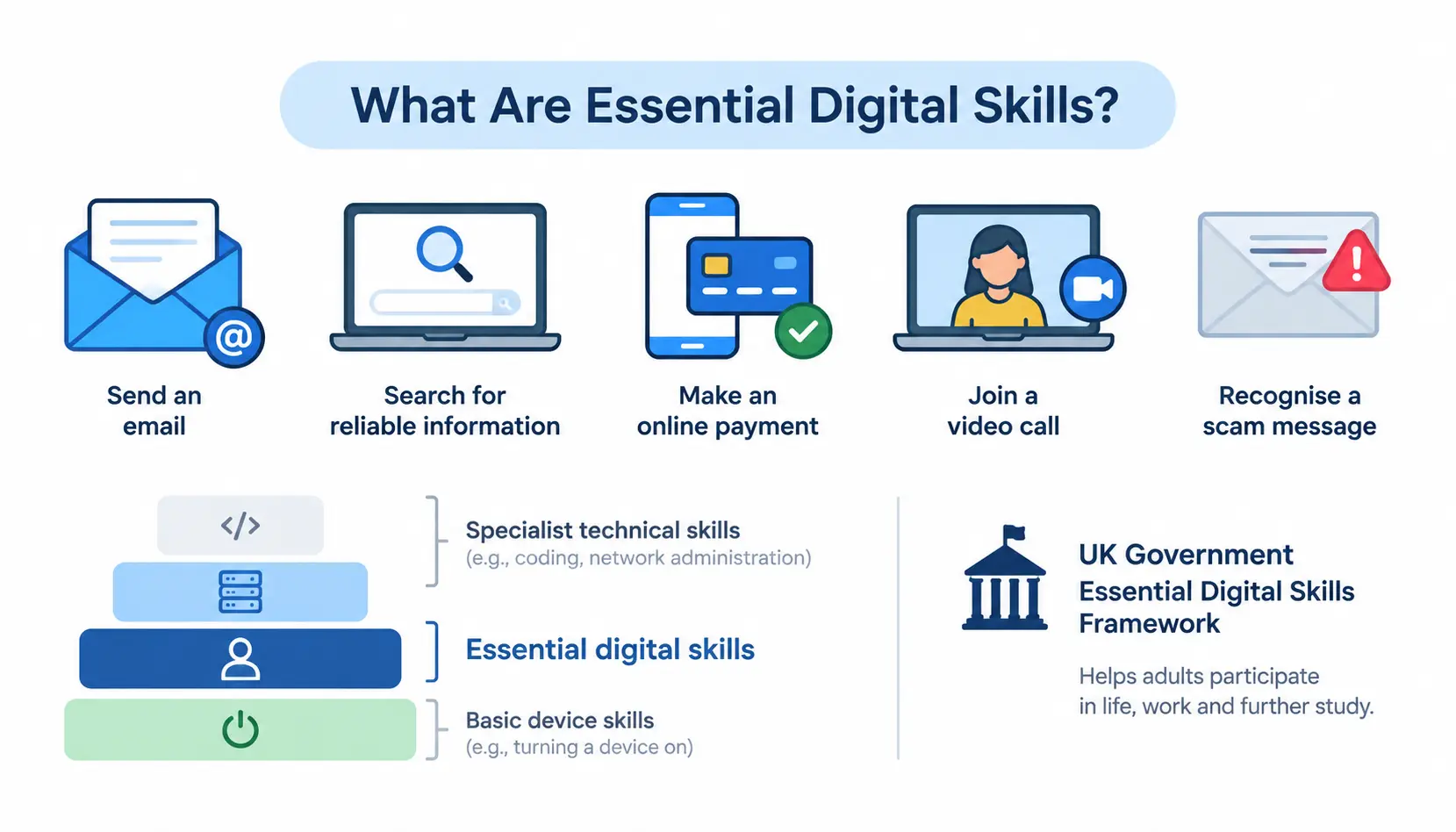
Essential digital skills are the practical, everyday abilities that let someone use technology confidently and safely: sending an email, searching for reliable information, making an online payment, joining a video call, and recognising a scam message. They sit below specialist technical skills like coding or network administration, but above simply “knowing how to turn a device on.”
In the UK, the term has an official meaning too. It refers to the government’s Essential Digital Skills Framework, which the Department for Education uses to define what adults need in order to participate in life, work, and further study.
Why are essential digital skills important?
Digital skills stopped being optional the moment everyday services moved online. A few reasons they matter so much now:
- Everyday life – paying bills, renewing a passport, or ordering a prescription usually means going online first, not last.
- Employment – most jobs now expect at least basic comfort with email, spreadsheets, and shared documents, even in roles that aren’t “tech jobs.”
- Education – schools, colleges and training providers increasingly deliver material and assessments digitally.
- Communication – staying in touch with family, employers, or public services often depends on messaging apps, email, or video calls.
- Access to services – banking, healthcare, and government services have shifted much of their front door online.
- Digital independence – being able to do these things yourself, rather than relying on someone else, protects both privacy and dignity.
- Online safety – the same connectivity that brings convenience also brings scams, so safety awareness has become part of basic digital competence, not an add-on.
Digital skills vs digital literacy vs digital fluency
These three terms get used almost interchangeably, but they describe different points on a spectrum.
Digital skills are the practical, task-based abilities: sending an email, using a spreadsheet formula, setting up two-factor authentication. Digital literacy goes a step further: it’s the ability to find, evaluate, and use digital information critically, including judging whether a source (or an AI-generated answer) is trustworthy. Wikipedia’s overview of digital literacy frames it as a combination of technical, cognitive, and social competencies. Digital fluency sits at the top, the confidence to adapt to new tools and platforms without needing step-by-step instructions each time, applying what you already know to something unfamiliar.
Think of it as a ladder: skills are the individual rungs, literacy is knowing which rung to use and why, and fluency is being able to climb a ladder you’ve never seen before.
What Are the 5 Essential Digital Skills?
The UK government’s framework organises essential digital skills into five categories. These form the backbone of national training standards, apprenticeship requirements, and adult education funding.
1. Communicating
This covers everything from sending a professional email to running a video call without technical hiccups.
Examples:
- Writing and replying to emails
- Instant messaging and workplace chat tools
- Video conferencing (Zoom, Teams, Google Meet)
- Collaborating on shared documents in real time
2. Handling Information and Content
This is about finding things online and working with digital files once you have them.
Examples:
- Searching effectively and filtering out irrelevant results
- Evaluating whether information is accurate and up to date
- Organising and naming files sensibly
- Creating and editing documents
- Using spreadsheets for basic calculations
3. Transacting
Anything that involves exchanging money, data, or a booking online.
Examples:
- Online banking and making payments
- Shopping and comparing prices
- Booking appointments (GP, dentist, driving test)
- Completing online forms accurately
4. Problem-Solving
The ability to work through a technical hiccup without immediately needing help.
Examples:
- Basic troubleshooting (restarting, checking connections)
- Changing device or app settings
- Installing software updates
- Knowing where to find legitimate technical support
5. Being Safe and Legal Online
Arguably the fastest-growing area, given how sophisticated scams have become.
Examples:
- Creating strong, unique passwords
- Using multi-factor authentication (MFA)
- Recognising phishing emails and smishing texts
- Managing privacy settings
- Understanding basic data protection principles
- Browsing safely and spotting fake websites
What Are Examples of Essential Digital Skills?
Sometimes a table makes this clearer than a list. Here’s how these skills show up in practice:
| Digital skill | Example task | Where it’s useful |
| Send an attachment | Work | |
| Spreadsheets | Calculate expenses | Work/study |
| Search | Find reliable information | Life/work |
| Video calls | Join a meeting | Work |
| File management | Organise documents | Work/life |
| Online banking | Make a payment | Life |
| Cybersecurity | Identify phishing | Life/work |
| AI literacy | Evaluate AI output | Work/study |
Essential Digital Skills for Work
Communication and collaboration
I think most workplaces today rely on email, chat platforms and shared calendars. Switching smoothly from one email to another from chat platforms to shared calendars and from shared calendars back, to email is something everyone expects. If you can move between email, chat platforms and shared calendars without confusion you are meeting the requirement not earning an extra perk.
Documents and spreadsheets
Word processing and spreadsheets are still among the wanted skills in job postings even when the job isn’t, in an office. People need to calculate budgets format reports. Keep track of stock levels and that often means using a spreadsheet. It’s a tool that shows up in many different kinds of work.
File and cloud management
Knowing where a file lives and how to find it again might seem easy.. You don’t really understand until you’ve seen someone spend an entire afternoon hunting for a document. It was saved somewhere on the shared drive. No one could remember where. That’s when the simple act of finding a file turns into a puzzle.
Online meetings
I have noticed that joining on time muting correctly and sharing a screen without spending three minutes asking “can you see this?” has become a requirement, in the workplace. Using tools like Whenavailable can help teams coordinate their team availability time that works for everyone.
Data and information literacy
I can read a chart. I can spot an outlier in a spreadsheet. I can judge whether a statistic in a report looks right.
Cybersecurity awareness
Recognising a suspicious link before clicking it protects not just the individual but the whole organisation.
Digital problem-solving
Knowing how to reset a password, clear a cache, or escalate a genuine IT issue rather than sitting stuck.
AI literacy
More and more it’s about knowing when an AI tool can save time and when its output must be checked carefully before it ever reaches a client or influences a decision.
The government’s workplace guidance spells out what this means in real life. It points to tasks, like video calls, online chat, word processing, spreadsheets, email, file management and staying safe online. These are the skills that employers should expect employees to handle well.
Essential Digital Skills for Everyday Life
Banking and financial services
Checking a balance, transferring money, or setting up a direct debit through an app or website.
Shopping and online transactions
Comparing prices, reading reviews critically, and knowing the signs of a fraudulent retailer.
Healthcare and public services
Booking appointments, ordering repeat prescriptions, and using services like the NHS App.
Communication with family and friends
Video calls and messaging apps have become the main way many families stay in touch, particularly across distance or generations.
Finding trustworthy information
Searching for health advice, news, or government guidance, and knowing how to tell a reliable source from a misleading one.
Managing online accounts
Keeping track of logins, updating personal details, and closing accounts that are no longer needed.
Staying safe online
Recognising scams, protecting personal data, and knowing what to do if something looks wrong.
Essential Digital Skills Standards 2026: What’s Changed?
This is where things have genuinely moved, so it’s worth slowing down.
What are the 2026 Essential Digital Skills Standards?
On 15 July 2026, the Department for Education published the revised Essential Digital Skills Standards, setting out the digital skills adults need to participate fully in life, work, and further study. It’s the first revision since the standards were introduced, and the DfE says the content has been “updated and expanded in response to technological change, including artificial intelligence.”
Which levels are covered?
The revised standards now run across five levels, extending further in both directions than before:
- Entry Level 1 – the most basic starting point, including foundation skills such as switching on a device and connecting safely to the internet
- Entry Level 2 – building initial confidence with core tasks
- Entry Level 3 – broader competence across communication, information handling and safety
- Level 1 – independent, everyday use across most digital tasks
- Level 2 – independent, critical and responsible digital use, including working with AI tools
Entry Level 1 and 2, along with the new Level 2, are new additions; the original standards stopped at Level 1.
How are AI skills changing digital literacy?
AI runs through the revised standards rather than sitting in a single section. Areas covered include:
- Using AI tools appropriately for a given task
- Evaluating AI-generated information rather than accepting it at face value
- Recognising misleading or fabricated content
- Understanding privacy implications when using AI tools
- Applying AI responsibly, including knowing its limits
This reflects a wider shift: digital literacy increasingly means judging machine-generated output, not just human-written content.
Do the 2026 standards replace existing qualifications?
Not yet. It’s important to be clear about this. The revised standards are now. Can be used as a reference. However the Essential Digital Skills Qualifications (EDSQs) and the Digital Functional Skills Qualifications (DFSQs) are still in place. Have not changed.
The Department for Education (DfE) has said it will share details later on how the updated standards should work together with the current qualifications. It will also explain how its overall approach to qualifications will be updated. In terms: the map has been redrawn, but the roads built using the old map are still open and in use, for now.
What Is the Essential Digital Skills Framework?
The five framework areas
The framework groups skills into the same five areas covered above: communicating, handling information and content, transacting, problem-solving, and being safe and legal online. The standards translate these areas into specific, assessable outcomes at each level.
Essential digital skills for life
Skills needed to manage everyday tasks independently: banking, healthcare, communication, and staying safe.
Essential digital skills for work
Skills needed to function in most workplaces: communication tools, documents, and basic troubleshooting.
Foundation skills
Below the five main categories sit foundation skills: the most basic capabilities needed to access technology at all, such as turning on a device, using a touchscreen, and connecting to the internet safely. These have been built more explicitly into the lower entry levels in the 2026 revision, to support adults who need smaller, more gradual steps.
For the official, most authoritative version of the framework, GOV.UK remains the primary source; treat commercial summaries (including this one) as a starting point, not a substitute.
Essential Digital Skills vs Technical Digital Skills
People sometimes conflate “digital skills” with “tech skills,” but they’re not the same thing.
| Essential digital skills | Technical digital skills |
| Programming | |
| Online safety | Cybersecurity engineering |
| Spreadsheets | Data engineering |
| Digital communication | Software development |
| File management | Cloud architecture |
| Online transactions | Network administration |
Essential digital skills are the foundation almost everyone needs, regardless of role. Technical digital skills are specialised, usually job-specific, and built on top of that foundation. You don’t need to know how to build a database to use one competently, but you do need the essential skills to work with it day to day.
Why Are Essential Digital Skills Important?
Improve employability
Employers increasingly list basic digital competence as a requirement, even for roles that aren’t customer-facing or office-based.
Increase workplace productivity
Someone comfortable with shared documents, scheduling tools, and basic troubleshooting simply loses less time to friction.
Improve digital confidence
Confidence tends to follow competence. The more familiar a task feels, the less intimidating new tools become.
Reduce mistakes and security risks
A large share of data breaches and financial scams succeed because of a simple, avoidable mistake: clicking a link, reusing a password, missing a red flag. Basic digital safety skills close a lot of that gap.
Support lifelong learning
Much of adult education and professional development now happens, at least partly, online.
Help people adapt to AI and automation
As AI tools become part of ordinary work, understanding how to use them critically, rather than either avoiding them or trusting them blindly, is becoming its own essential skill.
How to Assess Your Essential Digital Skills
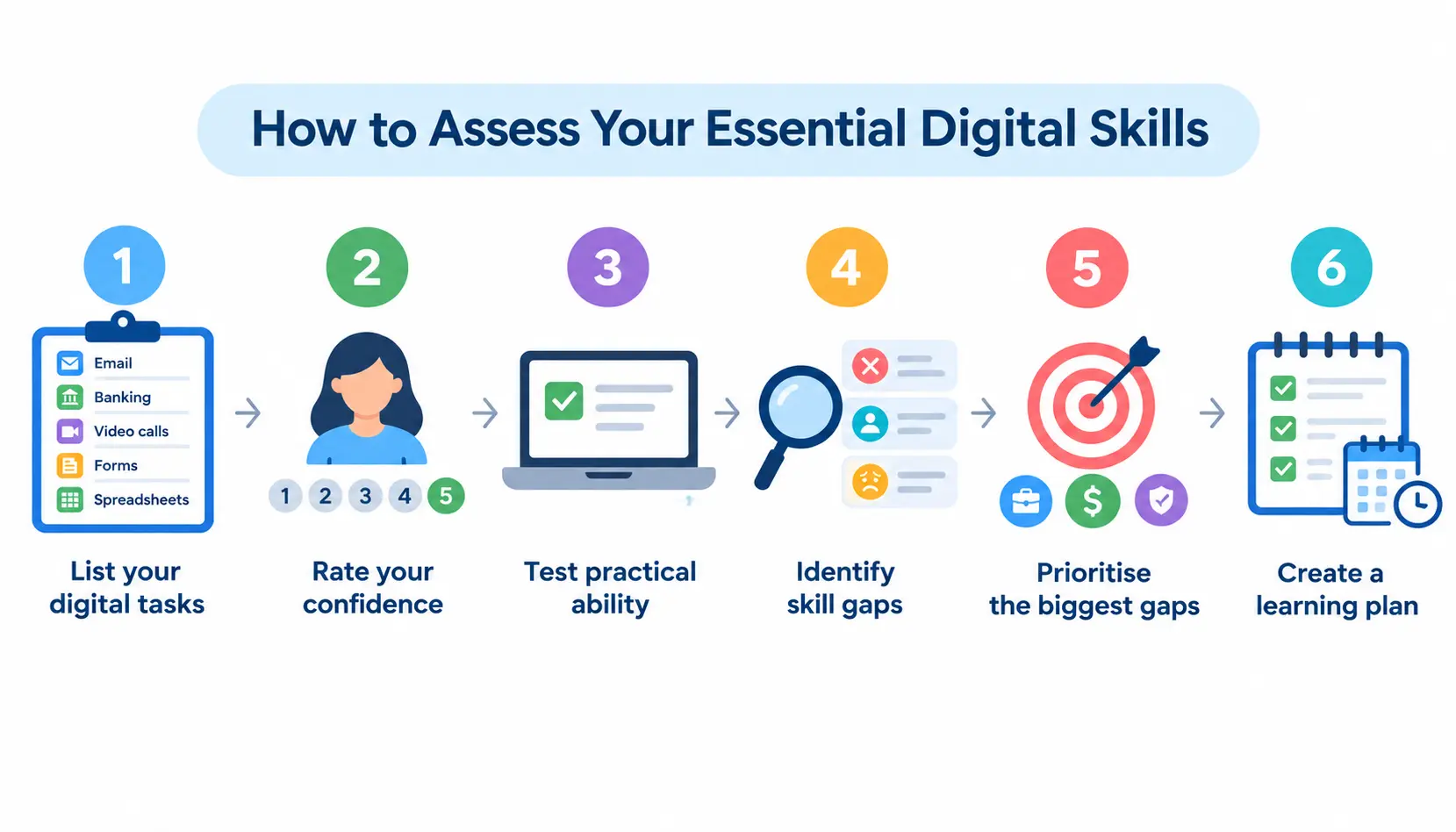
Step 1: List the digital tasks you perform
Write down what you actually do in a typical week: email, banking, video calls, forms, spreadsheets.
Step 2: Rate your confidence
Be honest. A quick 1–5 scale against each task is enough to spot patterns.
Step 3: Test practical ability
Confidence and ability don’t always match. Try the task for real rather than just imagining how it would go. Digital assessment platforms like AssessPrep can help educators evaluate practical skills and identify learning gaps.
Step 4: Identify skill gaps
Look for tasks you avoid, delegate to someone else, or find consistently stressful.
Step 5: Prioritise the most important gaps
Focus first on the gaps that affect work, money, or safety, since these carry the highest cost if left unaddressed.
Step 6: Create a learning plan
Turn the biggest gaps into a short list of specific things to practise, with a rough timeframe.
How to Improve Your Essential Digital Skills
Practice with real-world tasks
Skills stick better when they’re tied to something real, like booking an actual appointment online rather than a hypothetical one.
Take beginner-friendly courses
Many essential digital skills courses are free and designed for complete beginners; there’s no need to feel behind before starting.
Learn one tool at a time
Trying to master email, spreadsheets, and video calls all at once usually backfires. Pick one, get comfortable, then move on.
Practice online safety
Set up multi-factor authentication on one account this week. Small, concrete actions build the habit faster than reading about it.
Improve information literacy
Get in the habit of checking a second source before trusting a surprising claim online, especially anything AI-generated.
Build AI literacy
Use an AI tool for something low-stakes first, and get comfortable spotting when its answer is confident but wrong.
Track your progress
Revisit your self-assessment every few months. Progress in digital skills is often invisible day to day but obvious over a few months.
Essential Digital Skills Courses and Qualifications
Essential Digital Skills courses
These are typically free, non-accredited courses aimed at building practical confidence, often delivered by colleges, libraries, or community organisations.
Essential Digital Skills Qualifications (EDSQs)
Formal, accredited qualifications built on the national standards, generally covering Entry Level through Level 1.
Digital Functional Skills Qualifications (DFSQs)
Qualifications that replaced Functional Skills ICT, covering similar ground with a focus on functional, real-world application.
Who can take essential digital skills courses?
According to the government’s Skills for Careers guidance, essential digital skills courses can be taken online or in a classroom, and some lead to a formal qualification while others are purely for building confidence. There’s generally no prior qualification needed to start.
Essential Digital Skills by Career Stage
For students
Building comfort with research, document creation, and online collaboration ahead of coursework and, eventually, job applications.
For job seekers
Confident use of job portals, email correspondence, and video interview platforms.
For entry-level employees
Comfort with workplace communication tools, shared documents, and basic file organisation.
For managers
Managing digital workflows, reviewing work shared online, and setting a good example on data safety.
For older adults
Often starting with foundation skills and building up gradually; video calling family, online banking, and healthcare booking tend to be the most common priorities.
For career changers
Refreshing digital habits that may have gone unused in a previous role, and picking up whatever new tools the new field expects.
Real-World Examples of Essential Digital Skills
Example 1: Applying for a job
Creating a CV, uploading it to an online portal, and following up by email, each step draws on a different essential digital skill.
Example 2: Working remotely
Joining video calls, managing shared documents, and staying reachable through messaging tools, all without an IT desk down the corridor.
Example 3: Managing personal finances
Checking balances, setting up direct debits, and spotting a fraudulent transaction before it becomes a bigger problem.
Example 4: Booking a healthcare appointment
Navigating an NHS app or GP booking system, filling in required details accurately, and managing appointment reminders.
Example 5: Using AI at work
Drafting a first version of an email with an AI assistant, then checking it for accuracy and tone before sending, using the tool as a starting point, not the final word.
Digital Skills Self-Assessment Checklist
Use this as a quick gut-check before building a learning plan:
- ☐ I can send and manage email
- ☐ I can attach and download files
- ☐ I can organise digital files
- ☐ I can use a spreadsheet
- ☐ I can join a video call
- ☐ I can find reliable information
- ☐ I can recognise suspicious messages
- ☐ I can use MFA
- ☐ I can complete online transactions safely
- ☐ I can troubleshoot basic problems
- ☐ I understand how to use AI responsibly
If you’ve ticked fewer than eight, that’s a useful starting point for a short learning plan, not a reason to worry, since most adults have at least a couple of gaps somewhere on this list. It’s a topic that comes up often in community discussions too; threads on r/careerguidance and similar forums regularly feature people asking exactly where to start.
Frequently Asked Questions About Essential Digital Skills
1. What are essential digital skills?
They’re the practical, everyday abilities needed to communicate, find information, complete transactions, solve basic problems, and stay safe online: the baseline level of digital competence expected of most adults.
2. What are the 5 essential digital skills?
Communicating, handling information and content, transacting, problem-solving, and being safe and legal online.
3. Why are essential digital skills important?
They affect employability, workplace productivity, access to services, personal safety online, and the ability to keep learning throughout life.
4. What are examples of essential digital skills?
Sending emails, using spreadsheets, searching for reliable information, joining video calls, managing files, banking online, and recognising phishing attempts.
5. What digital skills are needed for work?
Communication and collaboration tools, documents and spreadsheets, file and cloud management, online meetings, data literacy, cybersecurity awareness, problem-solving, and increasingly, AI literacy.
6. What is the difference between digital literacy and digital skills?
Digital skills are practical, task-based abilities. Digital literacy is the broader ability to find, evaluate, and use digital information critically, including judging the reliability of a source.
7. What are the 2026 Essential Digital Skills Standards?
Standards published by the Department for Education on 15 July 2026, updating and expanding the previous version to cover five levels (Entry Level 1 to Level 2) and to address AI literacy directly.
8. Are essential digital skills qualifications still available?
Yes. EDSQs and DFSQs remain in place following the 2026 standards revision, with further guidance on how they’ll evolve expected from the DfE in due course.
9. How can I improve my digital skills?
Practise with real tasks, take a beginner-friendly course, focus on one tool at a time, and revisit a self-assessment every few months to track progress.
10. Are digital skills important for getting a job?
Yes, most employers now expect at least basic digital competence, and it’s increasingly listed explicitly in job requirements, even outside technical roles.
11. Is AI literacy an essential digital skill?
Increasingly, yes. The 2026 revision of the Essential Digital Skills Standards folds AI use, evaluation, and responsible practice directly into the framework, rather than treating it as a separate, optional add-on.
Conclusion
Essential digital skills are not a one‑time list that you finish and then forget. They change as the tools around us change which’s why the 2026 standards were created.
Whether you are reviewing the basics or figuring out where AI fits into your life the goal is the same: enough confidence and judgement, for using digital tools well not just using them at all.






[…] quote can quietly break a whole job. This is one of the most common bugs in shell scripts. Learning essential digital skills can also help beginners build confidence with everyday computer tasks and basic technical […]