

Evidence-based guide. Statistics are drawn from FIRST, the FBI’s IC3, the FTC, IBM, Verizon and Microsoft publications reviewed in November 2027.
Search interest in TheJavaSea.me Leaks AIO-TLP370 has grown alongside a wave of web articles that tie the phrase to leaked or redistributed digital material. The reviewed reporting does not establish what the alleged package contains, where it came from, or whether it is authentic. None of the sources reviewed pointed to an affected organization, an independent technical analysis, or a regulator notice.
That uncertainty is the reason to read carefully. A leak claim can send people to unsafe websites, and the risks attached to leaked credentials are real whether or not this particular package is genuine.
This guide separates three things: what is verified, what is only reported by third parties, and what is unproven. It then covers the practical steps that protect your accounts without touching any alleged leaked file.

Key Takeaways
- The phrase exists online, and third-party sites link it to alleged leaked material. The package’s contents, origin and authenticity are unverified.
- TLP370 is not an official Traffic Light Protocol label. FIRST states that only the labels listed in its standard are valid.
- No confirmed data breach tied to AIO-TLP370 appears in the reviewed reporting.
- Visiting leak-related sites or downloading unknown archives adds risk. You do not need the files to protect your accounts.
- The protective steps are the same regardless: unique passwords, multi-factor authentication (MFA), a password manager, and caution with unexpected messages.
What Is TheJavaSea.me Leaks AIO-TLP370?
TheJavaSea.me Leaks AIO-TLP370 is a search phrase used in online articles and forums for an alleged bundle of leaked or redistributed files linked to the domain TheJavaSea.me. Its contents, origin and authenticity have not been independently verified.
The phrase combines a domain name with an identifier, “AIO-TLP370.” In the articles reviewed, the two appear together, but no article offered primary evidence of how they are connected. The phrase is associated with leaked material because third-party websites say so, not because a victim, researcher or authority has confirmed it.
This distinction matters. An article that repeats a claim does not turn the claim into a confirmed cybersecurity incident. A confirmed incident has identifiable evidence behind it, as the section on breach confirmation below explains.
| Relationship | Status |
| The domain and the identifier appear together in online articles | Verified as online reporting |
| The identifier refers to a specific, existing data package | Unverified |
| The package contains data taken from a named organization | Unverified |
| The domain is the original source of the files | Unverified |
What Is TheJavaSea.me?
In public discussion, TheJavaSea.me is described as a site associated with distributing leaked and pirated material. One security-themed article uses that description. Others call it a platform for unauthorized tools and data.
A site that hosts or links to material is not necessarily where the material originated. Think of a notice board: the board shows what was pinned to it, but it says nothing about who wrote the notices. For that reason, the site’s association with an alleged leak does not establish the origin of any files.
What Does AIO-TLP370 Refer To?
Several articles read “AIO” as “all-in-one,” meaning a packaged bundle rather than a single item. That reading is common, but its exact meaning in this context is not confirmed.
The number 370 should not automatically be read as a version number or release date. One article calls it “likely a version number or identifier,” which is a guess rather than a finding. Another article’s FAQ mentions a different label, “AIO-TLP405,” without explaining it. That hints at a naming scheme, but none of the reviewed pieces defines one.
Why Has AIO-TLP370 Attracted Online Attention?
Four factors explain the attention:
- Search interest. People search the phrase to check whether their data is involved, or out of curiosity about what is circulating.
- Repeated coverage. Technology and informational websites have published near-identical explainers.
- Conflicting descriptions. One article describes a 1.2 GB archive posted on March 22, 2025 and containing source code, logs and API keys. Another describes bundles of pirated tools. A third calls it a new gadget with encrypted files. None of the excerpts reviewed pointed to primary evidence.
- Privacy and account-security concerns. Any mention of leaked credentials prompts readers to worry about their own accounts.
What Information Is Allegedly Associated With AIO-TLP370?
Online articles describe the alleged package in different ways. These descriptions come from secondary reporting, and they should not be treated as a verified inventory of what the files contain.
Alleged Personal and Account Information
Some articles say the material includes email addresses, usernames, passwords and login credentials, and other personal identifiers. Based on the supplied research and the reviewed articles, none of these claims is backed by a published, independently checked sample or an affected organization’s statement.
Alleged Technical and Digital Information
Other articles describe configuration files, server logs, API keys, source-code references and other technical files. One article specifically claims hardcoded API keys in configuration files. Again, the reviewed reporting offers no independent confirmation.
Why the Exact Contents Remain Uncertain
- No validated inventory. No independent party has published a verified list of what the package holds.
- Inconsistent descriptions. Articles disagree on the size, the date and the type of material.
- Possible repackaging. A reasonable interpretation is that a bundle label could be attached to previously exposed or recycled material. Without a timeline, this cannot be ruled in or out.
- Weak evidence. Filenames and screenshots can be renamed, edited or reused, so neither proves what a file contains.
| Reported material | Evidence status |
| Email addresses | Not independently verified |
| Passwords | Not independently verified |
| Personal information | Not independently verified |
| Source code | Not independently verified |
| Server logs | Not independently verified |
| Configuration files | Not independently verified |
These are categories mentioned in secondary reporting. They are not confirmed contents.
Is TheJavaSea.me AIO-TLP370 a Confirmed Data Breach?
No. In the reviewed reporting, TheJavaSea.me AIO-TLP370 is an online leak allegation, not a confirmed data breach.
The FBI’s IC3 defines a data breach as an intrusion into an organization’s system, network or database by an outside or internal party, resulting in unauthorized access to confidential or secured information. That definition requires an affected organization and evidence of access. A file name on a website supplies neither.
What Information Would Confirm a Genuine Data Breach?
- An official statement from an affected organization.
- A credible incident timeline.
- Independent technical analysis.
- Verified evidence of exposed records.
- Relevant regulatory or security notifications.
None of these appeared in the reviewed sources.
Verified Facts vs. Unverified Claims
| Claim | Assessment |
| The AIO-TLP370 keyword exists online | Verified |
| Third-party websites associate it with alleged leaked material | Verified as online reporting |
| AIO definitely means All-In-One in this package | Unconfirmed |
| TLP370 is an official FIRST classification | Incorrect |
| The package contains verified passwords | Not established |
| A specific number of people were affected | Not established |
| A particular organization suffered a confirmed breach | Not established |
Why Different Websites Describe the Leak Differently
- Repetition. Articles copy claims from other articles, so one unsupported claim can appear in many places.
- Unverified screenshots and claims. Visuals circulate without provenance.
- Repackaging of older information. Old material can be presented as new.
- Search-driven publishing. Sites publish on trending phrases whether or not they have facts.
- Blurred evidence. General cybersecurity risks get mixed with evidence about this specific identifier.
How to Evaluate Future AIO-TLP370 Reports
- Check the original source, not the article that quotes it.
- Look for independent corroboration from a second, unconnected source.
- Verify dates and context.
- Check whether a named organization acknowledges the incident.
- Separate technical evidence from speculation.
Understanding AIO, TLP, and the Traffic Light Protocol
The identifier mixes an informal abbreviation (AIO) with letters (TLP) that match a real cybersecurity standard. An informal label that borrows familiar letters is not an established standard.
What Does AIO Mean?
AIO is commonly read as “all-in-one,” a bundle of many items in one package. This reading is a convention, not a rule. It does not prove anything about the contents of AIO-TLP370.
What Is the Traffic Light Protocol in Cybersecurity?
The Traffic Light Protocol (TLP) is a set of four labels created to help share potentially sensitive information and collaborate more effectively. FIRST, the Forum of Incident Response and Security Teams, maintains it. Version 2.0 is the current standard and has been authoritative since August 2022.
FIRST says the labels indicate the sharing boundaries recipients should apply. It also says TLP is not a formal classification scheme.
| Official TLP label | Sharing boundary (per FIRST) |
| TLP:RED | Individual recipients only, no further disclosure |
| TLP:AMBER | Need-to-know within the recipient’s organization and its clients (TLP:AMBER+STRICT limits it to the organization) |
| TLP:GREEN | Peers and partners within the community, but not via publicly accessible channels |
| TLP:CLEAR | No limit on disclosure, subject to standard copyright rules |
Is TLP370 an Official Cybersecurity Classification?
No. TLP370 is not an official TLP label. FIRST states that only the labels listed in its standard are valid: TLP:RED, TLP:AMBER, TLP:GREEN and TLP:CLEAR.
The letters “TLP” in a filename therefore do not make it a security designation. You can verify this yourself on the official FIRST standard.
What Are the Potential Security and Privacy Risks?
The risks below are potential risks associated with leaked credentials and leak-related sites in general. They are not verified consequences of this specific alleged package.
The scale of the wider problem is documented. Microsoft’s Identity Protection Guide cites a Flashpoint report saying threat actors compromised over 3.2 billion credentials in 2024, a 33% increase year over year.
Exposure of Login Credentials
Exposed credentials can be tried against accounts. Microsoft’s guide says that once attackers gain access to an account, they can lock you out, steal personal or financial data, change your recovery options, and use your account to target others.
Reused passwords make this worse. If one service leaks a password you use elsewhere, every account sharing it becomes exposed.
Credential Stuffing Attacks
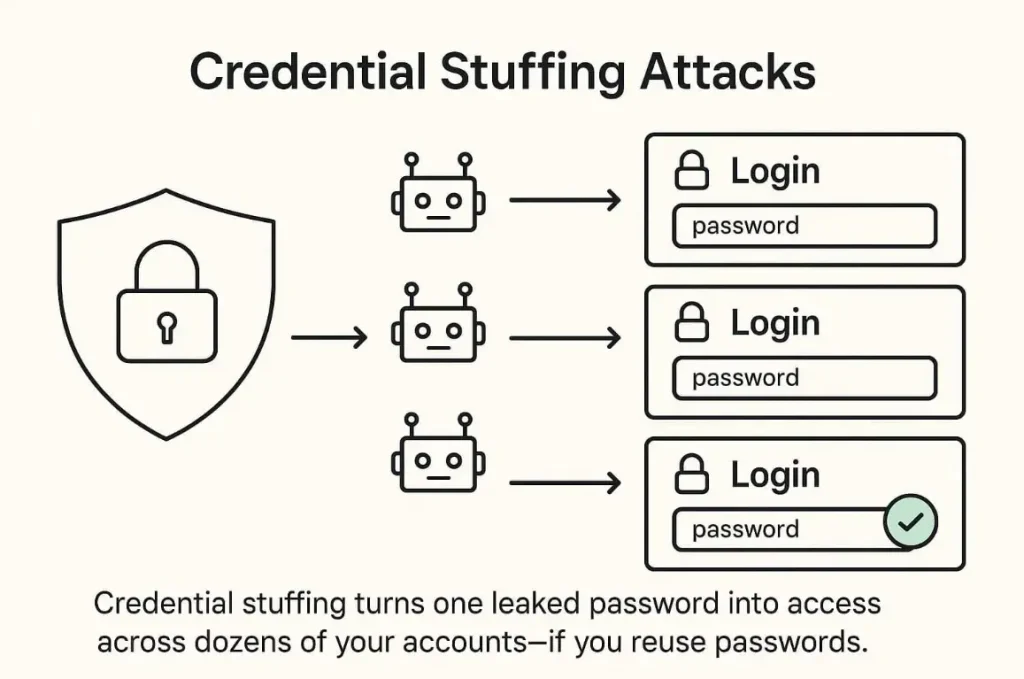
Credential stuffing uses large databases of leaked credentials to automate login attempts across many platforms. Microsoft’s guide says it exploits password reuse and scale, and cites more than 19 billion compromised passwords available online.
Here is a hypothetical example. Imagine someone used the same password for a forum and an online shop. If the forum’s data is leaked, an automated tool tries that email-and-password pair on the shop’s login page. If it works, the attacker is in, and the forum breach has become a shop account takeover.
Verizon’s 2026 Data Breach Investigations Report puts credential abuse at 13% of breaches as the initial access vector, down from first place in earlier years. Keepnet’s analysis of the report adds that credential abuse still appears somewhere in the attack chain in 39% of breaches.
Phishing and Social Engineering
Exposed personal details make phishing messages more convincing. Microsoft describes data aggregation attacks, which combine data from breaches, social media and public records into detailed identity profiles that fuel convincing impersonation.
Expect three patterns: fake password-reset notifications, suspicious login alerts that push you to click a link, and impersonation of people or brands you trust. Microsoft also warns about lookalike domains such as “micr0soft.com” and about “prompt bombing,” where attackers flood you with MFA requests hoping you approve one.
Phishing is the most reported crime type in the FBI’s 2025 Internet Crime Report, with 191,561 complaints, according to SOCRadar’s summary. Verizon’s 2026 report puts phishing at 16% of breaches as an initial access vector, per Delinea’s review. Microsoft’s guide uses a higher figure, describing phishing as nearly 80% of breaches. The numbers differ because they measure different things, so treat each as a snapshot of its own methodology.
Malware and Malicious Downloads
Unknown archives and executable files can carry malware. Information stealers collect saved passwords and session data from an infected device, and malicious installers can bundle hidden code with a tool you expected to be harmless.
A clean scan result shows only that the scanner did not recognize a threat. A reasonable interpretation is that it is not proof of safety, so the safest choice is not to run unknown files at all.
Identity Theft and Financial Fraud
Combinations of personal information can help someone impersonate you. Unauthorized access to one account can lead to others, with financial and reputational consequences.
The FTC told Congress that it received 3 million fraud reports in 2025, with consumers reporting $15.9 billion in losses, up from over $12 billion the year before. PPC Land’s summary of FTC data puts identity theft reports at nearly 1.4 million. Separately, the FBI’s IC3 logged $20.9 billion in reported cybercrime losses for 2025, a 26% increase.
Business and Organizational Risks
For organizations, the concerns are exposed employee credentials, unauthorized access to internal systems, compromised API keys, and misuse of configuration information.
Costs add up. IBM’s 2026 Cost of a Data Breach Report puts the global average at $4.99 million, up 12%, and the U.S. average at $11.5 million, according to eSecurity Planet. The mean time to identify and contain a breach rose to 247 days, per Baker Donelson’s summary. These are survey-based averages, not predictions for any single company.
Hypothetical attack pathway (illustrative only):
- A credential is exposed in a leak.
- The credential is added to a list of leaked logins.
- Automated tools test it on other services.
- Where the password was reused, a login succeeds.
- The attacker changes recovery settings and locks the owner out.
Is It Safe to Visit TheJavaSea.me or Download AIO-TLP370 Files?
Not recommended. Treat any leak-related website as unsafe until proven otherwise, and do not download or open files from it.
This is a precautionary recommendation, not a measured finding about this particular site. The reasoning is straightforward: sites that distribute unauthorized material have no accountability to their visitors, and the existence of a website does not establish that its downloads are trustworthy. Several of the reviewed articles themselves warn about malware and legal exposure around such sites.
Risks of Visiting Unfamiliar Leak-Related Websites
- Deceptive advertisements.
- Phishing pages that imitate login screens.
- Suspicious redirects to other sites.
- Fake download buttons.
- Forms or prompts that try to collect personal information.
Microsoft’s guide notes that phishing techniques have become more advanced, and that attackers rarely make obvious spelling or grammar mistakes. A page that looks polished is therefore not evidence that it is legitimate.
Why Downloading Unknown Archives Is Risky
An archive from an unverified source can hold anything. The main concerns are:
- Malware hidden among ordinary-looking files.
- Malicious scripts that run when opened.
- Credential-stealing software.
- Executable files disguised as documents or tools.
- Privacy and legal concerns, since the material may include other people’s data or unlicensed content.
There is also a practical point. People often download a leak to check whether they appear in it. That step is unnecessary, and the next section explains safer ways to check.
What If You Have Already Downloaded a Suspicious File?
- Do not open or run it. Leave the file closed.
- Disconnect the device from the network if you suspect it is compromised.
- Scan with trusted security software. Remember that a clean result is not a guarantee.
- Change potentially exposed credentials from a clean device, starting with your email and financial accounts.
- Seek professional incident-response help if you see signs of compromise, or if the device is used for work.
For organizations, the FBI’s IC3 guidance follows a similar order: quarantine or take offline the affected hosts, reimage compromised hosts unless told to preserve them forensically, and reset or revoke compromised credentials.
Is Searching for AIO-TLP370 Illegal?
Searching for a term is different from accessing, possessing or distributing unauthorized material. Reading about a topic is not the same act as downloading files from a leak site.
Laws differ by country and by the kind of material involved, so local rules matter. This article is not legal advice. If you are unsure about your position, ask a qualified lawyer in your jurisdiction.
How to Check Whether Your Personal Information Has Been Exposed
Everything in this section can be done without touching any alleged leaked file. It is the most practical part of this guide.
Check Your Email Address Against Known Breach Records
Microsoft’s guide recommends third-party tools such as Have I Been Pwned, or the password-security check inside your password manager, to see whether your credentials have appeared in a breach. It also suggests setting a recurring reminder to repeat the check.
A result shows known, historical exposure. A clean result does not prove your account has never been exposed. Microsoft notes that breaches happen constantly and that you are not always notified promptly.
Review Your Account Security
- Check recent login activity.
- Review connected devices.
- Examine account recovery settings, such as backup emails and phone numbers.
- Look for unfamiliar sessions and sign them out.
- Review security notifications you may have ignored.
Check for Reused or Compromised Passwords
A password manager’s security check can flag reused and breached passwords. Use it, then replace each flagged password with a unique one.
Do not paste your passwords into unknown “leak checker” websites. A reasonable interpretation is that entering a real password into a site you cannot vouch for hands it to a stranger.
Monitor Financial and Identity-Related Accounts
- Review transactions for anything unusual.
- Watch for account changes you did not make.
- Treat unexpected verification requests as warning signs.
- Contact your financial institution if suspicious activity appears.
| What to check | Why it matters |
| Email breach notifications | Identifies known historical exposure |
| Login history | Reveals potentially unauthorized access |
| Password reuse | Identifies accounts vulnerable to credential stuffing |
| Recovery settings | Helps detect account takeover |
| Financial activity | Helps identify suspicious transactions |
How to Protect Yourself From Potential Data Exposure
The measures below come mainly from Microsoft’s Identity Protection Guide and apply whether or not any specific leak is real.
Change Compromised and Reused Passwords
Use a unique password for every account. Microsoft advises changing the password immediately on any account tied to a breach, and updating every account that uses the same or a similar password.
Start with your email and financial accounts, because email controls account recovery for almost everything else. Microsoft’s guidance for new passwords is at least 12 characters (14 or more is better), no dictionary words or names, and nothing close to a previous password. Avoid predictable patterns.
Enable Multi-Factor Authentication
MFA adds a second verification step after your password, so a stolen password alone is not enough to get in. Microsoft says MFA can help prevent up to 99.9% of attacks, citing its own research. Because that is a vendor figure, read it as an indicator of strong protection rather than a guarantee.
Prefer phish-resistant methods such as passkeys over text messages or push notifications where possible. Always confirm you started an MFA request before approving it, since attackers use “prompt bombing” to wear people down.
Use a Trusted Password Manager
Password managers generate strong, unique passwords, store them in encrypted form, and identify weak and reused ones. Microsoft also notes that many of them alert you when credentials appear in a breach.
Recognize Suspicious Emails and Messages
- Check the sender’s address for typos and lookalike domains.
- Avoid unexpected login links.
- Verify urgent security notices through the official website or a known contact channel.
- Never share verification codes.
- Do not reply to suspicious messages or click “unsubscribe” in them, per Microsoft’s guide.
Keep Your Devices and Software Updated
Verizon’s 2026 report found vulnerability exploitation to be the leading initial access vector, at 31% of breaches, according to Keepnet’s analysis. Updates close the known flaws that attackers exploit.
Install security updates, use reputable security software, remove applications you do not recognize, and review browser extensions.
Monitor Important Accounts Regularly
Turn on security alerts, review account activity, check recovery information, and watch for suspicious login attempts. A short monthly routine is enough for most people.
What Should You Do If Your Information May Have Been Exposed?
Act in order of impact. Microsoft’s guide stresses that the sooner you respond, the safer you are, because stolen credentials can be used quickly.
| Priority | Action | Purpose |
| 1 | Secure your primary email account | Protect account recovery |
| 2 | Change compromised passwords | Prevent unauthorized access |
| 3 | Enable MFA | Strengthen authentication |
| 4 | Review active sessions | Identify unfamiliar access |
| 5 | Secure financial accounts | Reduce potential financial harm |
| 6 | Scan affected devices | Identify possible malware |
| 7 | Monitor account activity | Detect further suspicious behavior |
Immediate Actions for Individuals
Begin with your email account, because anyone who controls it can reset your other passwords. Change its password from a device you trust, turn on MFA, and sign out other sessions. Then work down the table above. If you reused that password anywhere, change it there too.
What Businesses Should Do
- Review access permissions.
- Rotate potentially exposed API keys and credentials.
- Review system logs.
- Investigate unusual authentication activity.
- Follow your incident-response procedures.
- Notify affected parties when legally required.
The FBI’s IC3 also asks victims to file a detailed complaint at ic3.gov, using the key words “data breach” in the incident description.
When to Seek Professional Cybersecurity Assistance
- Suspected account compromise you cannot resolve.
- A business system intrusion.
- Financial fraud.
- A malware infection.
- Exposure of sensitive organizational data.
How to Reduce the Risk of Future Data Exposure
The earlier sections cover what to do now. These are the habits that keep the risk low over time.
Build Strong Password Habits
Keep one unique password per account, stored in a password manager. Set a recurring reminder to re-check your breach status, as Microsoft suggests.
Adopt Multi-Factor Authentication
Make MFA the default for every account that offers it, and favor passkeys where available.
Use Secure Browsing Practices
Type or bookmark the addresses of sites you use for sensitive tasks instead of following links in messages. Avoid entering credentials on pages you reached through an ad or a redirect.
Keep Personal and Professional Accounts Separate
A reasonable interpretation is that separation limits the damage: a leak at a personal service should not hand anyone the keys to work systems, and the reverse also holds. Never reuse a password across the two.
Review Third-Party App Permissions
Microsoft recommends revoking social media access for third-party apps you no longer use. The wider picture supports this: Verizon’s 2026 report found third-party involvement in 48% of breaches, up 60% year over year, according to SecurityInfoWatch.
Monitor Breach Notifications and Security Alerts
Take alerts from your providers seriously, and check them against the provider’s official site rather than a link in the message.
Frequently Asked Questions About TheJavaSea.me Leaks AIO-TLP370
What is TheJavaSea.me Leaks AIO-TLP370?
It is a search phrase used in online articles for an alleged bundle of leaked or redistributed files linked to the domain TheJavaSea.me. The package’s contents, origin and authenticity have not been independently verified, and descriptions vary widely between websites.
Is AIO-TLP370 a confirmed data breach?
No. The reviewed reporting contains no statement from an affected organization, no incident timeline, no independent technical analysis and no regulatory notice. It is an online allegation, not a confirmed incident.
What does AIO-TLP370 mean?
Many articles read AIO as “all-in-one,” meaning a bundle. That reading is not confirmed for this package. The meaning of “370” is unexplained, and it should not be assumed to be a version number or a date.
What is TheJavaSea.me?
In public discussion it is described as a site associated with distributing leaked and pirated material. That association does not make it the source of any files it hosts or links to.
Is TLP370 an official cybersecurity classification?
No. FIRST’s Traffic Light Protocol has four valid labels: TLP:RED, TLP:AMBER, TLP:GREEN and TLP:CLEAR. FIRST states that only labels listed in its standard are considered valid.
What information is allegedly associated with AIO-TLP370?
Articles mention email addresses, usernames, passwords, other personal identifiers, configuration files, server logs, API keys and source-code references. These are categories from secondary reporting. None is independently verified.
Is TheJavaSea.me safe to visit?
It is not recommended. Leak-related sites can carry deceptive ads, phishing pages, suspicious redirects and fake download buttons. You can protect your accounts without visiting it.
Can downloading unknown leak files infect my computer?
Yes, that is a real risk. Unknown archives can contain malware, malicious scripts, credential stealers or disguised executables. A clean scan does not guarantee a file is safe.
How can I check whether my information has been exposed?
Use a reputable breach-notification service such as Have I Been Pwned or your password manager’s security check, then review login history, recovery settings and financial activity. A clean result does not prove you have never been exposed.
What should I do if my password appears in a breach notification?
Change it right away, along with any account that uses the same or a similar password. Enable MFA, review active sessions, and check your recovery settings for changes you did not make.
Can old leaked credentials still be dangerous?
Yes, if the password is still in use. Microsoft notes that leaked credentials can be added to combo lists and used in credential stuffing, and Verizon’s 2026 report found credential abuse somewhere in the attack chain in 39% of breaches. Changing the password removes the value of the old one.
How can businesses protect themselves from credential exposure?
Require MFA, rotate exposed credentials and API keys, review access permissions and logs, keep systems updated, and keep tested backups, in line with IC3’s guidance. Have an incident-response plan ready before it is needed.
Final Thoughts
What is known about TheJavaSea.me Leaks AIO-TLP370 is limited. The phrase exists, and third-party sites link it to alleged leaked material. Its contents, origin and authenticity are unverified, and TLP370 is not an official Traffic Light Protocol label.
The difference between an online claim and a confirmed incident is the core of this topic. A confirmed breach has an affected organization, a timeline and independent evidence. This one has none in the reviewed reporting.
You do not need to access alleged leaked files to protect your accounts. Use unique passwords, enable MFA, rely on a password manager, check breach notifications through reputable services, and verify unexpected messages through official channels. Those habits keep working regardless of which leak claim is trending next.
Sources Referenced
- FIRST, Traffic Light Protocol (TLP) Standard, Version 2.0
- FBI Internet Crime Complaint Center, Data Breach guidance
- Microsoft, Identity Protection Guide (citing Flashpoint’s 2025 Global Threat Intelligence Report)
- FTC, testimony on fraud, March 2026
- IBM Cost of a Data Breach Report 2026, via eSecurity Planet and Baker Donelson
- Verizon 2026 Data Breach Investigations Report, via Keepnet, Delinea and SecurityInfoWatch
- FBI IC3 2025 Internet Crime Report, via SOCRadar