If you’ve ever gone to screenshot an Instagram conversation and then hesitated finger hovering over the buttons, wondering if the other person is about to get a ping you’re not alone. It’s one of the most searched Instagram privacy questions out there, and the answer isn’t as simple as a flat yes or no.Want to make your Instagram profile more attractive? Check out our collection of Instagram Bio Ideas to create a bio that matches your personality and style.
Here’s the short version: Instagram does not notify anyone when you screenshot a regular DM. But there are two specific situations where it will. This guide breaks down exactl.y when Instagram sends a screenshot alert, when it doesn’t, and how to avoid an accidental notification.Looking to make your Instagram profile stand out? Explore our collection of Instagram Bio Ideas to find the perfect bio for your personality and style.
Quick Answer: Does Instagram Notify When You Screenshot a DM?
Usually, no. Instagram does not notify the other person when you screenshot:
- Regular DMs and chat conversations
- Photos or videos already saved in chat history
- Stories
- Reels
- Posts
- Profiles
- Highlights
- Comments
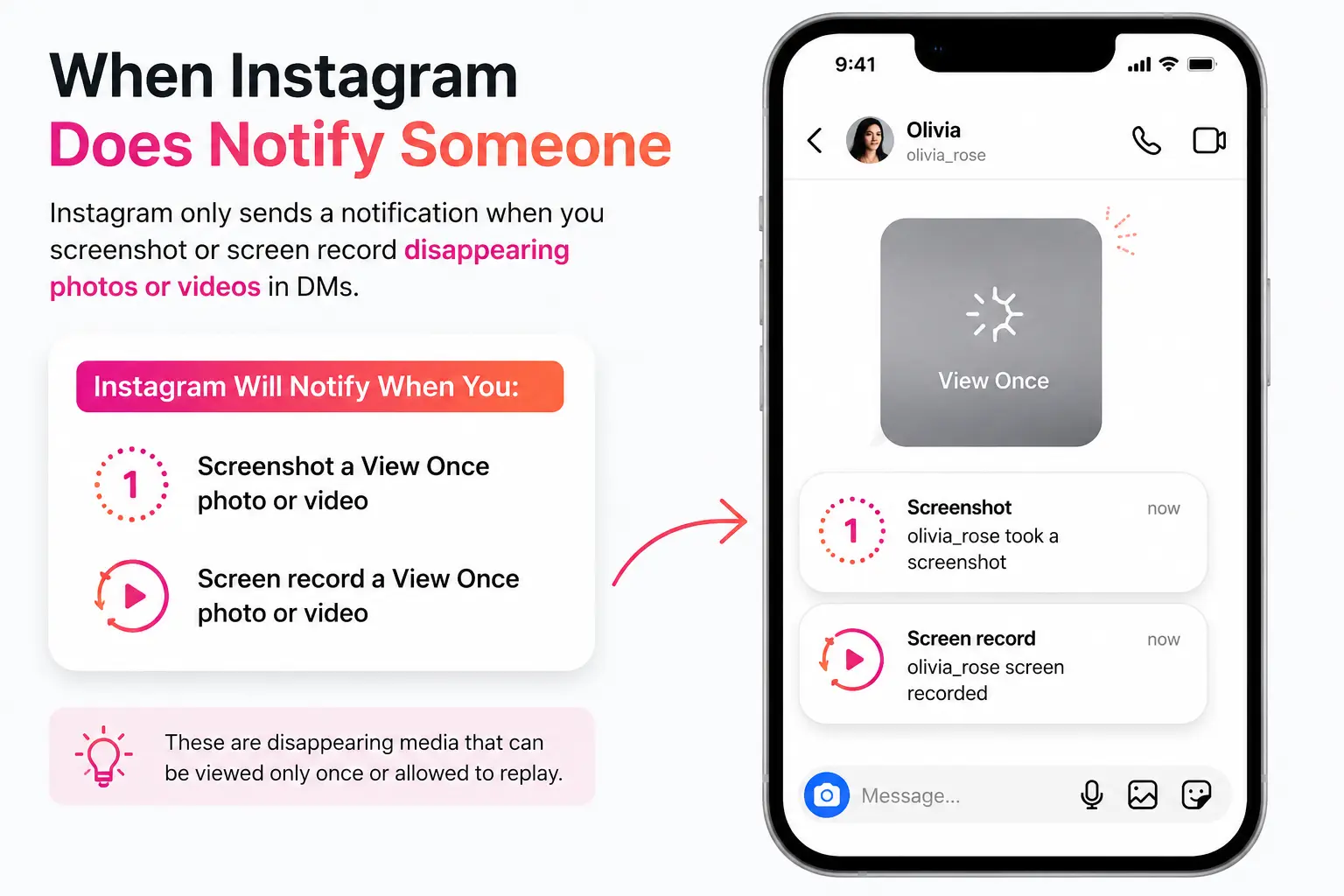
There are two exceptions. Instagram does send a screenshot notification when you capture:
- A View Once or Allow Replay photo/video sent in a DM (disappearing media)
- Any content while a chat is in Vanish Mode
In both cases, the sender sees a small alert directly in the chat thread letting them know a screenshot (or screen recording) was taken.
Understanding Instagram Screenshot Notifications
Screenshot notifications are small, automated alerts Instagram sends when it detects someone has captured specific, time-sensitive content. The idea is simple: some content on Instagram is meant to be permanent and shareable (your posts, your profile, most DMs), while other content is meant to be fleeting and private (disappearing photos, Vanish Mode chats). Instagram only polices the second category.
This wasn’t always so clear-cut. Instagram briefly experimented with broader screenshot alerts for Stories back in 2018, which is where a lot of the ongoing confusion comes from. That test was pulled quickly after user backlash, and it has never returned as a standard feature. Today, in 2026, the rule is narrow and consistent: only disappearing DM content triggers a notification.
When Instagram Does Notify Someone
Screenshot of View Once Photos and Videos
When someone sends a photo or video through the in-chat camera and selects View Once, that media is designed to disappear after it’s opened. Instagram treats this as a deliberate privacy choice by the sender, so it enforces it: if you screenshot or screen record a View Once photo or video, the sender is notified immediately, and your username is attached to the alert inside the chat thread.
Example: Your friend sends you a View Once photo. You open it, then take a screenshot before it disappears. Your friend sees a notification in the chat saying you captured the screen.
Screenshot of Allow Replay Media
Allow Replay works similarly to View Once but lets the recipient watch the photo or video one additional time before it vanishes for good. Because it’s still classified as ephemeral media, the same rule applies — screenshotting or screen recording an Allow Replay photo or video sends a notification to the sender.
Screenshots in Vanish Mode
The second trigger is Vanish Mode, Instagram’s disappearing-chat feature. When Vanish Mode is active, messages automatically clear once you leave the conversation. If either person takes a screenshot while Vanish Mode is on of any message, not just media Instagram alerts both parties inside the chat.
When Instagram Does NOT Notify
Here’s a quick-reference table for every major screenshot scenario on Instagram:
| Instagram Feature | Screenshot Notification? |
|---|---|
| Regular DMs | ❌ No |
| Chat Messages (saved in history) | ❌ No |
| Stories | ❌ No |
| Posts | ❌ No |
| Reels | ❌ No |
| Profile | ❌ No |
| Highlights | ❌ No |
| Comments | ❌ No |
| View Once Media | ✅ Yes |
| Allow Replay Media | ✅ Yes |
| Vanish Mode Chats | ✅ Yes |
Does Instagram Notify When You Screenshot Stories?
No. Instagram tested story screenshot notifications briefly in 2018, but the feature was removed within months and has not returned. In 2026, you can screenshot a public Story, a private account’s Story, or even a Close Friends Story without the account owner receiving any alert. You can see who viewed a Story, but not who screenshotted it Instagram simply doesn’t track or expose that data.
Does Instagram Notify Screenshots of Reels?
No. Reels are public, shareable content by design, so screenshotting or screen recording them never triggers a notification, regardless of whether the Reel is from a creator’s page or your feed.
Does Instagram Notify Screenshots of Posts?
No. Feed posts work the same way as Reels they’re built to be seen, saved, and shared, so there’s no screenshot detection built into them.
Does Instagram Notify Screenshots of Profiles?
No. Screenshotting someone’s bio, profile photo, or grid doesn’t notify them in any way. This applies to public and private accounts alike (assuming you already have access to view the private profile).
Does Instagram Notify Screen Recording?
Screen recording follows the exact same rules as screenshotting. That means:
- Screen recording a regular DM: no notification
- Screen recording a View Once or Allow Replay photo/video: notification sent
- Screen recording a Vanish Mode chat: notification sent
- Screen recording a Story, Reel, or post: no notification
Instagram treats screen recording as functionally identical to a screenshot for the purposes of these alerts if the content is ephemeral, capturing it in any form flags it.
What Is View Once on Instagram?
View Once is a privacy feature that lets you send a photo or video in a DM that disappears after the recipient opens it a single time. It’s built for moments you don’t want sitting permanently in someone’s camera roll or chat history a quick photo, a private moment, anything you’d rather not have saved indefinitely.
Key things to know about View Once:
- The photo or video disappears from the chat after it’s opened once.
- The recipient cannot reopen it once it’s been viewed (unless the sender used Allow Replay instead).
- Any screenshot or screen recording attempt is flagged to the sender.
- It only applies to media sent through the in-chat camera, not existing photos from your camera roll.
How to Send Disappearing Photos Safely
If you want to use View Once to keep something private, here’s the process:
- Open the DM conversation with the person you’re messaging.
- Tap the camera icon in the chat.
- Take a new photo or video.
- Select View Once (or Allow Replay if you want the recipient to be able to watch it twice).
- Tap Send.
Keep in mind that “safely” has limits there’s nothing stopping someone from photographing your screen with a second device, which Instagram has no way of detecting.
Why Instagram Uses Screenshot Notifications
Instagram limits screenshot notifications to disappearing content for a few practical reasons:
- Privacy for intentional, ephemeral sharing. When someone chooses View Once or Vanish Mode, they’re explicitly signaling they don’t want that content saved. The notification reinforces that boundary.
- Preventing misuse. Knowing a screenshot will be flagged discourages people from secretly saving sensitive content they were told would disappear.
- User trust. By not extending notifications to Stories, posts, or regular DMs, Instagram avoids creating anxiety around everyday sharing something users pushed back on hard during the 2018 test.
Common Myths About Instagram Screenshot Notifications
Myth: Instagram notifies every screenshot you take. False. Notifications are limited to View Once, Allow Replay, and Vanish Mode content everything else is fair game.
Myth: Story screenshots trigger an alert. False, and this is one of the most persistent Instagram myths. It hasn’t been true since Instagram’s short-lived 2018 test.
Myth: Screenshotting someone’s profile sends them a notification. False. Profiles carry no screenshot detection at all.
Myth: Third-party apps can detect or report your screenshots. False. Instagram doesn’t share screenshot data through its API, so any app or website claiming to reveal who screenshotted your Story or profile is not legitimate and is often a front for collecting your login credentials.
Can Third-Party Apps Detect Screenshots?
No legitimate third-party app can detect Instagram screenshots outside of what Instagram itself already flags (View Once, Allow Replay, Vanish Mode). Instagram does not expose this data through its official API, which means any app or site promising to show you a list of who screenshotted your content is misrepresenting what it can actually do.
These apps are worth being cautious around for another reason: many of them ask for your Instagram username and password to “scan” your account. Handing over your credentials to an unverified third party puts your account at real risk of being compromised. If an app’s core pitch is screenshot detection beyond what Instagram natively offers, treat it as a red flag.
Tips to Protect Your Privacy on Instagram
- Use View Once or Vanish Mode for anything sensitive you’d rather not have saved.
- Turn on Two-Factor Authentication (2FA) to add a layer of security to your account.
- Avoid sending confidential information – passwords, financial details, personal documents – through DMs altogether, since even non-ephemeral messages can be saved or forwarded.
- Limit who can message you using Instagram’s message request and privacy settings.
- Review your privacy settings periodically, since Instagram updates its features fairly often.
Frequently Asked Questions
Does Instagram notify when you screenshot a DM? No, not for regular DMs. Instagram only sends a screenshot notification for View Once media, Allow Replay media, and messages in Vanish Mode.
Does Instagram notify screenshots of stories? No. Instagram tested this briefly in 2018 but removed it, and it has not returned as of 2026.
Can someone see if I screenshot their Instagram profile? No. Profile screenshots are never flagged or reported to the account owner.
Does Instagram notify screen recordings? Screen recording follows the same rules as screenshotting: it’s flagged for View Once, Allow Replay, and Vanish Mode content, and not flagged for anything else.
Does Instagram notify screenshots of reels? No. Reels can be screenshotted or screen recorded without any notification being sent.
Can you screenshot Instagram chats without them knowing? Yes, for regular chat messages and permanent media. This does not apply to View Once, Allow Replay, or Vanish Mode content, which always trigger an alert.
What happens if I screenshot View Once media? The sender receives an immediate notification inside the chat thread letting them know you captured a screenshot (or screen recording) of the disappearing photo or video.
Can third-party apps detect Instagram screenshots? No. Instagram doesn’t make this data available through its API, so apps claiming otherwise aren’t legitimate and may be attempting to collect your login credentials.
Conclusion
To sum it up: Instagram does not notify when you screenshot a DM – or a Story, Reel, post, or profile, for that matter. The only situations that trigger an alert are disappearing content: View Once photos/videos, Allow Replay media, and Vanish Mode conversations. Everything else can be screenshotted freely, without the other person ever knowing.
Instagram’s privacy features do shift over time, so it’s worth staying current if screenshot privacy matters to you but as of 2026, this narrow rule is the one that holds across the platform.