Most SEOs treat link building like a checklist item. You land a placement, mark it done, and move on to the next target. But here’s the part almost nobody talks about: a good chunk of the backlinks you worked so hard to earn this year won’t even exist next year.
Pages get deleted, sites get redesigned, domains expire, and links quietly vanish without any notification landing in your inbox.
This slow, invisible erosion is called link decay, and if you’re not actively checking for it, you’re probably losing more link equity than you’re gaining. Whether those links came from years of manual outreach or more recent tactics like SERP Insight Link Insertion, none of them are immune to the slow erosion this article is about.
Most teams find out about it the hard way, a ranking quietly slips, someone finally runs a fresh backlink report, and half the links they were counting on turn out to be gone, redirected somewhere useless, or stripped of the dofollow attribute that made them worth pursuing in the first place.
This guide breaks down what causes link decay, why it matters more than most people realize, and exactly how to audit your backlink profile to catch it before it costs you rankings.
What Is Link Decay?
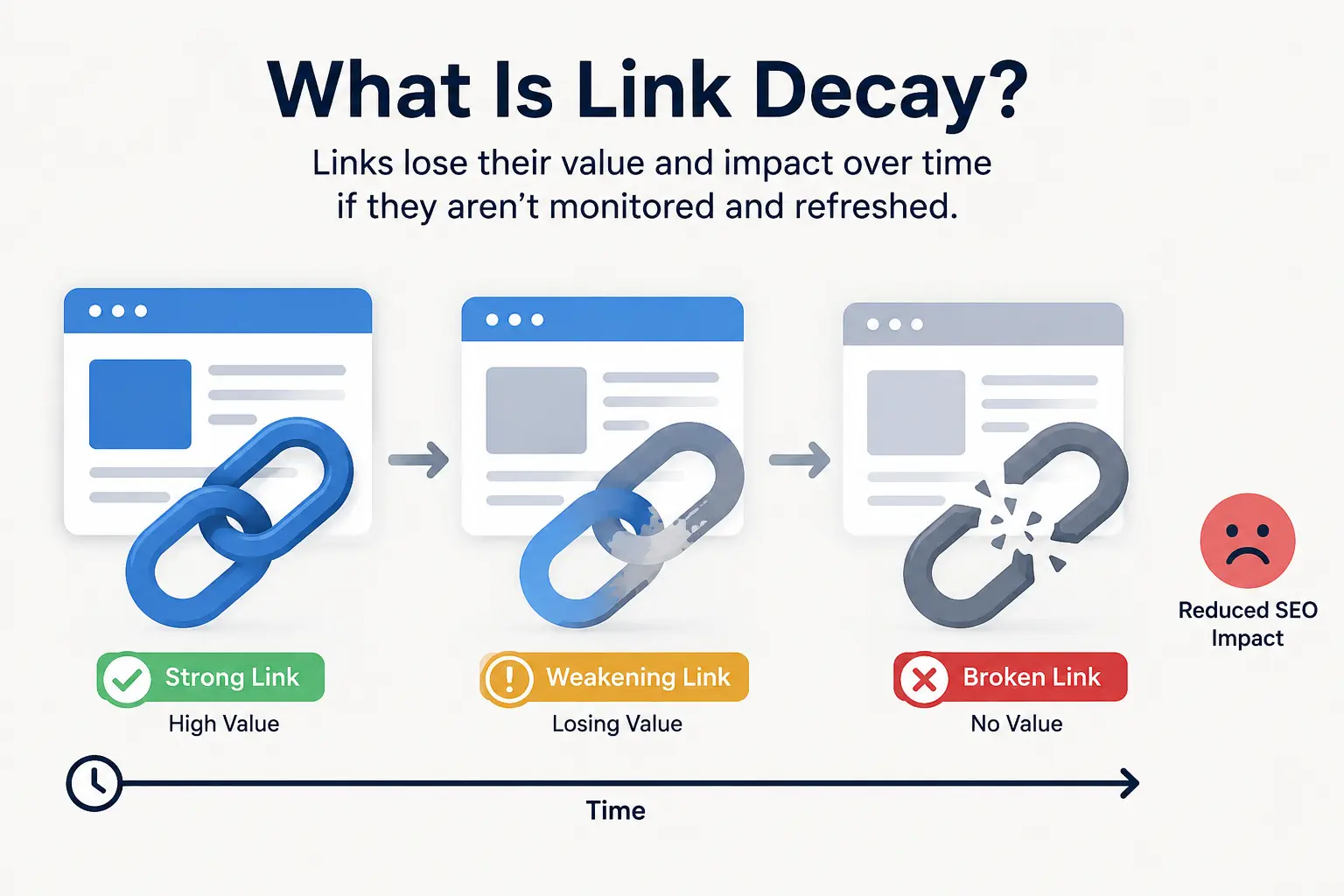
Link decay is the gradual loss of value or existence in a backlink over time. It happens when a link that once pointed to your site stops working, stops passing authority, or disappears from the web entirely.
It’s worth separating a few terms people often use interchangeably, since they show up in slightly different contexts:
- Link decay – the broader process of backlinks losing value over time, whether they break, get removed, or change attributes.
- Link rot – usually refers specifically to links that go dead (404s, expired domains, deleted pages). It’s the most extreme form of decay.
- Broken backlinks – the end result: a link that no longer resolves to a live page, regardless of what caused it.
Link decay isn’t a one-time event. It’s ongoing. Even if you never build another link, the ones you already have are slowly wearing down in the background, and the process doesn’t pause just because you stopped paying attention to it. Think of it less like a single deadline you can prepare for and more like normal wear on anything you own tires, roofs, relationships with vendors. Left unmanaged, it just gets worse.
What makes link decay particularly easy to ignore is that it doesn’t announce itself. Nobody emails you to say “hey, we just removed your link.” You only find out if you go looking, which is exactly why most sites carry far more decayed links than their owners realize.
Why Backlinks Decay: The Real Causes
Backlinks don’t disappear for one single reason. Understanding the different causes actually matters, because each one calls for a slightly different fix later. Here are the most common culprits:
Site redesigns without redirects. A site overhauls its structure, URLs change, and nobody sets up 301 redirects. Your link now points to a dead page instead of the content it used to support. This is one of the most common causes simply because website redesigns happen constantly, and link preservation is rarely high on anyone’s checklist during a rebuild.
Content gets deleted or unpublished. Blogs get cleaned out, old articles get archived to “declutter” a site, or content gets pulled during a rebrand. Any link inside that content disappears along with it, and there’s usually no warning before it happens.
Domains expire or get abandoned. Small sites and blogs shut down more often than most people think. A site owner loses interest, stops paying for hosting, or simply moves on, and every link that domain ever gave you evaporates with it.
Editorial swaps. A site replaces an old resource link with a newer one maybe a competitor’s, maybe just a more recent source they found more useful. This happens constantly on “best tools,” “top resources,” and roundup-style pages, which tend to get refreshed periodically as editors update their recommendations.
Attribute changes. A link that was once dofollow can quietly become nofollow, sponsored, or UGC after a site updates its linking policy. The link is technically still there, still clickable, still sending the occasional visitor — but it’s no longer passing the SEO value it once did.
CMS migrations. Moving platforms (WordPress to a headless CMS, for example) frequently breaks both internal structure and outbound links in old content. Migrations are messy by nature, and outbound links to third-party sites are rarely a priority during the process.
Negative SEO or competitive tampering. Less common, but worth mentioning occasionally a link disappears because a competitor reached out and convinced a site to swap it out, or because the hosting site was compromised and cleaned up in a way that removed outbound links entirely.
None of these require any wrongdoing on your part they’re just the natural lifecycle of the web. This applies even to links you paid to acquire: strategies like SERP Insight Link Insertion can land you a placement on a strong, relevant page today, but that page can still lose rankings or get restructured later, which is exactly why ongoing audits matter regardless of how a link was originally built.
Research tracking backlinks over multiple years has found that a majority of links built end up removed or deleted within that window, which gives you a sense of scale: this isn’t a minor edge case, it’s the default behavior of the internet. If you built 500 links over the past few years and haven’t checked on them recently, it’s reasonable to assume a meaningful chunk are already gone, degraded, or pointing somewhere you wouldn’t recognize.
Why Link Decay Quietly Hurts Your Rankings
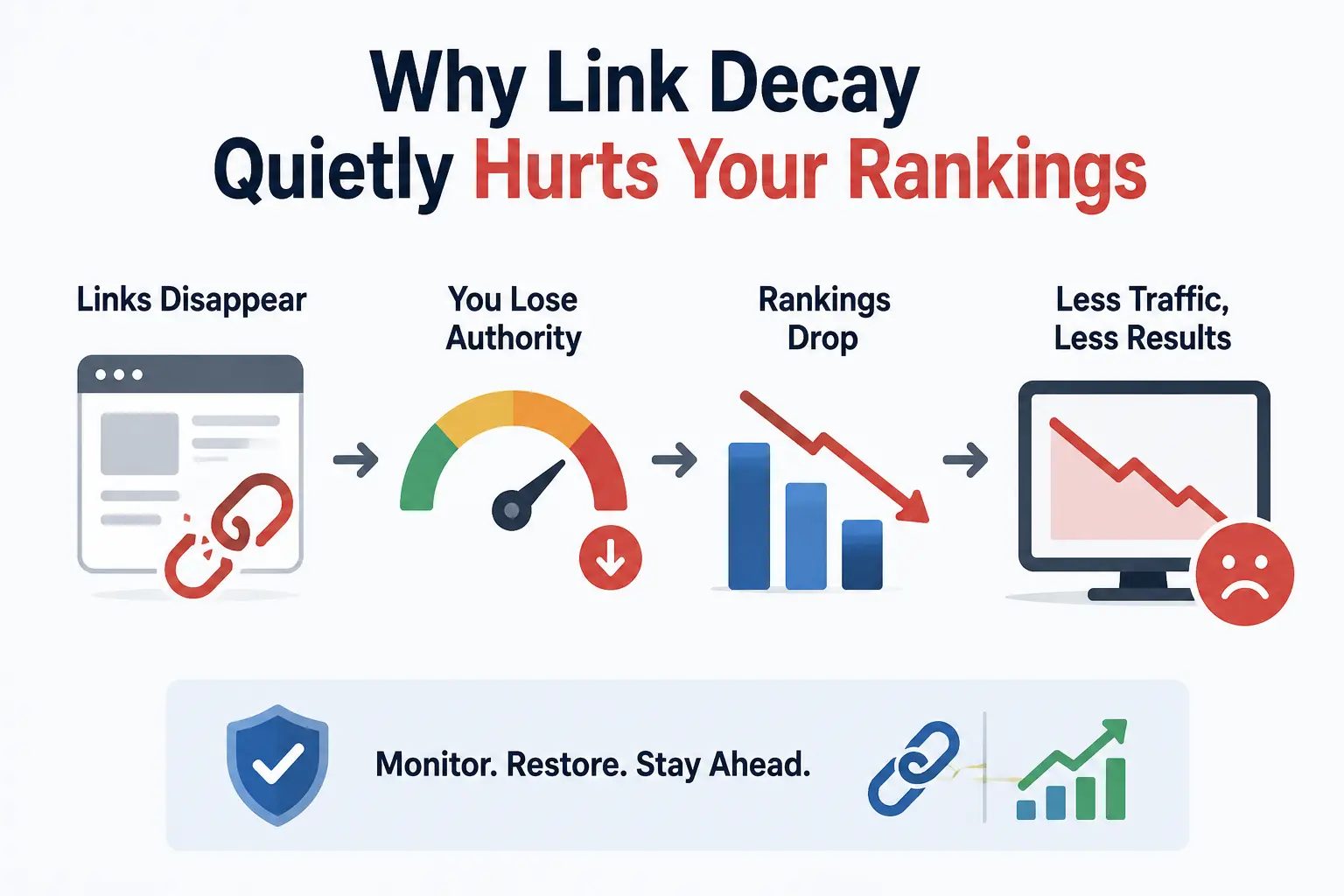
The tricky part about link decay is that it doesn’t show up as a dramatic ranking drop overnight. It’s a slow leak, not a burst pipe, which is exactly why it goes unnoticed for so long. Most site owners only start investigating after they’ve already felt the impact a keyword that used to sit comfortably in the top five slips to page two, and nobody can quite explain why, because nothing about the site itself changed.
Here’s what it actually costs you:
- Eroding authority. Every lost backlink is a small reduction in the ranking signal Google associates with your site. On its own, one lost link rarely matters. Dozens of them, quietly disappearing over a year, add up to something that does.
- Dried-up referral traffic. Links that once sent visitors your way stop sending anyone once they break. If a link was driving even modest referral traffic, that channel just goes to zero without any alert telling you it happened.
- Shifting anchor text distribution. Losing certain links can unintentionally skew your remaining anchor text mix in ways you never planned. If most of your lost links used branded anchors, for example, your remaining profile might look unnaturally weighted toward exact-match keywords — a pattern that can draw unwanted scrutiny.
- A widening gap with competitors. While your profile stays flat or shrinks, competitors actively building new links keep pulling ahead. Link building is often framed as a race to acquire more, but it’s just as much a race to not lose what you already have.
- Weakened topical relevance signals. If the links you lose happen to come from strongly relevant, on-topic sources, their absence can subtly reduce how tightly search engines associate your site with the topics you’re trying to rank for.
If you lost 15% of your backlinks this year without noticing, that’s not a one-time hit it compounds. Three years of unmonitored decay can mean a meaningfully smaller link profile than you think you have, even though your records still say otherwise. Plenty of sites are technically “still ranking” on the strength of a backlink profile that looks far healthier on paper than it actually is in practice.
How to Audit for Link Decay: Step-by-Step
The good news is that auditing for link decay doesn’t require anything exotic. You don’t need a massive budget or an enterprise tool to get real visibility into what’s happening to your links. Here’s a straightforward process you can run quarterly (or monthly if you’re actively building links at scale).
Step 1: Export your current backlink list. Pull your full list of referring links from Google Search Console (free) or a paid tool like Ahrefs or Semrush for more detail on link quality, history, and attribute changes over time. If you’re managing a smaller site, Search Console alone is usually enough to get started.
Step 2: Check the live status of each link. Crawl the list and sort links into three buckets: live (200), broken (404/410), or redirected. Most audit tools can automate this instead of you clicking through hundreds of URLs manually, which quickly becomes impractical once your link count climbs into the hundreds.
Step 3: Confirm the link still points to you. A link can technically be “live” but no longer point to your site if the page was edited and the link swapped out for something else. Spot-check a sample, especially on resource and roundup pages, which get updated the most often as editors refresh their recommendations.
Step 4: Check for attribute changes. Look for links that shifted from dofollow to nofollow, sponsored, or UGC. These links haven’t broken in the traditional sense, but they’ve lost most of their SEO value, and that kind of quiet downgrade is easy to miss if you’re only checking whether a link is “still there.”
Step 5: Categorize each link. Sort everything into lost, at-risk, or healthy. This makes prioritizing your recovery efforts much easier than treating every link the same, and it gives you a clear starting point for the next audit instead of starting from zero every time.
Step 6: Log it all in a tracking sheet. A simple spreadsheet with columns for source URL, status, date checked, and action needed is enough to keep this process repeatable instead of a one-off scramble. Over a few audit cycles, this log becomes genuinely useful – you’ll start noticing patterns, like certain types of sites (small blogs, expired-domain-style directories) decaying far faster than others.
What to Do About Decayed Links
Finding decayed links is only half the job. Here’s how to actually recover value where you can:
- Reach out for reinstatement. If a link broke because of a site update, a quick email asking the site owner to fix or restore it often works, especially if the content is still relevant to their audience. Keep the message short and specific — reference the exact page and what changed, rather than sending a generic request.
- 301 redirect moved content. If your own page moved and that’s what broke the link, a redirect can preserve the value instantly. This is one of the easiest fixes on this list, and it’s worth checking your own site’s redirect history whenever you do a redesign.
- Recreate lost content. If the page a link pointed to was deleted, rebuilding a similar resource can give you something to point future outreach toward, and occasionally the original site will relink once they see the replacement exists.
- Replace unrecoverable links. Some links just aren’t coming back. Use them as a prompt to find new placements rather than chasing a dead end indefinitely. If you’re sourcing new contextual backlinks to fill the gap, SERP Insight Link Insertion is worth understanding – it’s a data-driven way to identify and qualify placements on pages that are already ranking, rather than relying on domain metrics alone.
- Know when to let go. Not every lost link is worth fighting for. Weigh the effort against the authority and relevance of the source before spending time on recovery. A low-authority directory link that decayed isn’t worth the same outreach effort as a link from a genuinely relevant, high-traffic page in your niche.
How Often Should You Audit Your Backlinks?
For most sites, a quarterly audit strikes the right balance between staying on top of decay and not burning unnecessary time. If you’re running an aggressive link-building campaign or managing a large site with thousands of referring domains, monthly checks make more sense since you have more surface area to monitor and more room for something to slip through unnoticed.
A few signals that mean you should audit sooner than scheduled:
- A sudden, unexplained traffic dip on a page that used to perform reliably
- Noticeable ranking drops on pages that used to rank well, especially without any content changes on your end
- A major Google algorithm update, since these sometimes coincide with sites reassessing their own outbound linking practices
- A site-wide migration or redesign, yours or a major linking partner’s, since migrations are one of the single biggest triggers for sudden link loss
The goal is to treat this as ongoing maintenance, not a one-time project you check off and forget. Sites that build link auditing into a recurring calendar reminder catch problems months earlier than sites that only think about it when something already looks wrong.
Link Decay vs. Toxic Links: Don’t Confuse the Two
It’s easy to lump link decay in with toxic link cleanup, but they’re different problems with different fixes, and mixing them up can actually cost you links you didn’t need to lose.
Link decay is the natural loss of links you already earned — nobody’s out to get you, it’s just the web changing over time. The fix is reclamation: redirects, outreach, and rebuilding content where it makes sense.
Toxic links are harmful links pointing to your site, whether from spammy directories, negative SEO attacks, or low-quality sites you never asked to be linked from in the first place. The fix here is disavowing them, not trying to reclaim them, since there’s nothing worth reclaiming.
Treating a decayed link like a toxic one (or vice versa) wastes time and can even hurt you — over-disavowing healthy links is a bigger risk than leaving a few borderline ones alone. A link that simply went nofollow isn’t harming you the way a link from a link farm is, and lumping them into the same cleanup process usually means misallocating effort where it doesn’t need to go.
Tools That Make Auditing Easier
You don’t need every tool on this list, but knowing what each one is actually good for helps you avoid paying for overlap:
- Google Search Console – Free, and shows you which links Google currently recognizes. It’s a solid baseline, though it won’t flag attribute changes or historical trends as clearly as paid tools.
- Ahrefs – Strong for historical backlink data, letting you see when a link first appeared and when it disappeared or changed, which is genuinely useful for spotting decay patterns over time.
- Semrush – Similar strengths to Ahrefs, with a backlink audit tool that flags toxic links separately from lost ones, which helps avoid the confusion mentioned above.
- Screaming Frog – Useful for crawling a list of your backlink URLs in bulk to confirm live status, especially if you’re working with a spreadsheet export rather than a built-in dashboard.
- A basic spreadsheet – Genuinely underrated. For smaller sites, a manually maintained sheet with status columns can outperform an expensive tool simply because someone is actually looking at it regularly.
The tool matters less than the habit. A free tool checked every quarter beats an expensive one nobody logs into.
A Simple Framework to Track Link Health Going Forward
Instead of treating audits as isolated events, track a few ongoing metrics so you can spot decay trends before they become a problem:
- Link loss rate — the percentage of backlinks lost per month or quarter. Watching this number over several cycles tells you whether decay is accelerating or staying steady.
- Nofollow shift rate — how many previously dofollow links have changed attributes. A rising trend here often means certain types of sites (news aggregators, forums) are tightening their linking policies broadly, not just for you.
- Average link lifespan — how long your links typically stay live before breaking or disappearing. This helps you set realistic expectations for how much ongoing link building you need just to stay flat.
Watching these numbers over time turns link decay from a surprise into something predictable you can plan around, the same way you’d track churn in a subscription business instead of just counting new signups.
Frequently Asked Questions
What causes link decay? Site redesigns without redirects, deleted content, expired domains, editorial swaps, and attribute changes from dofollow to nofollow are the most common causes.
Is link decay normal? Yes. It’s an expected part of how the web changes over time, not a sign that something has gone wrong with your SEO strategy specifically.
How do I check if my backlinks are still live? Export your backlink list from Google Search Console or a tool like Ahrefs or Semrush, then crawl each URL to confirm it returns a 200 status and still contains a working link to your site.
How often should I audit my backlinks? Quarterly works for most sites. Larger sites or active link-building campaigns benefit from monthly checks instead.
conclusion
Link decay isn’t a flaw in your strategy it’s just what happens to backlinks over time. The sites that stay ahead aren’t the ones with zero decay; they’re the ones who catch it early and keep replacing what they lose. Start with a straightforward audit this quarter, build it into a recurring habit, and you’ll spend a lot less time wondering why your rankings quietly slipped.