Most safety software is sold on what it records. The more useful question, and the one that decides whether a rollout is worth the money, is what it stops people from having to do by hand.
Reducing administrative work in an EHS program means automating the paperwork that sits between an event and its proof: a failed inspection that automatically opens a corrective action with an owner and a due date, a certification that re-enrols the worker before it expires, a revised procedure that collects signed acknowledgments on its own, and a training log that exports without anyone rebuilding it in a spreadsheet.
That is a narrower test than “best EHS software,” and it sorts the market differently. We compared seven platforms on how much manual follow-up each one removes across training, inspections, policy control, and corrective actions.
Ratings, pricing, and limitations are included for every entry, including the platform we placed first.
What “Reducing Administrative Work” Actually Means In An EHS Platform
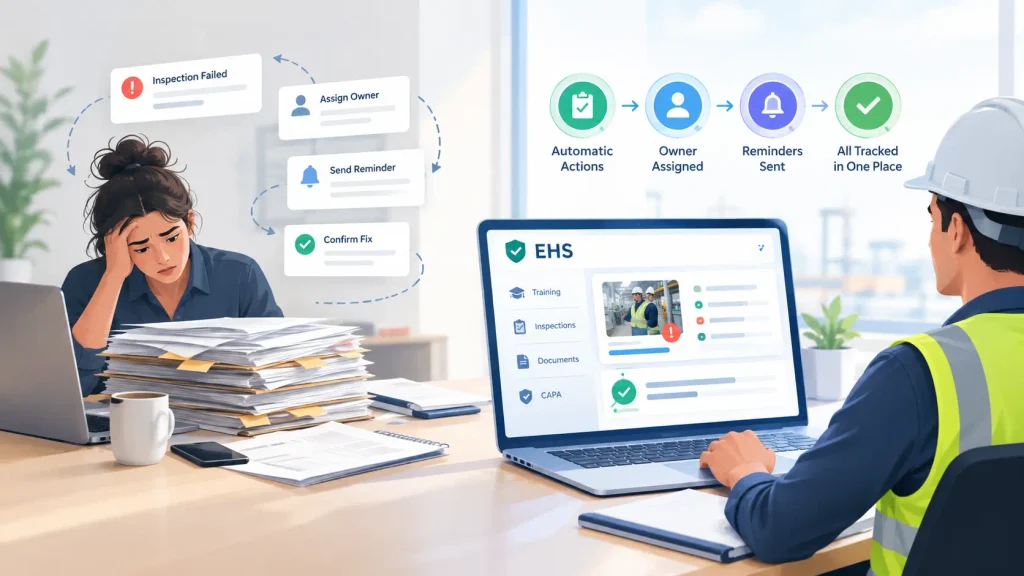
The administrative load in a safety program is rarely the safety work itself. It is the chasing. Someone has to notice that an inspection failed, decide who owns the fix, remind that person twice, confirm the fix happened, file the evidence, and then find all of it again eleven months later when an auditor asks. Software either does that, or it gives you a nicer place to store the same problem.
Four terms come up constantly in buyer conversations, and they are worth defining plainly before any vendor comparison.
CAPA (corrective and preventive actions) is the record of what an organisation did after something went wrong, and what it changed so the same thing does not happen again. In a platform that reduces admin, a failed inspection item or a reported incident automatically creates the action, attaches an owner and a due date, and refuses to close without evidence.
Closed-loop compliance goes one step further. The failed inspection triggers the corrective action and also assigns the refresher training tied to that hazard, so the fix and the competency update travel together instead of living in two systems.
Policy and document control means version-controlled procedures, policies, and safety data sheets, with tracked read-and-sign acknowledgments. The administrative win is that nobody maintains a side spreadsheet of who has signed what.
Automated recertification tracking is auto-re-enrolment plus expiry alerts, usually at 90, 60, and 30 days, applied across every site rather than per location. This is the single most requested piece of admin removal in multi-site manufacturing, and buyers tend to describe it plainly: they want to know how to keep on top of training expiries and safety certifications across several sites without running a separate list for each one.
The Four Functions That Have To Sit In One System
A platform only removes administrative work if the four functions share one record. Split them across tools, and you have simply moved the reconciliation problem into a weekly export.
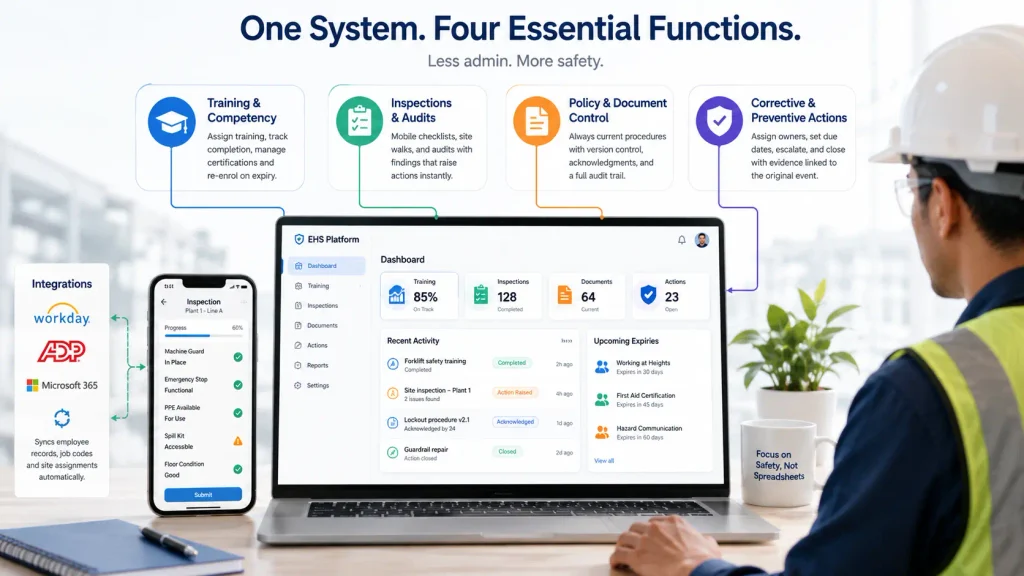
- Training and competency. Role-based assignment, completion tracking, certification records, and re-enrolment on expiry.
- Inspections and audits. Mobile checklists for job safety analyses, tailboards, equipment checks, and site walks, with findings that can raise an action directly.
- Policy and document control. One current version of every procedure, with acknowledgment tracking and an audit trail of who read what and when.
- Corrective and preventive actions. Owners, due dates, escalation, closure evidence, and a link back to the event that caused the action.
Integrations matter here more than feature counts. If the platform reads employee records, job codes, and site assignments from an HRIS or ERP such as Workday, ADP, or Microsoft 365, then new hires and transfers pick up the right training and the right documents without anyone typing them in twice.
Double data entry is where a lot of EHS admin time actually goes, and it never shows up on a feature matrix.
Closed-Loop CAPA, And Why It Removes The Follow-Up Chase
Follow-up eats more of a safety manager’s week than investigation or training design does. Not the interesting part of the job. The chasing.
Closed-loop CAPA is the mechanism that removes it. The inspection form flags a guard missing on a press. The platform creates an action, assigns it to the maintenance lead for that line, sets a due date, and escalates to the site manager if it ages. When the lead closes it, the system requires a photo or a note as closure evidence, then writes the whole chain back to the original inspection record.
The chain is what an auditor wants. Not the corrective action on its own, and not the inspection on its own, but the traceable link between them.
Published as ISO 45001:2018, the occupational health and safety standard specifies requirements for an occupational health and safety management system covering incident investigation, corrective action, and continual improvement, and certification auditors test whether those steps connect to each other in practice.
Buyers describe the requirement in more ordinary terms. In construction and manufacturing, what a compliance manager wants after a workplace accident is the ability to assign the appropriate follow-through and then watch it land, which is the same thing the standard asks for with the paperwork stripped off.
Platforms differ mostly in how much configuration this takes. Some ship the workflow as a default. Others give you a workflow engine and a professional services quote.
Recertification And Expiry Tracking Across Multiple Sites
Certification tracking sounds trivial until you run it across eight plants. Health and safety buyers in construction and manufacturing tend to describe their work as a list of artefacts rather than a workflow: job safety analyses, licences, inspections, and certifications, each carrying its own renewal clock and its own regulator.
Doing that in a spreadsheet is possible. It is also the reason a lot of programs run on one person’s memory. Spreadsheets and SharePoint remain the default for incident and training-completion tracking at plenty of organisations that are large enough to have bought software years ago, which is easy to forget when you read the market’s own marketing. The arrangement works right up until the person who maintains the file takes vacation.
Automated recertification removes three separate manual jobs. It watches expiry dates against a live roster. It re-enrols the worker in the required course on a schedule rather than on request. And it reports on gaps by site, so a regional manager can see that plant four is eleven certifications short of coverage without asking anyone to compile it.
The multi-site part is where platforms separate. Centralised dashboards with per-site filtering are common. Per-site configuration of different regulatory requirements, with one consolidated view above it, is less common and worth testing in a demo with your own site list.
What Audit-Ready Reporting Really Requires
“Audit-ready” is a marketing word until you define the evidence. Three things make an audit a report pull instead of a fire drill.
First, timestamps that were captured at the moment of the event rather than typed in afterwards. Second, exports in formats a regulator or a client will accept, which in practice means CSV and PDF, at the record level and not just as a summary chart. Third, version history on documents, so you can show which revision of a procedure a worker acknowledged on a given date.
Retention rules are the other half of it. United States employers covered by OSHA recordkeeping have to hold onto injury and illness records for a defined period.
Under 29 CFR 1904.33, employers must save the OSHA 300 Log, the privacy case list if one exists, the annual summary, and the OSHA 301 Incident Report forms for five (5) years following the end of the calendar year that these records cover. Environmental reporting adds its own calendar.
Facilities that hold hazardous chemicals above threshold quantities have to file an annual inventory report with their state commission, local planning committee, and fire department, and the EPA guidance on hazardous chemical inventory reporting states the report must be submitted by March 1 of each year.
A platform that cannot produce five years of clean, exportable records on demand has not reduced your administrative work. It has deferred it.
How This Comparison Was Put Together
Seven vendors made the list because safety and compliance buyers in this category keep naming them, and because each one clears a hard filter.
Each platform had to cover at least three of the four core functions (training, inspections, policy control, corrective actions) in one product rather than through a partner. Ratings were taken from published review platforms and are quoted with the source named.
Pricing is either the vendor’s published figure or the model it sells on, and where a vendor does not publish list pricing, we say so rather than guessing. Limitations were drawn from user reviews and product documentation, not from competitor marketing.
Order reflects fit for administrative reduction specifically. It does not reflect company size, and it is not a general ranking of EHS software.
The Seven Platforms, Ranked
1. iTacit
iTacit came into EHS from the frontline side, which shows in how it handles the identity problem. Workers sign in with verified credentials instead of a corporate email account, which matters when the inspection population is drivers, line operators, and crews without mailboxes.
Training, forms, documents, and corrective actions run through one app, so the acknowledgment trail and the training record sit against the same worker profile.
Best for: deskless and mobile workforces that were never issued company mailboxes.
What it covers:
- Compliance training assigned by role, site, or certification, with completions and acknowledgments tracked in real time
- Certification schedules with automatic training assignment and reminders ahead of expiry dates
- Mobile forms for job safety analyses, tailboards, inspections, near misses, incidents, and corrective actions
- Version-controlled policies and procedures with read receipts and formal sign-off
Rating: 4.6 on Capterra across 42 reviews.
Pricing: no published list price and no free trial. Charged per user, with the rate settled in the sales conversation rather than posted.
Not good for: crews who work where the signal drops. An inspection started in a tunnel, a remote yard, or a steel-walled plant will stall, since the app needs a live connection to save the entry. Reviewers also call the administrative back end complex and slow to learn.
2. EHS Insight
Configurability is the pitch here, and the module catalogue backs it up. EHS Insight sells 32 modules, including Training Management, Audit Management, Incident Management, and a dedicated CAPA module for reporting and tracking corrective and preventive actions.
Organisations can subscribe to individual modules or take a bundle, which suits programs that want to automate incident follow-through first and add training later.
Best for: mid-market safety teams that want to buy the admin problem they have now and expand module by module.
What it covers:
- Corrective and preventive action tracking as a standalone module
- Audit and inspection management with mobile capture and offline capability
- Training management with completion records
- Dashboards and reports across modules
Rating: 4.4 on Capterra across 59 reviews.
Pricing: listed at $4,600.00 per year as a starting price, billed annually, with enterprise pricing quoted separately. Final cost depends on headcount and how many of the 32 modules you take.
Not good for: buyers who want everything configured out of the box. Reviewers describe the dashboard as cumbersome and complicated, and note that advanced customisation is not fully covered by the training material, so fine-tuning tends to route through support.
3. Vector Solutions
Vector is the one platform on this list where the training library and the EHS record were built to be sold together. Vector EHS Management handles incidents, inspections and audits, hazard reporting, job safety analysis, and SDS and chemical management, and it connects to Vector LMS for role-specific course delivery.
The product even includes AI-generated training recommendations off the back of safety data, which is a direct attempt at the closed-loop pattern.
Best for: industrial, public sector, and AEC organisations that want courseware and safety records from the same vendor.
What it covers:
- Incident management and investigation
- Inspections and audits with real-time safety metrics
- Job safety analysis and hazard reporting
- Behaviour-based safety observations, plus connected LMS courses
Rating: 4.5 on Capterra across 24 reviews, on the Vector EHS Management profile. Vector’s separate LMS products carry their own scores.
Pricing: no published list price, though a free trial is offered. Vector quotes EHS Management per organisation, and Vector LMS courseware is priced separately.
Not good for: organisations with a tight implementation budget or heavy custom reporting needs. One reviewer described setup as long and costly with glitches that delayed form updates, and another summarised the reporting side bluntly as a platform that stores data but cannot run a report. Test your three most important reports before signing.
4. EcoOnline
EcoOnline covers more ground than most people expect, because it is several product lines stitched into one portfolio: health and safety software, chemical safety with SDS authoring, lone worker protection, and a training and eLearning layer with its own LMS.
For programs where chemical inventory and SDS management are the real administrative drain, that combination is hard to match at this end of the market.
Best for: chemical-heavy operations and organisations with lone or remote workers.
What it covers:
- Audit and inspection workflows with mobile capture
- Incident and risk management
- Chemical management and SDS authoring
- Learning management with eLearning content
Rating: 4.6 on Capterra across 123 reviews.
Pricing: no meaningful published figure. A free trial is offered, and the per-user price listed on its review profile is a placeholder rather than a real rate, so treat packaging as quote-based across the product lines you take.
Not good for: buyers who want one coherent product rather than a portfolio. The breadth comes from acquisition, so module depth and interface consistency vary across the range.
Reviewers also report app slowness, particularly when uploading photos into inspection records, which is exactly the moment a field user gives up on a form.
5. VelocityEHS
VelocityEHS is one of the two or three names that appear on nearly every EHS shortlist, and the depth is real. The Accelerate platform spans safety management, industrial ergonomics, chemical management, operational risk, contractor safety and permit to work, environmental compliance, and industrial hygiene.
Corrective action work is handled through Action Management and a Corrective Action Advisor, and there is a Training and Learning component under safety.
Best for: larger organisations with industrial hygiene, ergonomics, or chemical inventory obligations alongside core safety.
What it covers:
- Incident management with action tracking and escalation
- Audits and inspections as separate configurable modules
- SDS management and chemical inventory with regulatory reporting
- Industrial hygiene and ergonomics assessment tools
Rating: 4.4 on Capterra across 85 reviews.
Pricing: no published list price, with a free trial offered. Quoted per organisation by module set and headcount.
Not good for: small safety teams without administrative support. Reviewers consistently flag the learning curve for new users, slow support responses on technical issues, and difficulty customising advanced reports. Several also note that costs increase annually, which is worth raising during contract negotiation rather than at renewal.
6. Intelex
Sixty-seven applications is a lot of software. Intelex covers Training Management for EHS and quality training, Audit Management with unlimited scheduling and tracking, Document Management across the compliance document lifecycle, and Corrective Action Reporting with containment, root cause, and plan development.
If your organisation genuinely needs that surface area, few platforms match it.
Best for: enterprises that want EHS and quality management in one configurable system.
What it covers:
- Corrective action reporting with root cause analysis
- Audit management with unlimited audits and scheduling
- Document management across the compliance lifecycle
- Training management for EHS and quality
Rating: 4.2 on Capterra across 63 reviews.
Pricing: listed at $49 per user per month for the Essentials plan, with higher tiers quoted.
Not good for: teams without technical resources. The most consistent review complaint is that building reports is difficult without SQL knowledge, alongside a steep learning curve and interface areas that reviewers describe as unintuitive. That is a manageable trade for a large enterprise with a systems analyst, and a poor one for a two-person safety department.
7. Cority
Cority sits at the enterprise end and has the occupational health depth to prove it. Named modules include Learning Management, Audits and Inspections, Document Control, Risk Management, Incident Management, Occupational Health, Industrial Hygiene, Contractor Safety, and Permit to Work, with roughly 70 third-party integrations including SharePoint and several SAP products.
Users describe its real strength as standardising a process and producing an electronic trail that holds up in an ISO audit. One naming quirk is worth knowing before you score it: corrective and preventive work runs through Non-Conformance Management rather than through a module labelled CAPA, so an evaluation checklist searching for the acronym will come up empty.
Best for: large regulated enterprises with occupational health, industrial hygiene, and ESG obligations in scope.
What it covers:
- Audits and inspections with mobile tools
- Document control with version management
- Learning management for workforce compliance training
- Occupational health, industrial hygiene, and contractor safety
Rating: 4.4 on Capterra across 112 reviews.
Pricing: no published list price and no free trial. Sold on enterprise agreements quoted per organisation.
Not good for: anyone hoping for a fast rollout. Reviewers report significant setup time and a learning curve before teams use the platform efficiently, describe the interface as dated, and note that simple tasks can take many clicks to get right. Cority reduces administrative work eventually, but it asks for a lot of it up front.
Where The Seven Platforms Differ
Cells below name the module each vendor actually ships, taken from its own product documentation rather than from a feature checklist.
| Platform | Training | Inspections and audits | Document or policy control | Corrective actions | Offline mobile capture |
|---|---|---|---|---|---|
| iTacit | Compliance training and LMS | Mobile inspection forms | Version control with read receipts | Corrective action forms | No |
| EHS Insight | Training Management module | Audit Management module | No named module | Dedicated CAPA module | Yes |
| Vector Solutions | Delivered through Vector LMS | Inspections and Audits | No named module | Inside incident and hazard workflows | Not stated |
| EcoOnline | LMS and eLearning content | Audit and Inspections | No named module | Inside Incident Management | Not stated |
| VelocityEHS | Training and Learning | Audits and Inspections | SDS documents only | Action Management | Not stated |
| Intelex | Training Management | Audit Management | Document Management | Corrective Action Reporting | Yes |
| Cority | Learning Management | Audits and Inspections | Document Control | Via Non-Conformance Management | Not stated |
Two columns carry the same caveat, and it cuts in both directions. “Not stated” under offline capture means the vendor’s own materials did not confirm the capability at the time of writing, not that it is missing.
“No named module” under document or policy control means the vendor’s published module list does not include one, not that policies cannot be stored somewhere in the product.
Both are absence-of-evidence findings rather than proof of a gap, and both are worth putting directly to the vendor, since offline capture and document control are the two capabilities buyers most often assume and least often test in a demo.
Choosing By Organisation Size And Site Count
Under about 200 employees on one or two sites, the honest answer is that a mid-market platform with strong inspections and a simple action workflow will remove most of your administrative load, and the modular vendors are usually the cheaper route in. Buying an enterprise EHS suite at that size means paying for configuration you will not use.
Between 200 and 2,000 employees across several sites, recertification tracking becomes the deciding feature. This is the band where spreadsheets stop working and nobody notices for about a year. Ask every vendor to demonstrate expiry alerting and automatic re-enrolment against your own roster, with two sites that have different requirements.
Above that, and particularly with occupational health or chemical obligations in scope, the enterprise platforms earn their configuration cost. Budget for implementation properly and treat the first year as a build year.
There is one variable that cuts across all three bands and gets missed in most evaluations: whether your workers can actually get into the system. If a meaningful share of your workforce has never been issued a work mailbox, half of this market’s login and notification design does not apply to them, and you will end up with supervisors completing forms on other people’s behalf. That is administrative work you created.
Teams in that position should weigh the login question heavily when they compare EHS management software, because it decides whether the rest of the feature set is reachable at all. iTacit approaches the category from the worker’s credentials outward rather than from the module catalogue inward, and that starting point is the reason it leads a comparison about how to reduce EHS administrative work rather than a comparison about breadth.
Run the same test on any vendor you shortlist. Pick your three most common administrative tasks, then ask the vendor to complete all three live in a demo environment with your data. Whatever takes more than a few clicks in the demo will take longer in production.
Questions Safety Teams Ask Before Buying
Which EHS software supports training management?
All seven platforms here include training. iTacit, Intelex, EcoOnline, and Cority carry it as a full learning management capability with course delivery and completion records. Vector Solutions delivers training through Vector LMS, which is a separate product from the same vendor. EHS Insight and VelocityEHS include training management modules that focus on assignment and record-keeping rather than authoring.
What features make an EHS program audit ready?
Time-stamped records captured at the point of work, exportable reports at record level in CSV and PDF, version-controlled documents with acknowledgment history, and corrective actions that trace back to the event that caused them. Retention matters too, since OSHA recordkeeping requires those injury and illness records to be held for five years after the calendar year they cover.
Which EHS platforms export training logs in CSV or PDF?
All of them export in at least one of the two, and most support both. The real difference is whether you can export a filtered record-level log without vendor help. Ask for a specific export during the demo: all workers at one site whose certification expires in the next 90 days. If that takes a support ticket, the export capability is not doing what you need.
Which platforms support multi-site deployment with centralised dashboards?
All seven run across multiple sites, so the question is not whether but how. Cority, Intelex, and VelocityEHS are built for enterprise multi-site rollouts and hold up under different regulatory requirements per location. EHS Insight and EcoOnline handle site variation inside their modules, which covers most mid-market cases. iTacit and Vector Solutions filter by site and by role rather than running fully separate site configurations. Ask any vendor to show you two sites with different requirements rolling up into one view before you decide.
What is closed-loop compliance?
It is the pattern where one event drives every downstream task automatically. A failed inspection opens a corrective action with an owner and a due date, and also assigns the relevant refresher training to the worker involved, then records both against the original inspection. The loop closes when the action has documented evidence and the training is complete.
How much does EHS management software cost?
Published pricing is rare in this category. EHS Insight lists a starting price of $4,600.00 per year, and Intelex lists $49 per user per month for Essentials. The rest quote per organisation, based on headcount, module selection, and implementation scope. Ask for implementation and configuration costs as a separate line, because that is where the two vendors with similar subscription prices usually diverge.