If you’ve got a link in your bio, a link sticker on your Story, or a link tucked into a Reel caption, you’ve probably wondered the same thing every creator and business owner wonders at some point: can you see who clicks on your Instagram link?
The short answer is no Instagram doesn’t hand you a list of names. But that’s not the whole story. There’s a surprising amount of useful data hiding behind that link, and once you know where to look, you can get a lot closer to understanding your audience than you might think.
This question comes up constantly among creators, small business owners, and influencers who are trying to prove that their content actually drives traffic somewhere a website, a shop, a portfolio, a newsletter signup. And it makes sense to want that clarity.
You’ve put effort into crafting a bio that gets people to click in the first place, so it’s natural to want to know exactly who’s following through on it.
The good news is that even without individual names, Instagram and a few outside tools give you enough data to understand not just how many people are clicking, but when, roughly who they are, and what happens once they land on your page.
Here’s exactly what Instagram shows you, what it doesn’t, and how to squeeze the most insight out of what’s actually available.
The Short Answer: No, Instagram Doesn’t Show Usernames
Let’s get this out of the way first. Instagram does not show you the individual usernames or identities of the people who click your link whether that link lives in your bio, on a Story link sticker, or inside a Reel or post caption. What you get instead is aggregate data: total click counts, timing trends, and some basic demographic breakdowns if you’re on a Business or Creator account.
Quick takeaway: No matter how you set up your link, Instagram keeps clicker identities private. You can see how many people clicked and roughly who they are as a group, but never who they are individually.
This holds true across the board bio links, Story stickers, Reels, ads, all of it. If a tool or app ever claims to show you exact usernames of people who clicked, that’s a strong signal something’s off, and we’ll get into why later on.
Why Instagram Keeps This Data Private
It’s worth understanding the reasoning here, because it explains a lot of Instagram’s behavior elsewhere on the platform too. Clicking a link is, in a way, a private action.
Someone might tap through to check out a product, read an article, or visit a website out of simple curiosity, without wanting that action tied publicly to their profile. If Instagram exposed exactly who clicked what, it would essentially be surfacing a person’s browsing behavior to a third party in this case, you, the account owner.
This is the same underlying logic behind why Instagram doesn’t tell you who screenshotted your Story, and why it only reveals identities in situations where the action itself is inherently social, like liking a post or leaving a comment.
Clicking a link isn’t a public interaction the way a like or comment is, so it doesn’t get treated as one. Instead, Instagram gives you the shape of the data how many, roughly who, roughly when without exposing the specific individual behind each click.
The Short Answer: No, Instagram Doesn’t Show Usernames
Let’s get this out of the way first. Instagram does not show you the individual usernames or identities of the people who click your link whether that link lives in your bio, on a Story link sticker, or inside a Reel or post caption. What you get instead is aggregate data: total click counts, timing trends, and some basic demographic breakdowns if you’re on a Business or Creator account.
Quick takeaway: No matter how you set up your link, Instagram keeps clicker identities private. You can see how many people clicked and roughly who they are as a group, but never who they are individually.
This holds true across the board bio links, Story stickers, Reels, ads, all of it. If a tool or app ever claims to show you exact usernames of people who clicked, that’s a strong signal something’s off, and we’ll get into why later on.
Why Instagram Keeps This Data Private

It’s worth understanding the reasoning here, because it explains a lot of Instagram’s behavior elsewhere on the platform too. Clicking a link is, in a way, a private action.
Someone might tap through to check out a product, read an article, or visit a website out of simple curiosity, without wanting that action tied publicly to their profile.
If Instagram exposed exactly who clicked what, it would essentially be surfacing a person’s browsing behavior to a third party in this case, you, the account owner.
This is the same underlying logic behind why Instagram doesn’t tell you who screenshotted your Story, and why it only reveals identities in situations where the action itself is inherently social, like liking a post or leaving a comment.
Clicking a link isn’t a public interaction the way a like or comment is, so it doesn’t get treated as one. Instead, Instagram gives you the shape of the data how many, roughly who, roughly when without exposing the specific individual behind each click.
What You CAN See Instead (This Is the Real Value Section)
Even though usernames are off the table, there’s genuinely useful information available if you know where to dig. Here’s what you actually get access to.
Total Link Clicks (External Link Taps)
Instagram tracks the total number of times your bio link has been tapped, usually shown as “External Link Taps” inside your account’s Insights. This gives you a running count over a selected time period, so you can see whether your link is getting traction or sitting ignored.
Click Timing and Trends
Beyond the raw number, you can look at how clicks are distributed over time typically broken down weekly. This helps you spot patterns, like whether a specific post or Story drove a spike in clicks, or whether your link performs better on certain days.
Basic Demographic Data
If you’re on a Business or Creator account, Instagram Insights also gives you a rough demographic snapshot of who’s interacting with your content overall things like age range, gender split, and top locations. This isn’t tied specifically to link clicks alone, but it gives you a general picture of the audience behind those numbers.
Story Link Sticker Taps
Link stickers on Stories are tracked separately from your bio link. You’ll see a tap count for each Story that included a link sticker, letting you compare performance between different Stories rather than lumping everything into one bio link total.
One important distinction that trips a lot of people up: this level of detail is only available on Business and Creator accounts. If you’re using a personal account, your access to any of this data is extremely limited, which is usually the first thing to check if you’re not seeing the numbers you expect.
How to Check Your Instagram Link Click Data (Step-by-Step)
Here’s how to actually find this information inside the app.
For bio link clicks:
- Open your Instagram profile and tap the three horizontal lines in the top-right corner
- Select “Insights” from the menu
- Under the Overview section, look for “External Link Taps” or check the Activity tab
- Choose your date range to see how clicks have trended over time
For Story link sticker clicks:
- Go to your profile and open your Story archive, or tap directly into an active Story
- Tap “Insights” or View Insights at the bottom of the Story
- Look for the sticker tap count, which shows how many people tapped that specific link
If you’re on a personal account:
- Go to Settings, then tap “Switch to Professional Account”
- Choose either Business or Creator, depending on your goals
- Once switched, Insights will become available, and you’ll start collecting this data going forward (it won’t retroactively track clicks from before you switched)
Can You See Who Clicked Your Story Link Sticker?
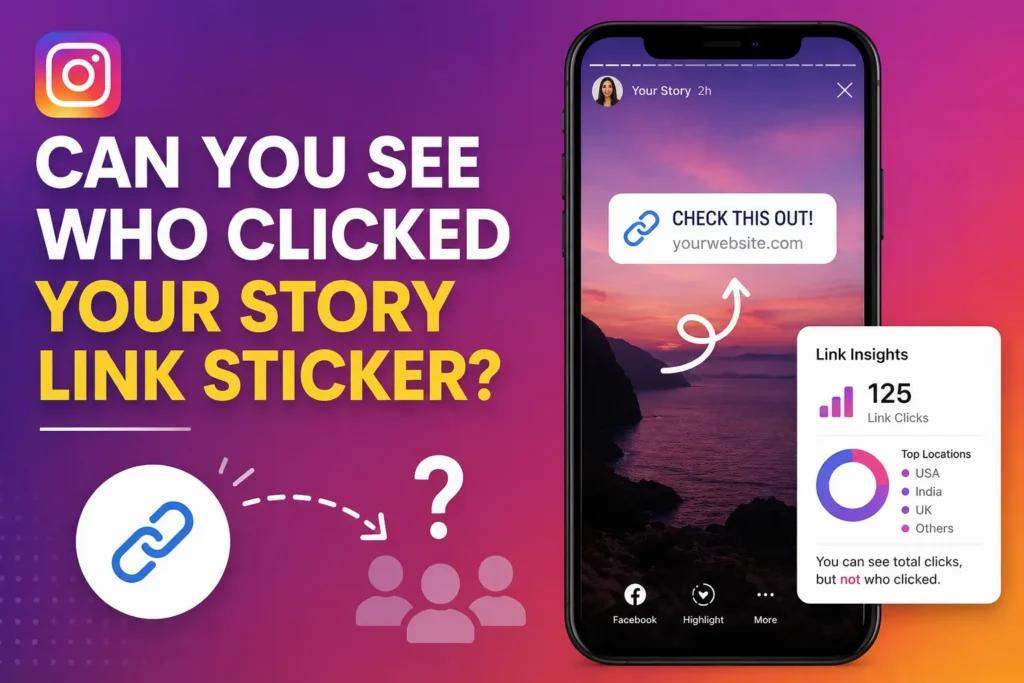
This is one of the most misunderstood parts of the whole topic, so it deserves its own section. You actually can see a full list of who viewed your Story that’s not private information, and it’s shown right there when you swipe up on any active Story. What you can’t see is which of those viewers specifically tapped the link sticker.
So there’s a meaningful gap here: viewer identity is visible, but the click action itself isn’t tied to that identity. You know who saw the Story, and you know how many people tapped the link, but you can’t connect those two pieces of information directly inside the app.
It’s a subtle distinction, but understanding it stops you from expecting data that Instagram was never going to give you in the first place.
Using Third-Party Tools for Better Link Insights
If Instagram’s native Insights feel a little thin, a handful of outside tools can round out the picture. None of these will reveal Instagram usernames either that’s simply not information any platform-external tool can access
but they can give you sharper, more actionable data about your traffic overall.
Linktree and Similar Bio Link Tools
Services like Linktree let you use a single link in your bio that then branches out to multiple destinations. Once set up, you can log into your Linktree dashboard and see views, clicks, click-through rate, and even subscriber counts if you’re using their newsletter features. Free accounts typically get lifetime, weekly, and monthly views, while custom date ranges are usually reserved for paid tiers.
Link Shorteners Like Bitly
A tool like Bitly lets you shorten your destination URL and then track clicks on that specific short link. You’ll get data like the device used, general location, and timing of each click all anonymous, but much more granular than what Instagram gives you natively.
Google Analytics and UTM Parameters
For the most complete picture, pairing your bio link with UTM parameters and tracking everything through Google Analytics (GA4) is hard to beat. Once someone clicks through to your website, GA4 can show you exactly what they did next c2 which pages they viewed, how long they stayed, whether they made a purchase or filled out a form.
To find this data, go to Reports, then Acquisition, then Traffic Acquisition, and filter by Instagram as the source. This won’t tell you who clicked in terms of identity, but it tells you everything about what happened after the click, which for most creators and businesses is actually the more useful metric anyway.
The Closest You Can Get to Who Clicked (Triangulation Method)
If you’re genuinely trying to narrow down who might have clicked your link say, for a giveaway or a specific outreach purpose there’s no official tool that will confirm it, but there is a reasonable workaround.
Start by looking at your Story viewer list for the specific Story that contained the link, and note the timestamp when you posted it. Then check the tap count for that link sticker. If you posted at, say, 3:00 PM and saw 12 link taps by 3:10 PM, the most likely candidates are the people who viewed that Story in that same window, especially the ones who regularly engage with your content through likes, comments, or DMs.
This is triangulation, not certainty. You’re narrowing down a probable shortlist based on timing and behavior patterns, not confirming an exact match. It’s genuinely useful for getting a rough sense of who’s engaged, but it should never be treated as proof that a specific person clicked your link.
Common Myths About Instagram Link Tracking
A handful of persistent myths keep circulating around this topic, so it’s worth addressing them directly.
“There’s an app that can show you exactly who clicked your link.” This isn’t true, and it’s one of the more common scams targeting creators. Instagram’s privacy architecture doesn’t expose this information to any outside developer, meaning no legitimate app, paid or free, can access it.
If you come across a service promising this, treat it as a red flag especially if it asks you to log in with your Instagram credentials to “unlock” the feature. That’s a classic phishing setup, not a real capability.
“IP tracking can identify the specific Instagram user.” This one’s technically half-true, in a misleading way. Your website’s analytics can absolutely capture the IP address of visitors who click through from Instagram. But an IP address doesn’t map to a specific Instagram username. It might tell you a rough geographic location or ISP, but it can’t connect that visit back to an identifiable Instagram account.
“Paid Instagram ads show who clicked.” Even with ad spend behind a link, Instagram still only reports aggregate data clicks, click-through rate, cost per click, and demographic breakdowns. You can build retargeting audiences using tools like Meta Pixel and Custom Audiences based on who visited your site, but you still won’t see individual usernames tied to those visits.
FAQ
Does Instagram tell you who clicked your link in bio? No. Instagram shows total clicks and general demographic data, but it never reveals the specific usernames of people who clicked your bio link.
Can I see who clicked my Instagram Story link sticker? Not directly. You can see the full list of people who viewed your Story, and you can see the total number of link taps, but Instagram doesn’t connect those two data points for you. The closest you can get is comparing viewer timing against tap counts.
Do Linktree or Bitly show who clicked? No, these tools give you richer anonymous data device, location, timing, click-through rate but they can’t reveal Instagram usernames either, since that information simply isn’t accessible outside Instagram’s own systems.
Do Instagram ads show who clicked the link? No. Paid ads follow the same rule as organic content: you get aggregate click and demographic data, not individual identities, even when you’re paying for the placement.
Why can’t I see link click data on my account? This usually comes down to account type. Detailed link click data through Instagram Insights is only available on Business and Creator accounts. If you’re using a personal account, switch through Settings to unlock this data going forward.