Have you ever seen your Instagram followers drop and thought “who stopped following me?” This is a question that many Instagram users, including creators, business owners, influencers and regular users often ask.
The simple answer is that Instagram does not have a feature that shows you exactly who stopped following you. You can see who is currently following you and your total number of followers. Instagram does not keep a list of people who unfollowed you.
That does not mean you cannot find out. There are ways to do this from manually checking someone’s profile to using other apps.
In this guide you will learn how to find out who stopped following you on Instagram, what Instagram allows, whether apps that track unfollowers are safe and the best alternatives for keeping track of changes, to your follower list. If you’re also using Instagram to drive traffic, it’s worth learning how to optimize your Instagram bio so your profile converts visitors into followers and customers more effectively.
Can You See Who Unfollowed You on Instagram?
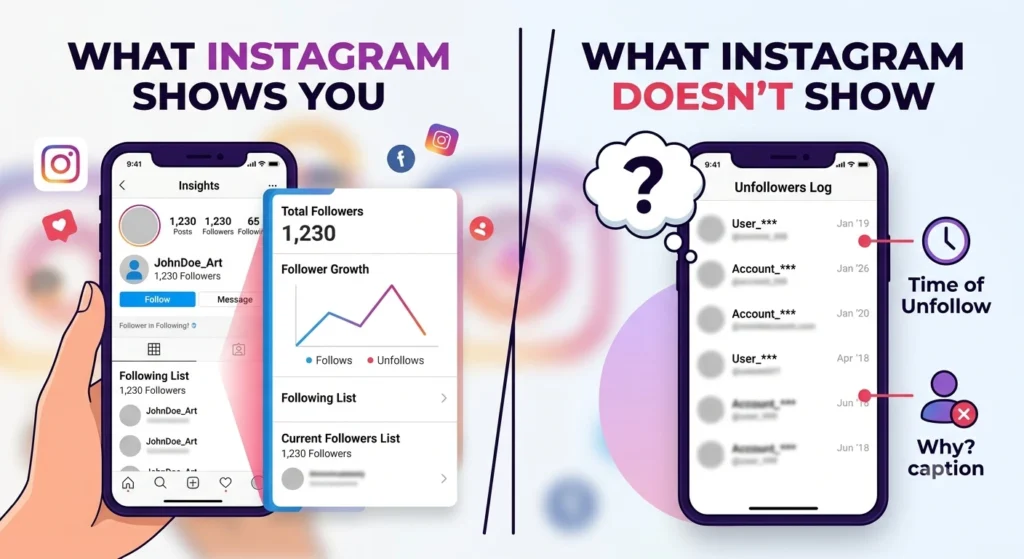
No. Instagram does not tell you when someone stops following your account. It also does not have a feature that shows you a list of people who have unfollowed you.
If someone chooses to unfollow you the only thing you will see away is that your follower count goes down.
Instagram does not say which account caused the change. Instead Instagram only gives you information about your account status now.
You can see:
- Your current followers
- The accounts you’re following
- Your total follower count
- Instagram Insights (for Professional accounts), including follower growth and overall audience trends
However, Instagram does not show:
- Who unfollowed you
- When they unfollowed you
- Why they unfollowed you
- A complete history or log of unfollowers
This is true for Personal, Creator and Business accounts. If you change to an account and get to use Instagram Insights you will only see basic information like the number of followers you got or lost over a certain time. Instagram does not tell you the usernames of the people who stopped following you.
The reason Instagram does this is to keep people’s information private and to keep who is following who a secret. So if you want to know if a specific person has stopped following you you have to look yourself or use an app that checks your followers over time.
You have to do this because Instagram will not tell you who stopped following your Instagram account. You have to use a third-party app to track changes to your follower list, on Instagram over time.
Why Doesn’t Instagram Show Unfollowers?
Instagram does this on purpose. It does not tell you who has stopped following your Instagram account. The reason is that Instagram wants to keep your information private and make Instagram a happy place for everyone.
If Instagram told you every time someone stopped following your Instagram account it could make people feel bad and do things that’re not good for them. People might get too worried about who stopped following them, always check to see who is following them or even get mad at others for stopping.
So Instagram keeps this to itself which means people can focus on putting up posts and pictures instead of worrying about who is following their Instagram account.If Instagram notified you every time someone unfollowed your account, it could lead to unnecessary stress or unhealthy behavior.
People might become overly focused on who unfollowed them, constantly monitor their follower count, or even confront others about their decision. Instead, Instagram encourages users to spend more time creating engaging content, interacting with their audience, and learning platform features such as how to tag someone on Instagram to increase visibility and engagement, rather than worrying about every follower they lose.
When someone follows or stops following your Instagram account Instagram just changes the number of people following your Instagram account. For example:
- Yesterday: 5,231 followers
- Today: 5,229 followers
So you are using Instagram. You notice that the number of people following you has changed. Instagram tells you that your audience size is different now. It does not tell you which two people stopped following you or when they did it.
This is how Instagram works for accounts Creator accounts and Business accounts. Even if you can see Instagram Insights you will only see if you got followers or lost some over a certain period of time. Instagram never tells you the names or usernames of the people who stopped following you.
It is also good to remember that just because you lost some followers it does not mean that someone decided to stop following you on purpose. The number of people following you can go down for reasons, such as people deleting their Instagram accounts or closing them for a while, Instagram removing fake accounts or people just deciding to follow different things.
Because of this Instagram only tells you about the change in the number of people following you, not about the specific Instagram accounts that stopped following you.
Method 1: Manually Check If Someone Unfollowed You
If you think a specific person may have unfollowed you, the simplest and safest way to confirm it is by checking manually within the Instagram app. This method doesn’t require any third-party apps or account permissions, making it the most reliable option for occasional checks.
Step 1: Open Instagram
Launch the Instagram app and sign in to your account if you’re not already logged in.
Step 2: Visit the Person’s Profile
Use the search feature to find the profile of the person you believe may have unfollowed you, then open their profile page.
Step 3: Check Their Following List
If you’re already following that person, tap Following on their profile to open the list of accounts they follow.
Step 4: Search for Your Username
Use the search bar at the top of the list and type your Instagram username.
- If your account appears in their Following list, they are still following you.
- If your account doesn’t appear, they have most likely unfollowed you.
Alternative Method
You can also check from your own account.
- Open your profile.
- Tap Followers.
- Search for the person’s username.
If their account doesn’t appear in your followers list, they are no longer following you. Keep in mind that this could also happen if they have temporarily deactivated or permanently deleted their Instagram account.
Pros
- Completely safe and doesn’t require sharing your login details.
- Uses Instagram’s official features.
- Provides accurate results for checking individual accounts.
Cons
- Time-consuming if you want to check multiple people.
- Not practical for accounts with thousands of followers.
- Doesn’t provide a history of when someone unfollowed you.
Method 2: Compare Your Followers List
If you have a relatively small number of followers, another option is to compare your followers list over time. Although this method takes some effort, it doesn’t require any third-party tools.
For example, you can:
- Take a screenshot of your followers list today.
- Wait a few days or weeks.
- Open your followers list again.
- Compare the old and new lists to see which usernames are missing.
You can also keep a written record or export the usernames into a spreadsheet if you prefer a more organized approach.
This method works best for accounts with a few hundred followers. Once your audience grows into the thousands, manually comparing lists becomes difficult and time-consuming.
Pros
- Completely free.
- No security or privacy risks.
- Doesn’t require giving another app access to your Instagram account.
Cons
- Requires regular tracking.
- Can be tedious for larger accounts.
- Doesn’t tell you exactly when someone unfollowed you unless you compare lists frequently.
Method 3: Download Your Instagram Data
Instagram allows every user to request a copy of their account information through the Download Your Information feature. This is useful if you want a backup of your Instagram activity or need access to your account data.
The downloaded archive can include information such as:
- Followers
- Following
- Photos and videos
- Comments
- Messages
- Profile information
- Account activity
Many users assume this download includes a complete history of people who unfollowed them. Unfortunately, that’s not how it works.
The downloaded file only contains your follower list at the time Instagram generates the archive. It does not include records of previous followers or a log showing who unfollowed you.
If you want to use downloaded data to identify unfollowers, you’ll need to:
- Request your Instagram data regularly.
- Save each downloaded follower list.
- Compare older lists with newer ones using a spreadsheet or comparison tool.
This approach can work, but it requires ongoing manual tracking and isn’t practical for most users.
Pros
- Uses Instagram’s official data export feature.
- Safe and secure.
- Useful for backing up your account information.
Cons
- Doesn’t include an unfollower history.
- Requires manual comparison of multiple data exports.
- Not convenient for tracking follower changes regularly.
Method 4: Use Instagram Insights (Professional Accounts)
If you have a Creator or Business account, Instagram provides access to Insights, which offers detailed analytics about your audience and account performance.
Within Insights, you can monitor metrics such as:
- New followers gained
- Followers lost over a selected period
- Overall follower growth
- Audience demographics
- Most active days and times
- Reach and engagement trends
These analytics are useful for understanding how your audience changes over time. For example, you might see something like:
- +120 new followers this week
- –34 unfollows this week
However, Instagram Insights only reports the numbers. It never reveals the usernames or identities of the people who unfollowed you.
Insights are designed to help creators analyze trends rather than track individual users. If you’re trying to understand how a particular post or campaign affected your audience growth, these analytics can be very valuable, even though they don’t identify specific unfollowers.
Pros
- Official Instagram feature.
- Provides valuable audience analytics.
- Helps monitor long-term follower growth.
Cons
- Available only for Professional accounts.
- Doesn’t reveal who unfollowed you.
- Focuses on trends rather than individual accounts.
Method 5: Use Third-Party Unfollower Apps
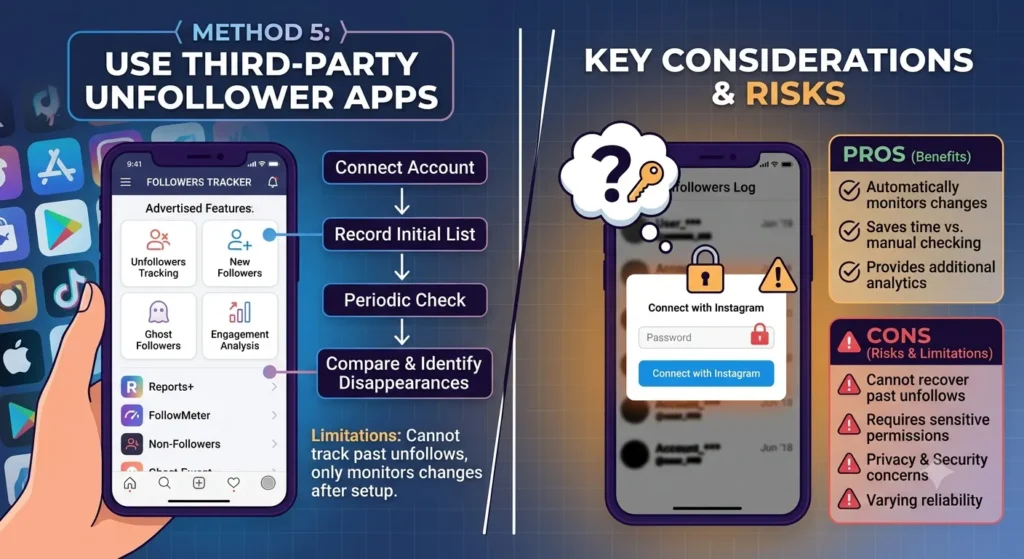
A quick search in the App Store or Google Play will reveal dozens of apps claiming to show exactly who unfollowed you on Instagram. Some of the most well-known examples include:
- Followers Tracker
- Reports+
- FollowMeter
- Follow Cop
- Unfollowers & Ghost Followers
These apps often advertise features such as:
- Unfollowers tracking
- New followers
- Users who don’t follow you back
- Ghost followers
- Engagement analysis
Despite their marketing, these apps do not receive a secret list of unfollowers from Instagram. Instead, they work by monitoring changes to your follower list over time.
Typically, the process looks like this:
- You connect your Instagram account.
- The app records your current followers.
- It checks your follower list at regular intervals.
- It compares the latest list with previous records.
- Any account that disappears from the list is identified as an unfollower.
These apps that track who unfollows you on Instagram have an important limitation. Because of the way they monitor your account, they cannot tell you who unfollowed you before you installed or connected the app. They only start tracking changes after you give them access, so any unfollows that happened earlier won’t appear in their reports.
You should also be cautious before using any third-party unfollower app. Many of these services require access to your Instagram account, and some may even ask for your login credentials. Before granting permissions, read the app’s privacy policy and understand what data it can access. Giving an app too much access could create security or privacy risks and, in some cases, may violate Instagram’s terms of use.
If your goal is to grow your audience rather than worry about losing followers, it’s better to focus on creating engaging content and building an authentic community. Check out our guide on How to Go Viral on Instagram to learn proven strategies for increasing your reach, attracting more followers, and improving engagement organically.
Pros
- Automatically monitors follower changes.
- Saves time compared to manual checking.
- May include additional follower analytics.
Cons
- Cannot recover past unfollows.
- May require sensitive account permissions.
- Some apps have privacy and security concerns.
- Features and reliability vary significantly between apps.
Are Unfollower Apps Safe?
Not always.
Some apps say they can show who stopped following you on Instagram.. Using them can be risky. Instagram does not have a feature to track who unfollowed you. So these apps need to access your account to check your followers.
Before you install an app to track unfollowers, think about what info you’re sharing and how it might affect your account.
Many third-party Instagram apps ask for one or more of the following:
- Your Instagram login credentials
- Permission to access your Instagram account
- Access to your profile and follower data
- Authorization through Instagram’s account connection features (where available)
Granting these permissions can introduce several security and privacy concerns.
Account Security
One of the biggest risks is account security. Some unofficial apps ask you to enter your Instagram username and password directly into their platform instead of logging in through Instagram’s official authentication process.
Sharing your login credentials with an untrusted app increases the risk of:
- Unauthorized access to your account
- Password theft
- Account hacking
- Spam activity being performed from your account
- Losing access to your Instagram profile
If the app’s servers are compromised or the developer has poor security practices, your account information could also be exposed in a data breach.
Privacy Risks
Many unfollower apps collect more information than users realize. Depending on the app and its privacy policy, it may gather data such as:
- Your profile information
- Email address
- Follower and following lists
- Engagement statistics
- Device information
- Usage analytics
- Other account-related metadata
Some apps use this information to improve their services, while others may use it for advertising, analytics, or other business purposes. Because privacy practices vary widely, it’s a good idea to review an app’s privacy policy before granting access to your Instagram account.
Account Restrictions
Instagram actively works to protect its platform from unauthorized access, automation, and suspicious activity. If an app violates Instagram’s terms of use or interacts with your account in ways that Instagram considers risky, your account could be affected.
Depending on the situation, users may experience:
- Temporary login blocks
- Security verification requests
- Requests to change their password
- Temporary limits on certain account features
- Warnings about suspicious login activity
In more serious cases, Instagram may revoke an app’s access or require you to remove unauthorized connected services before restoring full account functionality.
How to Stay Safe
If you decide to use a follower tracking app, take a few precautions to reduce potential risks:
- Choose apps from well-known developers with positive reviews.
- Read the app’s privacy policy to understand what data it collects.
- Avoid apps that ask for your Instagram password directly.
- Review the permissions you grant and only allow access that’s necessary.
- Regularly check your connected apps and remove any services you no longer use.
- Enable two-factor authentication on your Instagram account for an extra layer of security.
Ultimately, no third-party app can access a hidden list of unfollowers from Instagram. Most simply compare snapshots of your follower list over time. Before using one, consider whether the convenience of automatic tracking outweighs the potential privacy and security trade-offs.
How Third-Party Apps Actually Work
A common misconception is that third-party unfollower apps receive a hidden list of people who unfollowed you directly from Instagram. That’s not how they work.
Instagram does not provide developers with a special feature or API that reveals who unfollowed an account. Because this information isn’t available through Instagram, these apps have to determine unfollows on their own by comparing changes in your follower list over time.
Here’s how the process typically works:
- They record your current follower list.
When you first connect your Instagram account, the app creates a snapshot of everyone who is following you at that moment. - They check your follower list again later.
The app periodically updates its records by retrieving your latest follower list, such as once a day or whenever you open the app. - They compare the two lists.
The app looks for differences between the previous snapshot and the most recent one. - Missing accounts are marked as unfollowers.
If someone appeared in the earlier list but no longer appears in the latest one, the app identifies that account as having unfollowed you.
In other words, these apps are simply automating a comparison that you could perform manually by checking your followers list or comparing screenshots over time. Their main advantage is convenience, they save you the effort of tracking changes yourself.
It’s also important to understand the limitations of this approach. Because the app only starts collecting data after you install it and grant the necessary permissions, it cannot identify people who unfollowed you before it began tracking your account. It only detects changes that happen from that point onward.
Additionally, if someone temporarily deactivates their Instagram account or Instagram removes an account for violating its policies, that profile may disappear from your follower list. Depending on how the app works, it could mistakenly label that account as an unfollower even though the person didn’t intentionally stop following you. For this reason, third-party tracking apps may occasionally report results that aren’t entirely accurate.
Can You See Who Unfollowed You Without an App?
Yes, but only through manual methods.
If you prefer not to use third-party apps, you can still check whether someone has unfollowed you. However, Instagram itself does not provide an automatic unfollower tracker or a feature that keeps a history of people who stop following your account.
Instead, you’ll need to rely on Instagram’s built-in features and manually monitor changes to your followers over time. While these methods are safe and don’t require granting access to external apps, they can be more time-consuming, especially if you have a large number of followers.
Without using a third-party service, your options include:
1. Checking Someone’s Profile
So you want to know if someone has stopped following you on Instagram. First you should go to that person’s Instagram profile. See if you are on their list of people they follow. You can also look for that person’s name in the list of people who follow you.
If you do not see your name on their list or you do not see their name on your list then they might have stopped following you on Instagram. Instagram is a place where people can stop following you. They might also have stopped using Instagram altogether or they might have deleted their Instagram account.
2. Comparing Your Followers List
You have another choice to see how your followers list changes over time. You can take pictures of your screen, write down the names of your followers or keep a list in a table. When you look at the new lists you can find the usernames that are not there anymore. This way is good for accounts that do not have many followers because looking at thousands of accounts one by one can be very hard to do.
3. Monitoring Your Follower Count
So you want to know who stopped following you on Instagram. The thing is, Instagram does not tell you who it was. When someone follows or stops following your account Instagram does update the total number of people who are following you.
If you see that the number of people following you has gone down then you know someone stopped following you. Instagram will not tell you which people stopped following your Instagram account. This way is good, for seeing if more people are following you or if fewer people are following you over time.
It does not tell you about each person who stopped following your Instagram account.
4. Exporting Your Instagram Data
Instagram has a feature that lets you download your account information. This is called Download Your Information. When you use this feature you get a list of the people who are following you at that time.. It does not tell you who stopped following you.
If you download your information a lot and look at the lists you might be able to see who is not following you anymore. You have to do this yourself; it is not automatic.
Instagram does not want to tell you who stopped following you. So unless you look at your list of followers all the time or use a service you will not know who stopped following you on Instagram. Instagram keeps this information secret. You have to check your followers yourself to see who is not following you anymore. This can be a lot of work.
Can You See Who Unfollowed You on Instagram After Deleting an App?
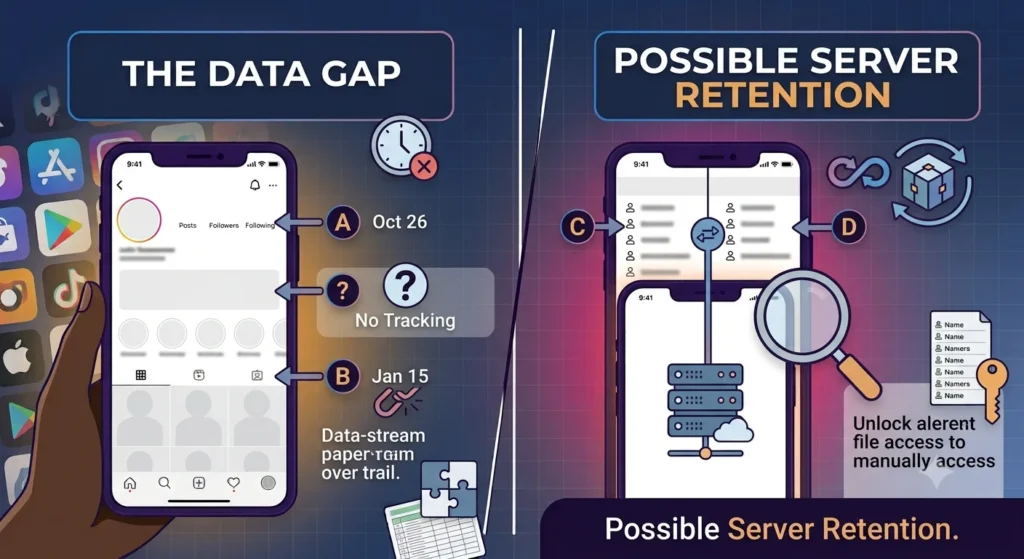
Usually not.
In most cases, deleting an unfollower tracking app means you’ll also lose access to the follower history it was collecting, especially if the app only stored data on your device. When you reinstall the app later, it typically treats your account as a new one and begins monitoring your followers from that point forward.
For example, if you:
- Delete the app
- Revoke its access to your Instagram account
- Stop using it for several weeks or months
- Reinstall it later
The app will generally create a snapshot of your current Instagram followers and start tracking changes from that moment. It usually cannot tell you who unfollowed you while the Instagram app was uninstalled or disconnected from your account.
The app will create a snapshot of your current Instagram followers and that is when it starts to track changes.
Some apps store Instagram follower history on their servers instead of only on your device. If that is the case and you sign back into the account you may regain access to previously recorded Instagram data, about your Instagram followers.
However this depends entirely on the app’s policies. Whether it continues to retain your Instagram information after you have stopped using the Instagram service.
Some apps automatically delete Instagram user data after a certain period while others may keep it for longer.
It is also important to understand that no app can reconstruct Instagram follower changes that it never recorded. Since Instagram does not provide developers with a log of Instagram unfollowers an app cannot go back in time and determine who unfollowed you on Instagram while it was not actively monitoring your Instagram account.
The app cannot tell you who unfollowed you on Instagram if it was not tracking your Instagram followers at that time. For this reason, if continuous follower tracking is important to you, you’ll generally need to keep the app connected to your Instagram account. Otherwise, there will be gaps in the tracking history that cannot be recovered later.
Ultimately, whether historical data is available after reinstalling an app depends on how that particular service stores user information. If the app relies solely on periodic snapshots of your follower list, any period during which it wasn’t tracking your account will simply remain unrecorded.
Can Someone Know If You Unfollow Them?
No.
Instagram does not notify users when someone unfollows them. If you decide to unfollow another account, Instagram won’t send a notification, email, or alert informing that person of your action.
For example, Instagram never displays messages such as:
“John unfollowed you.”
Instead, the change happens quietly in the background. The person you’ve unfollowed may eventually notice that you’re no longer following them, but only if they actively check their account.
They might realize you’ve unfollowed them if they notice one of the following:
- Their total follower count has decreased.
- Your account no longer appears in their Followers list.
- They search for your username and see that you’re no longer following them.
- They use a third-party follower tracking app that monitors changes to their follower list over time.
For most users, however, an individual unfollow often goes unnoticed. Unless someone regularly monitors their follower count, manually checks their followers list, or uses an unfollower tracking service, they usually won’t know immediately that you’ve unfollowed them.
It’s also worth noting that a lower follower count doesn’t necessarily mean a specific person unfollowed them. Followers can decrease for several reasons, including users deleting or deactivating their accounts, Instagram removing spam or fake accounts, or multiple people unfollowing around the same time. Because Instagram doesn’t identify which account caused the change, the person can only determine who unfollowed them by checking manually or using a tracking app that had already been monitoring their account.
What Happens When Someone Unfollows You?
When someone unfollows your Instagram account, a few things change, but many aspects of your previous interactions remain the same. Unfollowing simply means that the person chooses to stop receiving your posts in their Instagram feed—it does not erase your past activity or block future interactions.
Here’s what happens when someone unfollows you:
1. Your Follower Count Decreases
The most noticeable change is that your total follower count goes down by one (or more if multiple people unfollow). Instagram updates this number automatically, but it does not tell you which account unfollowed you or when the change occurred.
2. They Stop Seeing Your Posts in Their Home Feed
Once someone unfollows you, your new posts and most of your future content are no longer delivered to their Home feed simply because they were following you. However, Instagram’s content recommendations can still occasionally surface your public Reels or posts through features like Explore or suggested content, depending on the person’s activity and Instagram’s recommendation system.
3. They Can Still View Your Profile (If It’s Public)
If your Instagram account is public, anyone, including someone who has unfollowed you, can still visit your profile at any time. They can view your photos, videos, Reels, Stories (while they’re available), profile information, and public highlights without following you.
If your account is private, however, users who unfollow you will no longer have access to your posts, Stories, or other private content unless they send a new follow request and you approve it.
4. Previous Likes, Comments, and Messages Remain
Unfollowing does not delete your previous interactions. Any likes or comments the person left on your posts generally remain unless they choose to remove them or you delete the content. Likewise, your own likes and comments on their posts are unaffected by the unfollow.
5. Direct Messages Are Not Removed
Your existing conversation in Instagram Direct Messages stays intact. Both of you can still view previous messages unless one of you deletes the conversation or unsends individual messages. In most cases, you can also continue sending messages to each other, although message delivery may depend on each person’s privacy and messaging settings.
6. They Can Follow You Again Later
An unfollow isn’t permanent. The person can choose to follow your account again whenever they want. If your account is public, they can usually follow you instantly. If it’s private, they’ll need to send a new follow request, and you’ll have to approve it before they regain access to your private content.
Overall, being unfollowed mainly affects whether someone automatically receives your content in their feed. It doesn’t erase your previous interactions or prevent future ones, and it doesn’t stop someone from visiting your profile or following you again later.
Why Do People Lose Instagram Followers?
Losing followers on Instagram is completely normal and happens to accounts of every size, from personal profiles to large creators and businesses. A fluctuating follower count doesn’t necessarily mean you’re doing something wrong. People join and leave Instagram every day, their interests change, and the platform regularly removes inauthentic accounts.
Here are some of the most common reasons why people lose Instagram followers:
1. Inactive Followers
Not everyone who follows you will remain active on Instagram forever. Some users stop using the platform, temporarily deactivate their accounts, or permanently delete them. When this happens, your follower count may decrease even though no one intentionally chose to unfollow you.
2. Content Changes
People often follow an account because they’re interested in a specific type of content. If your content changes significantly, for example, switching from travel photography to fitness tips or from personal updates to promotional posts, some followers may decide the account no longer matches their interests and choose to unfollow.
Changing your niche isn’t necessarily a bad thing, but it’s common to see some follower turnover during the transition.
3. Posting Frequency
How often you post can also influence follower retention. Posting too frequently may overwhelm some followers and cause them to unfollow if they feel your content dominates their feed. On the other hand, posting very infrequently may lead people to lose interest or forget why they followed you in the first place.
Maintaining a consistent posting schedule that delivers value to your audience is generally more effective than posting too much or too little.
4. Instagram Removing Fake Accounts
Instagram regularly takes action against accounts that violate its policies or appear to be inauthentic. As part of its ongoing efforts to improve the quality of the platform, Instagram may remove:
- Spam accounts
- Bots
- Fake profiles
- Automated accounts
- Accounts involved in suspicious activity
When Instagram performs these cleanups, many users notice a sudden drop in their follower count. In these cases, the decrease doesn’t reflect real people choosing to unfollow you—it’s simply the result of Instagram removing accounts that were no longer considered legitimate.
5. Follow-Unfollow Behavior
Some people do something on Instagram that is called the follow and unfollow thing. They follow Instagram accounts because they want those Instagram accounts to follow them back. Then they stop following those Instagram accounts after a while so they can make their Instagram follower-to-following ratio better.
This is not a thing to do but it still happens on Instagram. The follow and unfollow thing can make the number of people following you on Instagram go up and down a lot.
6. Changes in User Interests
People’s interests naturally evolve over time. Someone who enjoyed your content a year ago may now prefer different topics or spend less time on Instagram altogether. Unfollowing is often simply a reflection of changing preferences rather than dissatisfaction with your content.
7. Increased Promotional Content
If followers feel that an account has become overly promotional, with frequent advertisements or sponsored posts and little educational or entertaining content, some may choose to unfollow. Maintaining a balance between promotional and value-driven content can help keep your audience engaged.
8. Seasonal or Viral Growth
When an account on Instagram gets really popular from a Reel or a trending topic or a giveaway or a collaboration it gets a lot of new followers.. These new followers are only interested in that one thing that made the account popular. They are not really interested in what the account’s usually about.
So when the trend is over some of these followers will stop following the account if the regular posts are not like the one that made them follow in the first place.
It is normal to lose some followers when you use Instagram. Of worrying about every person who stops following it is better to look at how things are going over time and see if people are interacting with your Instagram posts.
Having a group of followers who really care about what you post on Instagram is better than having a lot of followers who do not really pay attention to your Instagram content.
How to Reduce Unfollows on Instagram
While it’s impossible to prevent every unfollow, there are several strategies that can help you build a loyal audience and encourage followers to stay engaged with your content. The goal isn’t to keep every follower forever, it’s to consistently provide value to the people who genuinely enjoy your content.
Here are some proven ways to reduce unfollows on Instagram:
1. Post Consistently Without Overwhelming Your Audience
Consistency helps followers know what to expect from your account. Posting regularly keeps your profile active and gives people a reason to return. However, posting too frequently can clutter followers’ feeds and may encourage some people to unfollow, while posting too rarely can cause your audience to lose interest.
Instead of focusing on posting as much as possible, aim for a schedule you can maintain over the long term while prioritizing quality over quantity.
2. Share Content That Matches Your Niche and Audience Interests
People usually follow an account because they enjoy a particular type of content. Staying consistent with your niche helps meet those expectations and builds trust with your audience.
If you decide to expand into new topics, introduce the changes gradually and continue creating content that appeals to your existing followers. Understanding what your audience enjoys through engagement metrics and feedback can also help you create more relevant posts.
3. Use High-Quality Photos, Videos, and Captions
Well-produced content is more likely to capture attention and encourage followers to keep engaging with your account. This doesn’t necessarily require expensive equipment, clear images, good lighting, readable graphics, and thoughtfully edited videos can make a significant difference.
Strong captions can also increase engagement by providing useful information, telling a story, asking questions, or encouraging meaningful conversations with your audience.
4. Engage With Comments and Direct Messages
Instagram is designed to be a social platform, so interacting with your audience can strengthen your relationship with followers. Responding to comments, answering direct messages, and acknowledging feedback shows that you value your community.
When followers feel heard and appreciated, they’re often more likely to remain engaged and continue following your account.
5. Create Interactive Stories
Instagram Stories offer several built-in features that encourage audience participation. Using tools such as:
- Polls
- Questions
- Quizzes
- Emoji sliders
- Countdown stickers
can make your followers feel involved rather than simply consuming content. Interactive Stories also provide valuable insights into your audience’s interests, helping you create more relevant posts in the future.
6. Publish Reels That Provide Value or Entertainment
Reels are one of Instagram’s most effective content formats for reaching both existing followers and new audiences. Whether you create educational tutorials, behind-the-scenes content, product demonstrations, quick tips, or entertaining videos, focus on delivering value that encourages viewers to watch, share, save, or comment.
Consistently publishing engaging Reels can improve overall audience retention while also attracting new followers who are genuinely interested in your content.
7. Avoid Buying Fake Followers
Purchasing followers may make your account appear larger temporarily, but it rarely provides long-term benefits. Fake or inactive followers don’t meaningfully engage with your content, which can reduce your overall engagement rate.
Additionally, Instagram regularly removes:
- Spam accounts
- Bots
- Fake profiles
- Inauthentic accounts
As a result, accounts that purchase followers often experience sudden drops in follower count during these periodic cleanups. Focusing on organic growth through valuable content and genuine engagement is a far more sustainable strategy.
8. Monitor Your Analytics
If you have a Creator or Business account, regularly reviewing Instagram Insights can help you understand what resonates with your audience. Pay attention to metrics such as reach, engagement, saves, shares, and follower growth to identify the types of content your audience responds to best.
Using this data to refine your content strategy can improve audience satisfaction and help reduce unnecessary unfollows over time.
9. Build a Community Instead of Chasing Numbers
Ultimately, follower count is only one measure of success. A smaller audience that actively comments, shares, saves, and interacts with your content is often more valuable than a much larger audience with little engagement.
By consistently creating helpful, entertaining, or inspiring content and building genuine relationships with your followers, you’ll naturally attract people who are more likely to stay engaged with your account over the long term.
Frequently Asked Questions
1. Does Instagram notify you when someone unfollows you?
No. Instagram does not send notifications when someone unfollows your account.
2. Can you see who unfollowed you on Instagram for free?
Yes, but only by checking manually or comparing follower lists. Instagram itself does not provide a free unfollower history.
3. Do Professional accounts show who unfollowed you?
No. Instagram Insights show follower growth and losses but do not reveal the identities of users who unfollowed you.
4. Are unfollower apps accurate?
They can accurately report changes only after you start using them. They cannot identify unfollows that occurred before tracking began.
5. Can someone tell if I unfollow them?
Instagram does not notify users when they are unfollowed. They would need to notice the change themselves or use a tracking app.
Conclusion
If you want to know who stopped following you on Instagram the truth is that Instagram does not tell you this. Instagram does not send you a message when someone stops following you. They also do not keep a list of people who stopped following you.
If you really want to know if a specific person is still following you you can check their account manually. If you want to keep track of who’s following you all the time there are other apps that can do this.
These apps compare the people who are following you now to the people who were following you before. You have to be careful with these apps because they can cause problems with your privacy and security. Also they cannot tell you who stopped following you before you started using them.
For people who use Instagram like artists and companies it is better to focus on getting more followers over time. It is normal for some people to stop following you. The best way to get a lot of followers and keep them is to post content all the time. This will help you build a group of followers over time.