

No, Instagram does not give you a list of people who viewed your profile, and no one can see that you viewed theirs. Instagram offers no general profile visitor list, hidden menu or native tool that shows who looked at your grid or profile page.
Instagram does show two related things. Stories come with a named viewer list. Business and Creator accounts get an anonymous count of profile visits. This article explains the difference between those, what Instagram Insights does and doesn’t reveal, and why profile viewer apps are a risk.
Does Instagram Have Profile Views?
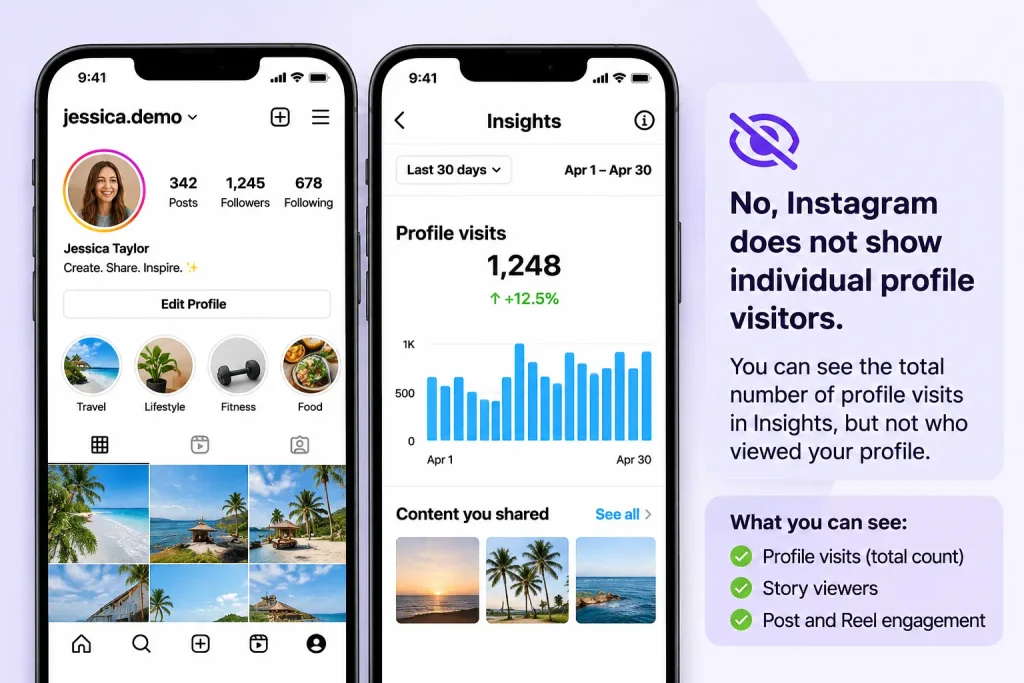
Short answer: Instagram does not provide a list of individual profile visitors. It does record profile activity as aggregate numbers for professional accounts. Those accounts get a total profile visits count in Insights, but it is an anonymous number with no names attached.
So the answer depends on what you mean by “profile views”:
- A count of visits: available, but only for professional accounts.
- Names of the people who visited: not available to anyone.
Normal browsing also doesn’t trigger notifications. Instagram’s visible signals come from actions like following, liking, commenting and messaging, which the other person can see.
Can You See Who Viewed Your Instagram Profile?
No. Instagram has no standard visitor list. One 2026 guide states that this applies to every account type, free or paid. If someone opens your public profile and only looks, you receive no name and no alert.
The sources I reviewed don’t describe a separate rule for private accounts. A private account limits who can see posts. It doesn’t create a visitor-identification feature. Instagram’s Help Center is the place to confirm any private-account detail.
Does Instagram Notify Someone When You View Their Profile?
No. One 2026 guide reports that Instagram has no profile-view notification, and that even the reported test of a private count doesn’t reveal your username. That guide is a third-party source, not an official one.
Passive browsing and visible interactions are different. Instagram’s visibility model comes down to this: passive views stay private, while active engagement can be seen. Following, liking, commenting and messaging all put your name in front of the other person.Screenshots are a separate question, and we cover whether Instagram notifies you about screenshots in a dedicated guide.
What Happens When Someone Views Your Instagram Profile?
A profile visit is a person opening your profile page. For personal accounts it leaves no visible trace. For professional accounts, the visit is added to an aggregate count in Insights. You can see how many visits happened, but not who made them.
Can Someone See If You Visit Their Instagram Profile Multiple Times?
No, based on the outline’s own comparison table, where visiting a profile does not identify you. Repeating a visit doesn’t change that. The sources I reviewed describe no mechanism for flagging repeat visitors. This is an interpretation of that evidence, not a separately documented rule.
The “profile stalking” worry usually comes from Story viewer lists. Seeing the same names there is not proof those people visit your profile.
Can Someone See If You Search for Their Instagram Username?
No. Per the outline, searching for a username doesn’t identify you to the account owner. Searching and visiting are both separate from actions like following or liking. I found no documentation of search notifications. for any official Instagram statement on this.
What Can You Actually See on Instagram?
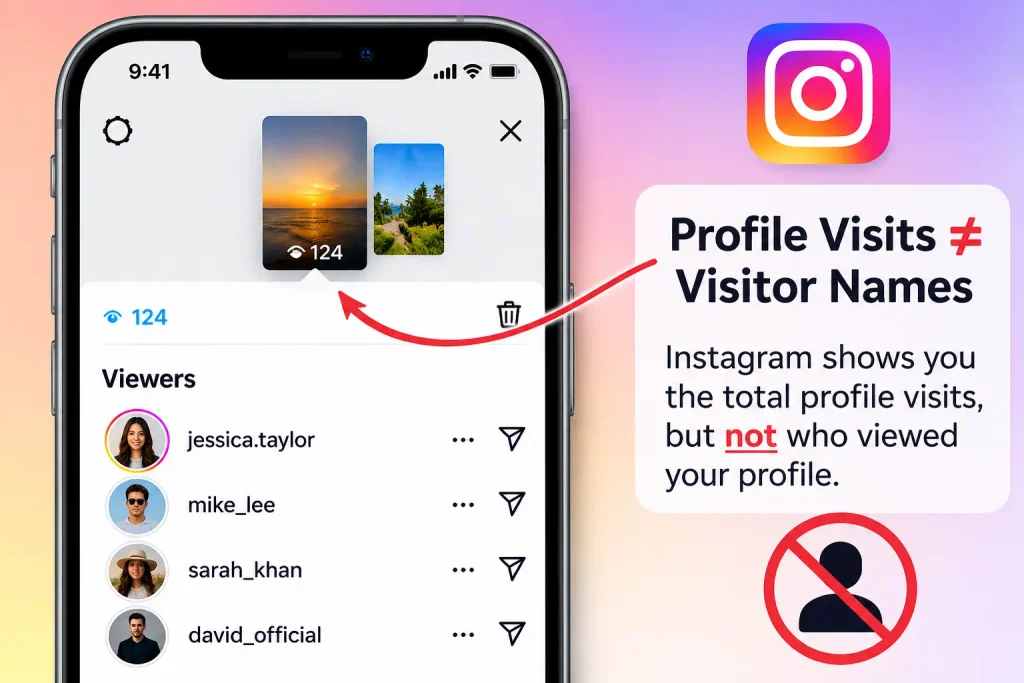
The table shows which actions let the account owner identify you.
| Instagram activity | Can the account owner identify you? |
|---|---|
| Visiting a profile | No |
| Searching for a username | No |
| Viewing a Story | Yes |
| Liking a post | Yes |
| Commenting on a post | Yes |
| Following an account | Yes |
| Viewing a Reel | No individual viewer list |
| Watching a Live | Viewers can be visible during the broadcast |
| Profile activity (Insights) | Aggregate counts only, no names |
Can You See Who Viewed Your Instagram Stories?
Yes. Stories are the one place Instagram names viewers. Only you can look at who has seen your story. To check, open your own Story and swipe up, or tap the viewer count at the bottom left.
How long the list lasts is the part people get wrong. Instagram’s Help Center says you can look at who has seen your story for up to 48 hours after you post it. The Story leaves your profile at 24 hours, but the viewer names stay available for another day. One guide says that after the Story expires you reach the list through your profile menu, then Archive.
Highlights follow the same clock. One guide says the named list lasts only 48 hours from when the original Story was posted, not from when you added it to a Highlight. After that you keep a view count, not names.
Can You See Who Viewed Your Instagram Reels?
No. Reels show counts, not names. One 2026 comparison lists only view and like counts for Reels. You can see how many people watched and how many liked, but there is no list of individual viewers. Likes and comments name the people who made them, because those are visible actions.
Can You See Who Watched Your Instagram Live?
Yes, during the broadcast. Per the outline, viewers can be visible while the Live is running. This is a different situation from profile visits: a Live is a real-time broadcast people join, not a page they browse. I did not find documentation on what remains visible after a Live ends.
Can Business and Creator Accounts See Who Viewed Their Instagram Profile?
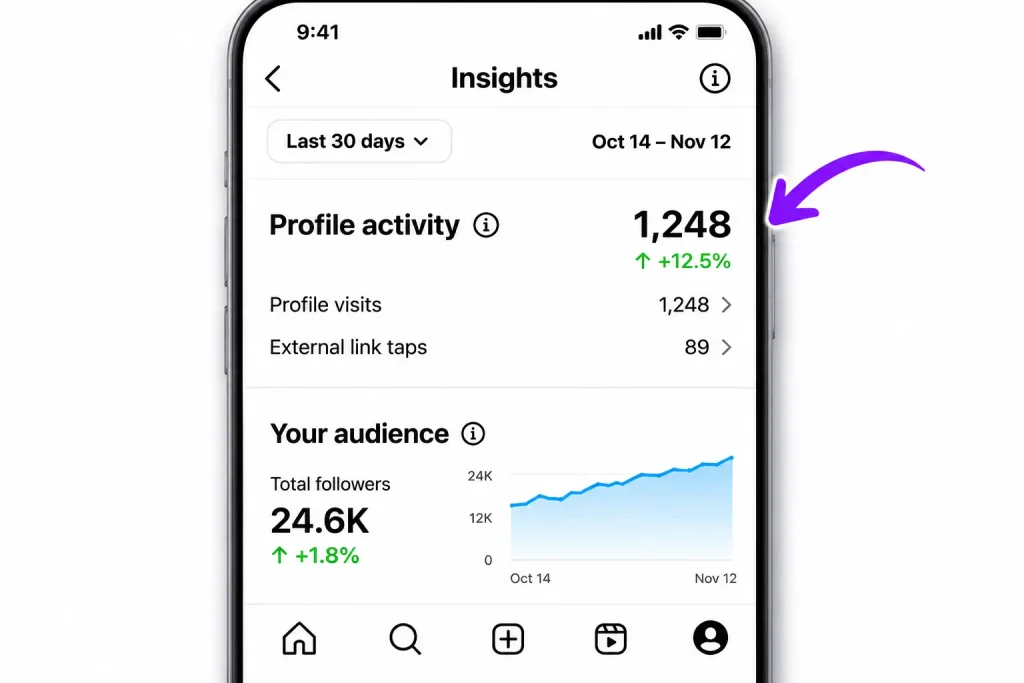
Short answer: No. Business and Creator accounts get more analytics, but those analytics are aggregate. They show how many people visited, not who visited. A professional account adds data tools and does not unlock a visitor list.
What Can Instagram Business Accounts See?
Instagram’s Help Center says professional accounts can view an Insights overview covering Accounts reached, Accounts engaged and Total followers, plus a section on content you shared. The same page defines Accounts reached as the number of unique accounts that have seen your content, along with demographic information.
The profile-related data sits in Profile activity. Profile activity shows how users interact with your whole profile, and it appears in the Accounts reached tab. It covers actions such as profile visits and website taps.
Do Creator Accounts Have More Profile-View Features?
No. The Help Center describes these analytics as available to professional accounts generally, which covers both Business and Creator. I found no source showing that Creator accounts get a visitor list or a different profile-visit feature. Both account types keep visitor identities private.
Personal vs. Business vs. Creator Accounts: What’s the Difference?
| Feature | Personal | Business | Creator |
|---|---|---|---|
| Profile visitor names | No | No | No |
| Story viewer list | Yes | Yes | Yes |
| Professional analytics | Limited / account-dependent | Yes | Yes |
| Content performance metrics | Available features vary | Yes | Yes |
| Business tools | Limited | Yes | Yes |
This table follows the outline and should be checked against current in-app features before publishing, since availability can vary. One 2026 guide says Insights works only for Business or Creator accounts, so a personal account owner isn’t missing a hidden menu.
How to Check Your Instagram Profile Activity
Open the Professional Dashboard from your profile. It is the only place to see profile visit counts, and none of it is a visitor list. If you’re on a personal account, switch to a free professional account first.
How to Access Instagram Insights
- Open Instagram and go to your profile.
- Tap View professional dashboard near the top of your profile.
- Open Insights, then Accounts reached.
- Scroll to Profile activity and tap the profile visits figure.
- Choose a date range. Accounts reached covers a period of up to 90 days.
Menu labels can differ by app version, so the exact wording on your screen may vary. [Add a current screenshot of the dashboard here before publishing.]
What Does Profile Activity Mean on Instagram?
Profile activity counts actions taken on your profile, such as visits and taps on your website link. It is different from reach and engagement:
- Reach counts unique accounts that saw your content.
- Engagement counts likes, comments, shares and saves.
- Profile visits count people who opened your profile page.
A useful signal is how reach compares with profile visits. One analytics guide notes that high views with low profile visits suggests viewers aren’t curious enough to click through to you. That is an interpretation, not an Instagram rule.To time your posts for more reach, check when your followers are most active.
Is Instagram Adding a Profile Views Feature in 2026?
Short answer: Not as a visitor list. Some articles describe a private count of profile views in testing, but I found no official Instagram or Meta announcement confirming a universal rollout. Treat the claim as unverified.
The reports conflict. PostLink says Instagram confirmed a test showing how many times your profile was viewed over 14 days, and that it has expanded gradually into 2026. Other sources disagree. One guide says Instagram has made no official announcement of a profile view feature coming. Another says tests of this kind aren’t widely implemented or verified around the world.
Even the most generous version is about counts. PostLink itself says the test is about counts, not identities.
To verify a new feature yourself:
- Check your profile for a “Profile views” or “Views” section.
- Look in the Professional Dashboard.
- Search Instagram’s Help Center and Meta’s newsroom for an announcement.
- If you can’t find it, you probably don’t have it yet.
Is the Instagram Profile Views Feature Officially Available?
Not that I could confirm. Features often reach some accounts before others, so one person may see a test feature that another can’t. I found no official evidence of a global rollout, so I won’t claim one. for any Meta announcement of the 14-day count.
Will Instagram Ever Let Users See Who Viewed Their Profiles?
Nothing I found says so, and predicting an unannounced feature would be speculation. The privacy trade-off is real. TikTok’s version is opt-in and mutual, so both people must turn it on for views to show. A named list without that agreement would mean every visitor loses anonymous browsing. Whether Instagram will change course is unknown.
Do Third-Party Instagram Profile Viewer Apps Really Work?
Short answer: No. Apps that claim to show your profile visitors can’t reliably access that information, because Instagram doesn’t expose it. One analysis states that Instagram’s backend provides no profile-view information through official APIs, so no app can accurately tell you who viewed your profile. Giving one your login creates a security risk.
Why Do Apps Claim They Can Show Instagram Profile Visitors?
Two common reasons:
- Guessing from interactions. One source says such tools either infer from Story views or fabricate results.
- Marketing. Ads promise a “who viewed me” list because the question is popular.
Likes, comments and Story views show who engaged. They are not proof of who visited your profile.
Are Instagram Profile Viewer Apps Safe to Use?
Generally no. One reference describes “see who viewed” prompts as known phishing scams. The main risks:
- Apps that ask for your Instagram password
- Permissions beyond what the app needs
- Phishing pages that collect your login
- Account compromise after you hand over credentials
Avoid any app that promises hidden visitor identities.
How to Protect Your Instagram Account From Fake Profile Viewer Apps
- Never share your password with an app or website.
- Review the apps and websites connected to your account, and remove ones you don’t recognize.
- Turn on two-factor authentication.
- Change your password if you suspect unauthorized access.
- Read Instagram’s security notifications and report suspicious messages.
How to Protect Your Privacy When Using Instagram
Privacy settings control who can see your content and activity. They do not control profile visit tracking, because no visitor list exists to hide. The tools in your settings:
- Public vs. private account: controls who can see your posts. for current menu paths.
- Story audience controls: choose who can watch your Stories.
- Blocking and restricting: limit contact from specific accounts.
- Activity status: controls whether others can see when you’re online.
Visible actions stay visible regardless of settings. Following, liking, commenting and viewing a Story are all shown to the account owner. Instagram’s Help Center says that when you see someone’s Story, they can tell you’ve seen it.
Does Switching to a Private Account Hide Profile Views?
Switching to a private account limits who can see your posts, but it doesn’t create a visitor-identification feature, and your own browsing remains anonymous either way. Whether a private account changes what appears in Insights is a detail to confirm in Instagram’s Help Center.
Can You Hide Your Instagram Activity From Other People?
Partly. You can adjust active status and Story audiences. You can’t hide actions that are visible by design, such as likes, comments and Story views. Those controls limit who sees your activity, and they are unrelated to profile-visit tracking.
Frequently Asked Questions About Instagram Profile Views
Does Instagram show who viewed your profile?
No. Instagram has no profile visitor list for any account type. Free and paid accounts are treated the same. Professional accounts can see anonymous visit counts in Insights.
Can someone see if I view their Instagram profile?
No. Opening someone’s profile doesn’t notify them or reveal your name. They can see you only if you take a visible action, such as following, liking, commenting or viewing their Story.
Does Instagram notify users about profile visits?
No. Reports in 2026 describe no notification for profile visits. Even the reported test count doesn’t alert anyone when you view their profile.
Can business accounts see who visits their Instagram profiles?
No. Business accounts can see how many people visited, not who they were. The data appears as Profile activity in Insights.
Can you see who viewed your Instagram profile without following them?
No. Following status doesn’t change anything. Nobody sees visitor names, whether the visitor follows the account or not.
Can Instagram show who searched for your username?
No. According to the outline, searching for a username doesn’t identify the searcher, and I found no documentation of search notifications. for an official statement.
Can someone see if you view their Instagram Highlights?
Sometimes. One guide says the owner can see who viewed a Highlight, but only within 48 hours of when the original Story was posted. After that, only counts remain.
Can you see who viewed your Instagram profile picture?
No separate feature exists in the sources I reviewed, and there is no profile visitor list of any kind. for a specific Instagram statement on profile pictures.
Can someone see how many times you viewed their profile?
No. Profile visits aren’t tied to your identity, so no one can see a personal visit count for you. Professional accounts see only an overall number of visits.
Are Instagram profile viewer apps legitimate?
No. These apps can’t access visitor data, because Instagram doesn’t provide it through official APIs. Some are phishing attempts. Never enter your Instagram password into one.
Can Instagram show profile views in Professional Dashboard?
Yes, as an anonymous count. Professional accounts can find profile visits under Accounts reached and Profile activity. Names are never shown.
Does Instagram have a profile-view feature in 2026?
Not a visitor list. A private count of profile views is reported in testing by some sources, but I found no official confirmation of a global rollout.
Final Verdict: Does Instagram Have Profile Views?
For ideas on turning that interest into growth, see these marketing strategies for small businesses.
Instagram has profile visit counts but no visitor identities. Professional accounts can see how many people visited their profile. Nobody can see who visited, and nobody is notified when you look.
Stories are the exception. They show a named viewer list for 48 hours after posting, which is why they get confused with profile views. Insights adds aggregate numbers on reach, engagement and profile activity.
Be careful with claims about new 2026 features. The evidence points to counts, not names, and I found no official announcement. Avoid any app that promises to reveal your visitors, since it can’t deliver and may put your account at risk. To see who is interested in your account, use your Story viewer list and your Insights data.