
The internet you use today barely resembles what existed 30 years ago. Pages load before your finger lifts off the screen. Videos buffer in milliseconds. Entire applications run inside a browser tab. None of that happened by accident.
The Early Days of the Internet
Cast your mind back to 1995. Connecting to the internet meant picking up a telephone and waiting for a modem to screech its way through a handshake. Dial-up connections topped out at 56 Kbps on a good day. A single image could take 20 seconds to fully appear on screen, painting itself top-to-bottom like a slowly pulled blind.
Page rendering was painfully linear. Browsers downloaded every element one at a time, displayed what they had, and made you wait for the rest. Servers were physical machines sitting in someone’s office or data center, with fixed capacity that couldn’t flex when traffic increased. If too many people visited a site at once, it simply crashed.
Why Web Speed Became a Priority
By the mid-2000s, businesses started tracking what slow pages were costing them. Amazon famously found that every 100 milliseconds of latency reduced sales by 1%.
Google experiments have shown that even small delays can reduce user engagement and search activity. The numbers were clear: slow websites lost money.
User expectations shifted too. As broadband spread through homes and offices, people stopped tolerating delays. The mental bar for “acceptable” loading time kept dropping. Today, research from Google shows that 53% of mobile users abandon a page that takes longer than three seconds to load.
As websites grew more complex and generated larger volumes of user, transactional, and performance data, many organizations discovered that improving front-end speed alone was not enough.
Analytics platforms, monitoring systems, and business intelligence tools all depend on well-structured data infrastructure behind the scenes.
Working with a data warehouse service provider can help businesses consolidate data from multiple sources, improve query performance, and deliver real-time insights that support both technical optimization and strategic decision-making.
This becomes particularly important for companies managing high-traffic digital platforms, where performance metrics, customer behavior data, and operational analytics must be processed efficiently at scale.
SEO added another layer of urgency. Google began factoring page speed into rankings, making performance a direct driver of organic traffic. A slow site didn’t just frustrate visitors, it became invisible in search results.
The Technologies That Changed Everything
No single invention made the web fast. Speed came from a stack of overlapping innovations, each solving a different piece of the puzzle: how data travels, how browsers handle it, how servers deliver it, how files are compressed, and how applications behave. The 13 technologies covered in this article represent the most consequential of those breakthroughs.
A Timeline of Web Speed Innovation
Understanding how we got here requires a quick look at each decade’s defining shift.
The 1990s: Static Pages and Dial-Up
The earliest websites were static HTML files, plain text with basic formatting and the occasional GIF. HTTP/1.0 opened a new connection for every single file request, which was fine when pages had three assets but catastrophic as the web grew more visual.
Speed improvements in this era came mostly from faster modem standards rather than smarter software.
The 2000s: Broadband and Dynamic Websites
Broadband adoption transformed the experience for home users while simultaneously raising expectations. Content management systems and server-side scripting made websites dynamic.
JavaScript began handling client-side interactions. AJAX emerged and fundamentally changed how browsers communicated with servers. CDNs appeared as a commercial service, letting large companies serve content from multiple global locations.
The 2010s: Mobile, Cloud, and CDNs
The smartphone changed everything again. Suddenly, half the world was browsing on 3G connections with small screens and limited processing power. This forced developers to rethink every performance assumption they had.
Cloud platforms replaced physical servers, providing elastic infrastructure that scaled on demand. HTTP/2 replaced the aging HTTP/1.1 standard. Image optimization became a discipline in its own right.
The 2020s: Edge Computing, AI, and HTTP/3
The current decade has pushed processing closer to users than ever before. Edge computing moved logic out of centralized data centers and into network nodes spread across cities worldwide.
HTTP/3 and the QUIC protocol rewrote how connections work at the transport layer. And AI started automating performance decisions that once required manual engineering work.
Faster Mobile Networks Reset User Expectations
From 2G to 5G Connectivity
The jump from 2G to 3G was the first hint that mobile could be serious. 3G offered download speeds of 2-7 Mbps, enough for basic web browsing.
4G LTE pushed that to 20-50 Mbps under real-world conditions, making mobile browsing comparable to home broadband. 5G, now rolling out in cities globally, delivers theoretical speeds above 1 Gbps with latency dropping below 10 milliseconds.
Each generation didn’t just make pages load faster, it changed what people expected to do on their phones.
2G users checked text-heavy news sites. 4G users watched YouTube without buffering. 5G users expect instant, app-quality experiences from every website they touch.
How Faster Networks Enabled Rich Media
Before 4G became widespread, developers made painful trade-offs. Background videos were desktop-only. High-resolution photography was compressed into muddy JPEGs. Interactive features were stripped from mobile versions of sites. As networks improved, those compromises became unnecessary.
Today’s mobile web carries high-resolution images, autoplay video, complex animations, and real-time data updates, all over a wireless connection. The network speed set the ceiling; engineers built up to it.
Why Mobile-First Development Became Essential
Google’s shift to mobile-first indexing in 2019 formalized what developers already knew from their traffic data: most visits came from phones. Mobile-first development means designing and optimizing for the smallest, slowest device first, then scaling up for desktop. This discipline produces leaner code, smaller assets, and better performance across every device, not just phones.
1. Content Delivery Networks (CDNs): Bringing Content Closer to Users

Why Distance Slowed Down Early Websites
Speed of light is not a metaphor in networking, it is a hard physical constraint. Data travels through fiber optic cables at roughly two-thirds the speed of light. A request from London to a server in New York takes around 70 milliseconds in ideal conditions, just for the round trip. Multiply that by dozens of assets per page and the delay becomes noticeable.
Early websites had one server, one location. A visitor from Tokyo connecting to a server in Chicago was at the mercy of thousands of miles of cable and dozens of routing hops.
How CDNs Work
A Content Delivery Network solves the distance problem by storing copies of your content on servers placed strategically around the world. When a visitor loads your site, their request routes to the nearest CDN node — called a Point of Presence or PoP, rather than traveling back to your origin server.
CDNs cache static assets: images, stylesheets, JavaScript files, fonts, and sometimes entire HTML pages. The origin server handles the original request once. After that, the CDN delivers cached copies to everyone else from the closest possible location.
Reducing Latency Through Global Distribution
A visitor in Mumbai requesting content from a CDN node in Singapore waits perhaps 10 milliseconds rather than the 180 milliseconds it would take to reach a server in Frankfurt. This difference sounds small in isolation, but a typical page makes 60 to 100 requests. Cutting even 50 milliseconds per request translates to several seconds of total load time saved.
Major CDN providers like Cloudflare, Akamai, and Fastly operate hundreds of PoPs globally, ensuring that almost any visitor on earth is within 30-50 milliseconds of a cached copy of your content.
Handling Traffic Spikes and Viral Events
CDNs also protect origin servers from traffic surges. When a news story goes viral or a product launch drives sudden demand, CDN edges absorb the requests and serve cached content without forwarding every hit to the origin.
Similarly, critical B2B networks that handle automated supplier risk management workflows utilize this edge protection to prevent data lag during global supply chain events.
This is why major media sites can survive being linked from the front page of Reddit without immediately collapsing.
2. DNS Optimization: The First Step to a Faster Website

Every web request starts with DNS before anything else happens. When a browser encounters a domain name, it has to resolve it into an IP address before it can open a connection, trigger a CDN, or apply any other performance technology.
That lookup takes 20 to 120 milliseconds on a cold request, and on pages pulling resources from multiple third-party domains, those delays stack up fast.
How DNS Latency Affects Page Load Time
Modern pages load assets from several domains simultaneously: analytics scripts, font providers, payment processors, CDN subdomains. Each one requires its own DNS lookup.
A page that depends on multiple external domains may incur several DNS lookups during loading. Although modern browsers often resolve these lookups in parallel, slow DNS responses can still add noticeable latency before resources begin downloading.
DNS Prefetching
Browsers can resolve domain names in the background before a user actually requests anything from them. A single HTML hint instructs the browser to perform the lookup speculatively while the rest of the page loads, so the answer is already cached when the request arrives.
For pages that depend on third-party domains, prefetching eliminates lookup latency entirely and can reduce total load time by several hundred milliseconds with minimal implementation effort.
Browser DNS Caching
Once a domain has been resolved, browsers and operating systems typically cache the result locally. Repeat visits often bypass external DNS lookups entirely, eliminating resolution delays and helping pages load faster.
This is one reason frequently visited websites often feel noticeably quicker than sites a user is visiting for the first time.
Anycast Routing and Fast DNS Providers
Anycast routing assigns the same IP address to DNS servers distributed worldwide, automatically directing each query to the nearest available node. Public resolvers like Cloudflare’s 1.1.1.1 and Google’s 8.8.8.8 use this approach, Cloudflare’s Anycast DNS network is consistently ranked among the fastest public DNS resolvers in independent performance tests.
Users whose ISP-provided resolvers are slow or poorly located can cut DNS lookup times by 50 to 80 percent simply by switching providers, one of the lowest-effort performance gains available.
DNS over HTTPS
Traditional DNS queries are typically sent over unencrypted UDP, making them visible to network operators and intermediaries.
DNS over HTTPS (DoH) encrypts these queries by sending them through standard HTTPS connections instead. Because DoH can take advantage of persistent HTTP/2 and HTTP/3 connections, multiple DNS requests can be handled efficiently without repeatedly establishing new transport sessions.
Chrome, Firefox, and Edge support DoH, while providers such as Cloudflare and Google operate some of the most widely used public DoH services.
TTL Strategy and Authoritative DNS Performance
Every DNS record carries a Time to Live (TTL) value that controls how long resolvers cache the answer. High TTL values reduce lookup frequency for repeat visitors by keeping cached answers valid for hours. When that cache does expire, the speed of the authoritative DNS server determines how fast it refreshes.
Major DNS providers such as Cloudflare DNS, Amazon Route 53, and NS1 operate globally distributed Anycast networks designed to deliver low-latency responses worldwide. Their infrastructure helps reduce lookup times for new visitors and improves the overall efficiency of website delivery.
Providers like Cloudflare DNS, Amazon Route 53, and NS1 can often return authoritative DNS responses in just a few milliseconds, making DNS performance an important contributor to connection setup time and overall page loading speed.
3. Smarter Protocols: The Evolution of HTTP

Limitations of HTTP/1.1
HTTP/1.1, standardized in 1999, was a remarkable improvement over its predecessor but came with structural limitations that became more painful as websites grew complex. Its most significant constraint was head-of-line blocking: within a single connection, requests had to be processed in order. If one resource took time to deliver, everything behind it in the queue waited.
Browsers worked around this by opening multiple parallel connections per domain, typically six. But this created overhead from repeated TCP handshakes, and developers resorted to domain sharding (spreading assets across multiple subdomains) to squeeze more parallel connections out of the browser. These were workarounds for a protocol that wasn’t designed for modern web complexity.
How HTTP/2 Improved Performance
HTTP/2 redesigned the HTTP application layer while continuing to use TCP as its transport protocol. It introduced a binary framing layer that changed how data was packaged and transferred, unlocking several improvements simultaneously.
Multiplexing
The most impactful change was multiplexing. HTTP/2 introduced independent streams within a single TCP connection, allowing multiple requests and responses to be transmitted concurrently. This eliminated application-layer head-of-line blocking by preventing one request from waiting for another to complete before it could begin.
However, because HTTP/2 still relied on TCP, packet loss could still cause transport-layer head-of-line blocking until the arrival of HTTP/3 and QUIC. As a result, browsers could efficiently load dozens of assets over a single connection without relying on multiple parallel TCP connections.
Header Compression
HTTP/1.1 sent headers as plain text with every request. On a page with 80 resources, the same cookie headers, user-agent strings, and accept headers repeated 80 times. HTTP/2 introduced HPACK compression, which encoded headers efficiently and remembered previously sent headers so they didn’t need repeating. This could reduce header overhead by 85-90%.
Server Push
HTTP/2 allowed servers to send resources to browsers proactively, before the browser knew it needed them. When delivering an HTML page, a server could simultaneously push the CSS and JavaScript it knew the page required, eliminating the round trip the browser would normally take to discover those dependencies. Server Push saw mixed adoption in practice due to caching complications, but the concept influenced later optimization strategies.
HTTP/3 and the QUIC Revolution
HTTP/3 took the improvements of HTTP/2 further by replacing TCP with an entirely new transport protocol called QUIC.
Why QUIC Uses UDP
TCP, which underlies HTTP/1.1 and HTTP/2, requires a connection to be fully established before any data flows. A TCP handshake takes one or two round trips. Add TLS encryption on top and a secure HTTP/2 connection requires three round trips before the first byte of content arrives.
QUIC runs over UDP, which has no built-in connection process. QUIC implements its own connection management and encryption in a single combined handshake, reducing connection setup to one round trip for new connections and zero round trips for connections where the browser and server have communicated before.
Reduced Connection Delays
This 0-RTT (zero round-trip time) resumption is especially valuable for users who visit sites they’ve accessed recently. The browser can start sending request data with the very first packet rather than waiting for the handshake to complete.
Better Performance on Mobile Networks
Mobile connections frequently switch between towers and between Wi-Fi and cellular. TCP treats every such switch as a broken connection requiring a full restart. QUIC uses connection IDs rather than IP address and port combinations, meaning a connection survives network changes without interruption. For mobile users moving through city streets, this alone produces a meaningful improvement in perceived loading speed.
4. Faster and More Intelligent Browser Engines

Browsers Became Performance Platforms
The browser was once a simple document viewer. Modern browsers are sophisticated platforms capable of running 3D graphics, audio synthesis, machine learning models, and complex applications, while simultaneously managing dozens of resource requests and rendering animated interfaces.
This transformation required continuous reinvention of the browser’s internal architecture. Every major browser engine, Blink (Chrome), Gecko (Firefox), WebKit (Safari), has been substantially rebuilt multiple times to squeeze more performance out of the same hardware.
JavaScript Engines Such as V8
The V8 engine, introduced with Google Chrome in 2008, changed what people thought JavaScript could do. Rather than interpreting JavaScript code line by line, V8 compiled it to native machine code at runtime using a technique called just-in-time (JIT) compilation. The performance gains were dramatic, JavaScript that took seconds to run could now execute in milliseconds.
V8 also introduced hidden class transitions, inline caches, and garbage collection optimizations that made JavaScript practical for computationally intensive work. Node.js later brought V8 to the server side, creating a unified JavaScript runtime across the full stack.
Prioritizing Above-the-Fold Content
Modern browsers don’t wait to have a complete page before rendering anything. They parse HTML incrementally and begin displaying content as it arrives. Layout and rendering run on dedicated threads separate from JavaScript execution, reducing jank caused by script processing.
Browsers prioritize above-the-fold content, the portion of the page visible without scrolling, deferring images and scripts below the fold until the visible portion is fully rendered. This technique, often guided by priority hints developers add to HTML, makes pages feel instant even when the full download isn’t complete.
Better Memory and Resource Management
Each browser tab used to be a memory black hole. Modern browser architectures isolate tabs in separate processes, improving both security and stability. Resource management has grown sophisticated enough to throttle or suspend background tabs, freeing memory and CPU for the active page. These improvements mean browsers perform consistently even when dozens of tabs are open.
5. Advanced Compression and Efficient Data Transfer

Why Smaller Files Load Faster
Before a browser can display anything, it needs to download it. Every byte saved in transmission directly reduces load time. Compression technologies work by finding patterns in data and encoding them more efficiently, a file that takes 200 KB of storage might transfer in 40 KB when compressed, cutting download time by 80%.
GZIP Compression
GZIP, based on the DEFLATE algorithm, became the web standard compression format in the late 1990s. It works by finding repeated patterns in text data and replacing them with shorter codes. HTML, CSS, and JavaScript are highly repetitive, tags, property names, and variable declarations repeat throughout files — making them compress extremely well.
Most web servers and CDNs apply GZIP automatically to text assets before transmission. A typical HTML page compresses by 60-80%. The server compresses once; the browser decompresses in milliseconds. The net saving in transfer time almost always outweighs the processing cost.
Brotli Compression
Google developed Brotli in 2015 as a compression algorithm specifically designed for web content. Where GZIP was designed as a general-purpose tool, Brotli included a pre-built dictionary of common HTML, CSS, and JavaScript patterns. This gave it a starting advantage, it didn’t need to discover patterns in the data because it already knew which patterns were most common on the web.
Brotli typically achieves 15-25% better compression than GZIP on web assets. For JavaScript files, the improvement can be even larger. Brotli is now supported in all modern browsers and used by default on most major CDNs and hosting platforms.
Minification and Asset Optimization
Minification removes everything from code that a machine doesn’t need but humans put there for readability: whitespace, line breaks, comments, and long variable names. A JavaScript file with readable formatting and descriptive variable names might shrink by 30-50% through minification alone. Combined with compression, the effect is compounded.
Build tools like webpack, Rollup, and esbuild automate minification as part of the deployment process. Tree shaking, removing code that the application never actually executes, can remove tens or hundreds of kilobytes from JavaScript bundles. Code splitting breaks large bundles into smaller chunks that load only when needed.
6. Caching: The Invisible Technology Behind Fast Websites
Browser Caching
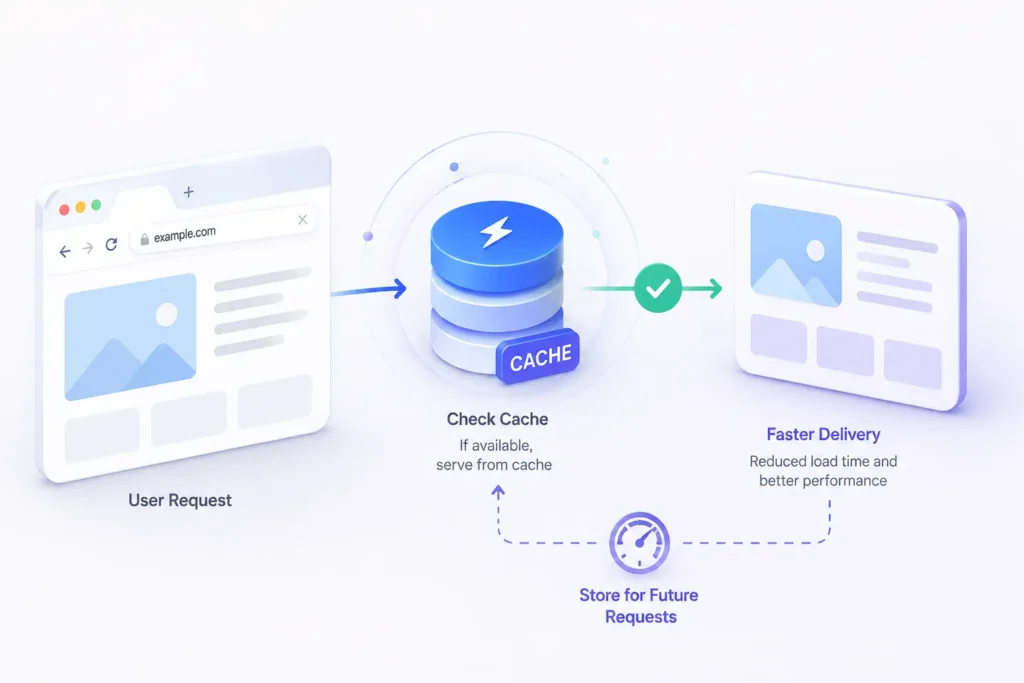
The fastest request is one that never needs to be made. Browser caching stores downloaded assets locally so they don’t need to be fetched again on repeat visits. Servers instruct browsers how long to cache each resource using HTTP headers, a logo image might be cached for a year, while an HTML page might be cached for minutes or not at all.
When a returning visitor loads your site, their browser checks its local cache before making any network requests. Static assets like fonts, stylesheets, and images load from disk at memory speed rather than waiting for network delivery. Only resources that have changed since the last visit need to be downloaded fresh.
Server-Side Caching
Dynamically generated pages require database queries and server processing on every request — unless the server stores the result. Server-side caching saves the output of expensive operations and returns the cached version to subsequent requests without repeating the work.
A news homepage that assembles articles from a database might take 200 milliseconds to generate. With server-side caching, the first visitor pays that cost; everyone for the next five minutes gets a pre-built response in single-digit milliseconds. Tools like Redis, Memcached, and Varnish implement this pattern at varying layers of the stack.
CDN Caching
CDN caching combines the geographic distribution benefit of CDNs with caching logic. When a CDN edge node receives a request for a resource it hasn’t cached, it fetches it from the origin server, delivers it to the user, and stores a copy. Every subsequent request from any visitor near that PoP gets the cached copy without reaching the origin.
For popular content, CDN cache hit rates above 95% are achievable, meaning only 1 in 20 requests touches the origin server. This dramatically reduces server load and latency simultaneously.
Why Cached Content Loads Instantly
Cached content bypasses the entire delivery chain. No DNS lookup, no TCP connection, no server processing, no database query — just reading bytes from local storage or nearby network memory and sending them. For returning visitors, well-cached websites load in under half a second because most of the work was already done on their last visit.
7. Modern Image Formats Reduced Page Weight
The Problem With Traditional Images
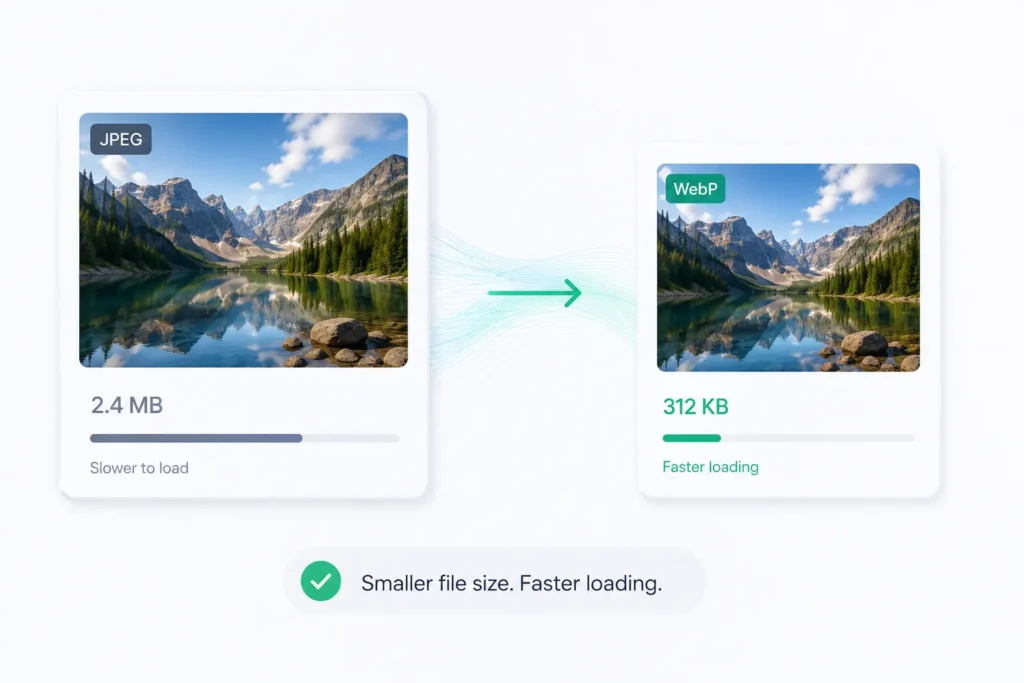
Images typically account for 40-60% of a web page’s total data weight. JPEG, introduced in 1992, and PNG, introduced in 1996, were designed for a world where screens were smaller and network speeds were lower. They encode well but not efficiently enough for today’s high-resolution displays and performance standards.
A full-width hero image in traditional JPEG at retina resolution might weigh 800 KB. Deliver that to 10,000 visitors daily and you’re transferring 8 GB of image data every day, for a single image.
JPEG vs WebP
Google released WebP in 2010 with a straightforward goal: better compression than JPEG without visible quality loss. WebP uses more sophisticated prediction and entropy coding algorithms, achieving 25-35% smaller files than equivalent-quality JPEGs. It also supports transparency (previously requiring PNG, which doesn’t compress as efficiently) and animation.
Browser support took years to achieve full coverage but is now universal. Most modern image optimization pipelines convert JPEGs and PNGs to WebP automatically at build time or on the fly via CDN image transformation services.
AVIF and Next-Generation Optimization
AVIF (AV1 Image File Format) builds on the AV1 video codec developed by the Alliance for Open Media. Released in 2019 and now supported in all major browsers, AVIF achieves 50% smaller file sizes than JPEG and roughly 20% smaller than WebP at the same visual quality.
The catch is encoding time. AVIF images take longer to encode than WebP or JPEG, making real-time conversion more demanding. For pre-rendered assets, the size savings are worthwhile. For dynamic image generation, WebP remains the more practical choice until encoding hardware acceleration improves.
How Image Optimization Improves User Experience
Images that load faster produce measurably better experiences. Google’s Largest Contentful Paint metric specifically measures when the largest image or text block on a page becomes visible. For most pages, that’s a hero image. Moving from JPEG to WebP and adding lazy loading (deferring off-screen images until the user scrolls near them) can improve LCP scores by several seconds on mobile connections.
8. AJAX and Asynchronous Loading Changed User Experience
The Problem With Full Page Reloads
In the earliest web applications, every interaction required a full page reload. Click a button to submit a form, and the browser sent a request to the server, waited, then re-downloaded and re-rendered the entire page. The screen would go blank, a spinning indicator would appear, and a few seconds later the page would reload, possibly with just one changed value.
This model worked when websites were documents. It broke down as soon as developers tried to build anything interactive. Every action felt heavy and slow, not because the server was slow, but because replacing an entire page to change one paragraph was an enormous amount of unnecessary work.
How AJAX Works
AJAX, Asynchronous JavaScript and XML, changed the model fundamentally. First used at scale by Google Maps and Gmail in 2004-2005, AJAX allowed JavaScript running in the browser to make HTTP requests to the server in the background, receive a response, and update only the relevant part of the page, without touching anything else.
The XMLHttpRequest API (later replaced by the cleaner Fetch API) gave JavaScript this ability. A user types in a search box and AJAX fires a request with each keystroke, returning suggestions and inserting them into a dropdown, all without reloading the page. A user marks an email as read and AJAX updates the count in the inbox without refreshing anything.
Real-Time Updates Without Refreshing Pages
AJAX made real-time web interfaces possible. Chat applications, live sports scores, social media feeds, collaborative document editing, all of these depend on the ability to update parts of a page continuously without disrupting the user. WebSockets later extended this further by keeping a persistent connection open for true bidirectional real-time communication.
The Foundation for Modern Web Applications
AJAX’s most lasting contribution was demonstrating that the browser could manage application state. Once JavaScript could fetch data and update the interface independently, the idea of building entire applications inside a browser became feasible.
This thinking directly led to single-page application (SPA) frameworks like React, Angular, and Vue, which manage complex interfaces by updating only what changes rather than replacing entire pages.
9. WebAssembly (WASM): Bringing High-Performance Computing to Browsers
What Is WebAssembly?
WebAssembly is a binary instruction format that runs in the browser at near-native speed. It isn’t a replacement for JavaScript, it’s a compilation target for languages like C, C++, and Rust that lets code written in those languages run inside a browser sandbox with predictable, high performance.
Standardized by the W3C in 2019 and supported in all major browsers, WebAssembly gives developers access to performance levels that were previously only possible in native desktop or mobile applications.
Why WASM Is Faster Than JavaScript
JavaScript is a dynamic language. Types are determined at runtime, functions can be redefined, and the engine has to make assumptions about code behavior before optimizing. Even with JIT compilation, JavaScript execution carries overhead that compiled, statically typed languages don’t.
WebAssembly modules are pre-compiled. The browser doesn’t need to parse source code, infer types, or run through optimization phases at runtime.
A WASM module loads and executes in a predictable, uniform way that modern processors can optimize at the hardware level. For computationally intensive operations, WASM typically runs 2-20 times faster than equivalent JavaScript.
Real-World Applications
Video Editing
WebAssembly has helped bring professional-grade media processing to the browser.
Tools such as Microsoft Clipchamp, Adobe Express, and Google’s Squoosh use WebAssembly to execute performance-intensive operations that would otherwise be difficult to run efficiently in JavaScript alone.
Video transcoding, image optimization, and media processing can now occur directly within a browser, enabling experiences that previously required native desktop applications.
Gaming
WebAssembly made the browser a viable gaming platform. Engines like Unity and Unreal can compile games to WASM for web delivery. Games that would have required a native download run in a browser at 60 frames per second. This opened the browser to a category of experiences it was previously too slow to support.
Data Processing
Scientific computing, signal processing, image manipulation, and cryptographic operations all benefit from WebAssembly’s performance. Applications processing genomic data, running physics simulations, or performing complex financial calculations can use WASM to match the speed of native tools without requiring installation.
10. Cloud Computing Removed Infrastructure Bottlenecks
Traditional Hosting Limitations
Before cloud computing, running a web service meant buying or renting physical servers, estimating your peak traffic in advance, and provisioning enough capacity to survive your busiest day without over-spending on hardware that sat idle the rest of the time.
Getting this wrong in either direction was costly. Under-provision and your site crashed during traffic spikes. Over-provision and you paid for machines running at 5% utilization.
Scaling required purchasing hardware, racking it, configuring it, and waiting, a process that took weeks or months. If a server failed, it needed physical replacement.
Automatic Scaling During Traffic Surges
Cloud platforms like AWS, Google Cloud, and Microsoft Azure replaced this model with infrastructure that scales in minutes or seconds. Auto-scaling groups monitor traffic and spin up additional server instances when load increases, then terminate them when demand drops.
A service handling 1,000 requests per second at noon can automatically expand to handle 50,000 at 5pm and scale back down by midnight, paying only for what it used.
This elasticity fundamentally changed the performance ceiling. A website is no longer limited to the capacity of the servers its owners can afford to keep running at all times.
That same elasticity makes spending harder to predict, which is why cloud cost management became its own discipline, giving teams visibility into where compute, storage, and idle resources are quietly driving up the monthly bill so the savings auto-scaling promises actually show up.
Global Availability and Reliability
Cloud providers operate data centers across dozens of regions worldwide. Traffic routing policies direct users to the nearest healthy region, reducing latency and maintaining availability if one data center experiences problems. Multi-region deployments that once required enormous infrastructure investment became accessible to companies of any size.
Why Cloud Infrastructure Improved Performance
Cloud platforms also introduced managed services that replaced slow, hand-configured components with optimized, purpose-built alternatives. Managed databases with automatic replication, serverless functions that start in milliseconds, object storage with global CDN integration, and containerized deployment with sub-second startup times, each eliminated layers of latency that self-managed infrastructure struggled to avoid.
11. Progressive Web Apps (PWAs) and Offline Reliability
What Makes a PWA Different?
A Progressive Web App is a website that behaves like a native app. It loads instantly, works offline, can be added to a home screen, and receives push notifications. From the user’s perspective, a PWA is indistinguishable from an installed application. From the developer’s perspective, it’s a website built with a specific set of technologies that unlock app-like capabilities.
The term was coined by Google engineers Alex Russell and Frances Berriman in 2015. Major companies including Twitter (now X), Pinterest, Uber, and Starbucks deployed PWAs and reported dramatic improvements in performance and user engagement.
Service Workers Explained
The technology at the heart of every PWA is the service worker, a JavaScript file that runs in the browser background, separate from the main page, even when the page isn’t open. Service workers intercept network requests and can respond from a local cache, forward them to the network, or do both and merge the results.
This interception layer gives developers complete control over what happens when a user requests a resource. Serve it from cache instantly. Try the network and fall back to cache if offline. Fetch a fresh copy in the background and update the cache for next time. Each strategy can be applied per resource type, per URL pattern, or per request condition.
Offline Access and Instant Loading
A PWA pre-caches its critical assets during installation. The next time the user opens it, those assets load from local storage without any network request.
For repeat visits, the app shell, the interface structure, appears in under 100 milliseconds because it was already there. Data then loads from the network or cache depending on connectivity.
In low-connectivity environments like rural areas, public transport, and poor cellular coverage zones, offline capability transforms a website from unusable to functional. Users in emerging markets with limited connectivity were among the first and most enthusiastic adopters of PWA experiences.
Improved User Engagement
Twitter Lite, Twitter’s PWA, reported a 75% increase in tweets sent and a 65% improvement in pages per session after switching users to the PWA. Starbucks built a PWA to reach customers in areas with unreliable internet access and doubled the number of daily active users who placed orders online. These results reflect a consistent pattern: faster, more reliable experiences produce measurably better engagement.
12. Edge Computing: The Next Step Beyond Traditional CDNs
What Is Edge Computing?
Edge computing moves computation out of centralized data centers and into nodes distributed across the network, as close to users as possible.
The edge can only switch between renditions that were encoded sensibly to begin with, so a bitrate calculator is often used upstream to match encoding settings to each stream’s resolution and frame rate, giving the edge a clean ladder of bitrates to move a viewer through as their bandwidth shifts.
Rather than a request traveling to a server farm and back, processing happens at the network edge, sometimes in the same city, sometimes in the same building.
The “edge” refers to the outer boundary of the network, where the internet meets end users. Edge computing platforms place programmable compute nodes at CDN PoPs, internet exchange points, and telecommunications facilities.
How It Differs From CDNs
Traditional CDNs cache static content. They’re excellent at delivering pre-built files quickly but can’t make decisions or run logic, they just store and serve. Edge computing adds programmability. Code runs at the edge node, processing requests and generating responses dynamically before they ever touch a centralized origin server.
Cloudflare Workers, Vercel Edge Functions, and AWS Lambda@Edge are examples of edge computing platforms that let developers deploy code globally, running at the location nearest each user. An edge function can authenticate users, rewrite URLs, personalize content, run A/B tests, or support mobile fraud detection by analyzing device signals and suspicious activity, all without requiring every request to travel back to a centralized origin server.
Real-Time Processing Near Users
For latency-sensitive applications, edge computing is transformative. A gaming application that needs to validate moves, synchronize state, or calculate physics can do that within 10 milliseconds by running logic at the nearest edge node rather than waiting 100+ milliseconds for a request to reach a central server.
Streaming platforms use edge computing to manage session state, select optimal bitrates, and handle ad insertion close to users. Financial applications run risk calculations at the edge to make faster decisions. IoT platforms process sensor data at edge nodes rather than shipping all data to a central cloud.
Examples of Edge-Powered Applications
E-commerce platforms increasingly use edge computing for personalization, localization, and checkout optimization, ensuring that shop pages load with sub-100ms response times regardless of where the buyer is located.
Cloudflare’s Magic Transit routes network traffic through edge nodes to filter DDoS attacks before they reach origin infrastructure, processing the decision in milliseconds.
Video platforms like Mux use edge computing to start streams faster by pre-positioning manifest files and initial segment data close to viewers.
13. AI-Powered Optimization Is Making the Web Even Faster
Predictive Caching
Traditional caching is reactive, content gets cached after someone requests it. AI-powered predictive caching is proactive. Machine learning models analyze navigation patterns and predict which resources a user is likely to request next, pre-loading them before the user makes a decision.
Netflix uses this approach to pre-buffer content while you browse, so playback starts instantly. Google Chrome uses ML-based prefetching to predict the next page you’ll click based on your browsing patterns and the text you hover over, pre-fetching it before you click.
Intelligent Traffic Routing
Traditional routing picks the path with the lowest apparent latency at any moment. Intelligent routing uses historical performance data, real-time network conditions, and machine learning to predict which path will perform best over the duration of a request, not just at the instant it’s routed.
Cloudflare’s Argo Smart Routing uses ML to analyze real-time network conditions and route traffic over the fastest available paths, typically often reducing latency significantly compared with default internet routing.
Similar systems at Akamai and Fastly continuously optimize routing decisions based on observed performance rather than static rules.
Automated Performance Optimization
AI automation services are starting to automate the performance work that previously required expert engineers. Tools now analyze page content and automatically apply responsive image sizing, compression levels, caching headers, and lazy loading, adapting settings per user based on their device, connection speed, and browsing history.
The same automation trend is now expanding beyond technical infrastructure into customer-facing operations, where businesses are increasingly adopting AI powered reception systems to manage inbound conversations and automate repetitive communication workflows.
Cloudflare’s Speed Brain and Image Resizing products make automatic optimization decisions per request. Google’s PageSpeed Insights and Lighthouse now recommend specific fixes with enough detail that AI-powered build tools can apply them automatically as part of a deployment pipeline.
The Future of AI-Driven Web Speed
The direction is toward fully personalized performance. Rather than one website that delivers the same assets to every user, future systems will dynamically compile, compress, and route individualized responses optimized for each visitor’s exact device, network conditions, and usage patterns. The web doesn’t slow down — it adapts.
Comparison Table: Which Technologies Had the Biggest Impact?
| Technology | Problem Solved | Speed Benefit | Still Important Today? |
|---|---|---|---|
| CDNs | Geographic latency | Reduced load time by 50-70% for global users | Yes, foundational |
| DNS Optimization | Slow domain name resolution | Faster connection setup and reduced lookup delays | Yes, foundational |
| HTTP/2 | Head-of-line blocking, redundant headers | 30-50% faster page loads | Yes, now baseline |
| HTTP/3 / QUIC | Connection setup, mobile network switching | 0-RTT connections, better mobile performance | Yes, growing adoption |
| GZIP / Brotli | Large file sizes | Reduces transfer by 60-85% | Yes, applied everywhere |
| Browser Caching | Repeat download overhead | Near-instant repeat loads | Yes, essential |
| Modern Image Formats (WebP/AVIF) | Oversized image files | 25-50% smaller than JPEG | Yes, widely deployed |
| JavaScript Engines (V8) | Slow client-side scripting | 10-100x JS execution speed | Yes, underpins the whole web |
| AJAX | Full page reloads for every interaction | Interactive apps without reload delays | Yes, foundation of SPAs |
| WebAssembly | JS performance ceiling for complex apps | 2-20x faster for compute tasks | Growing rapidly |
| Cloud Computing | Fixed infrastructure capacity | Elastic scaling, global availability | Yes, dominant model |
| PWAs + Service Workers | Slow repeat visits, no offline support | Sub-100ms repeat loads, offline access | Yes, mainstream on mobile |
| Edge Computing | Origin server latency for dynamic content | Single-digit millisecond response at edge | Yes, expanding fast |
How Faster Websites Affect SEO, Conversions, and User Experience
Core Web Vitals
Google’s Core Web Vitals are a set of specific measurements that assess user experience quality. The three primary metrics are Largest Contentful Paint (LCP), which measures loading speed; Cumulative Layout Shift (CLS), which measures visual stability; and Interaction to Next Paint (INP), which measures responsiveness.
These metrics became ranking factors in 2021 and now directly influence where pages appear in Google search results. A site that scores well on Core Web Vitals gets a meaningful ranking advantage over slower competitors targeting the same keywords, all else being equal.
Bounce Rate Reduction
Research published by Google shows a direct relationship between page load time and bounce rate. Pages loading in one second have a bounce rate roughly 30% lower than pages loading in three seconds. Pages loading in five seconds have bounce rates nearly three times higher than one-second pages.
Every second shaved off load time keeps more users on the page. For content-driven sites, this translates to more time on site and more pages per session. For e-commerce, it means more users reaching product and checkout pages.
Conversion Improvements
The commercial impact of speed is well-documented. Walmart found that improving load time by one second increased conversions by 2%. Mobify calculated that a 100ms reduction in homepage load time generated 1.11% more revenue per session. Zalando reported a 0.7% increase in revenue for every 100ms of improvement.
These might seem like small percentages, but at the scale of major e-commerce operations, fractions of a second translate to millions in annual revenue.
Search Ranking Benefits
Page experience signals, including Core Web Vitals, mobile usability, HTTPS usage, and absence of intrusive interstitials, combine with relevance and authority signals in Google’s ranking algorithm. A fast, well-built site doesn’t automatically outrank authoritative content, but two sites competing for the same topic with similar content quality will be meaningfully separated by their technical performance.
Technologies Behind the Fastest Websites Today
Google’s own web properties serve as a live testing ground for every performance technology discussed in this article. Google.com uses HTTP/3, Brotli compression, and aggressive prefetching. Core products like Gmail and Google Docs use service workers for offline capability and AJAX for near-instant interactions. Google’s infrastructure runs on its own private fiber network and custom-built servers optimized for latency reduction.
Netflix
Netflix serves hundreds of millions of streams daily with multi-second startup times that are actually measured in milliseconds on modern connections. Their performance stack includes predictive pre-buffering (downloading the start of a video before the user clicks play), custom adaptive bitrate algorithms that adjust stream quality every few seconds based on current network conditions, and Open Connect — their proprietary CDN that places servers inside internet service providers’ facilities, getting content as close as physically possible to subscribers.
Amazon
Amazon is famously rigorous about performance. Every millisecond of latency is tracked against revenue impact, and the company has built an entire culture around it. AWS CloudFront (their CDN) runs from over 600 edge locations. Amazon.com uses server-side rendering with edge caching for product pages, predictive pre-loading for likely next clicks, and continuous A/B testing of performance changes to measure their exact business impact.
Cloudflare
Cloudflare is worth examining not just as a user of speed technologies but as a builder of them. Their global network of 300+ PoPs underpins a significant portion of the internet. Cloudflare Workers brought edge computing to the mainstream. Their implementation of HTTP/3 at scale helped validate the standard for the broader industry. Cloudflare’s R2 storage, Zero Trust networking products, and bot management all process requests at the edge, making security and performance inseparable on their platform.
What Technologies Will Make the Web Faster in the Future?
Edge AI
The next phase of edge computing involves running AI inference directly at network edge nodes. Rather than sending data to a central server to run a model and wait for a response, edge AI processes requests locally — generating personalized content, making recommendations, detecting anomalies, and moderating content in milliseconds.
Smaller, more efficient AI models designed for edge deployment — distilled versions of larger models — are already being tested at CDN points of presence. The result will be websites that feel personally responsive in ways that centralized AI cannot match due to latency constraints.
Smarter Network Routing
The future of routing is less about finding fixed optimal paths and more about continuously learning, adapting systems that model network behavior in real time. BGP (the Border Gateway Protocol that governs routing between autonomous systems on the internet) is over 30 years old and was not designed for today’s traffic patterns or performance requirements.
Newer approaches using software-defined networking and ML-driven traffic engineering are gradually replacing static routing rules with intelligent systems that anticipate congestion before it causes problems.
Advanced Compression Standards
The Brotli successor already in development aims for 10-15% better compression ratios through improved context modeling. For media specifically, AV1 video and AVIF images continue improving their encoders, and next-generation codec work is underway.
The long-term trajectory is toward formats that compress more aggressively and encode the intent of content, not just its pixels or bytes, making assets smaller without the quality trade-offs that defined earlier compression.
Future Web Protocols
HTTP/3 is still in early global deployment, but research on its successor is already underway. IETF working groups are exploring connection migration improvements, multipath QUIC (using multiple network paths simultaneously for redundancy and speed), and deeper integration between the application layer and transport layer to eliminate the remaining handshake and round-trip overhead.
The web is unlikely to stop getting faster. Each generation of protocol, format, and infrastructure builds on the last, and the gap between users and content keeps closing.
Frequently Asked Questions
What technology made the web move quicker?
No single technology deserves all the credit. CDNs removed geographic latency. HTTP/2 and HTTP/3 improved how data travels. Browser engines made JavaScript run faster. Compression reduced file sizes. Caching eliminated unnecessary requests. Mobile networks improved connectivity. Together, these overlapping technologies produced the fast, responsive web that exists today.
What was the biggest breakthrough in web performance?
Depending on your perspective, the answer changes. From a network standpoint, CDNs had the most immediate and widespread impact by solving the latency problem for global audiences. From an application standpoint, AJAX was transformational because it changed the fundamental model of how web interactions worked. From a protocol standpoint, QUIC and HTTP/3 represent the most architecturally significant advancement in how web data moves.
How do CDNs improve website speed?
CDNs store cached copies of website content in servers distributed worldwide. When a user makes a request, it routes to the nearest CDN node rather than the origin server, dramatically reducing the physical distance data must travel. This cuts latency, speeds up delivery of static assets, and protects origin servers from traffic spikes.
Why is HTTP/3 faster than HTTP/2?
HTTP/2 improved on HTTP/1.1 by multiplexing requests over a single connection, but it still ran over TCP, which requires a multi-step connection handshake before data flows. HTTP/3 uses QUIC over UDP, which combines connection setup and encryption into a single step, reducing connection time dramatically. QUIC also handles network switches (like moving from Wi-Fi to cellular) without dropping connections, which HTTP/2 cannot do.
What is WebAssembly used for?
WebAssembly enables high-performance computing in the browser. It is used in browser-based video and audio editing tools, games ported from native engines, scientific and data processing applications, cryptography, 3D visualization, and any web application that needs to perform computation that would otherwise be too slow in JavaScript. Languages like C, C++, Rust, and Go can compile to WebAssembly.
How does caching improve performance?
Caching stores the results of previous operations — downloaded files, generated pages, database query results — so they can be served immediately without repeating the work. Browser caching saves assets locally so returning visitors don’t re-download them. Server caching saves generated page content so servers don’t re-process identical requests. CDN caching delivers assets from nearby network nodes. Combined, these layers eliminate most of the work involved in serving repeat visitors.
What role does AI play in web optimization?
AI currently contributes to web performance through predictive prefetching (loading resources before users request them), intelligent traffic routing (choosing optimal network paths in real time), automated performance auditing, and dynamic content adaptation. Future applications include edge AI inference for personalization, automated code optimization, and ML-driven protocol decisions that adapt communication behavior based on observed network conditions.
What technology will make the web faster in the future?
The most promising near-term technologies are edge AI (running inference close to users for instant personalized responses), multipath QUIC (using multiple network connections simultaneously), advanced compression codecs for media and text, and smarter routing infrastructure. Longer term, deeper integration between AI models and the infrastructure layer may produce web experiences that adapt proactively to each user’s context rather than responding to requests after the fact.