

If you searched for “backlink checker Wisestudyspot.com,” you probably want one of two things. Either you want a free tool that shows who links to a website, or you want to know whether Wisestudyspot offers one.
This guide answers both. You will learn what the search phrase means, how backlink checkers work, and how to check backlinks step by step. You will also see how to read the numbers, spot risky links, and use Google Search Console for free.
I wrote this the way I would explain it to a client: plain language, real examples, and no hype.
What Is Backlink Checker Wisestudyspot.com?
Backlink Checker Wisestudyspot.com is a search phrase people use to find a backlink-analysis tool or guide connected to the Wisestudyspot website. It points to a topic, not necessarily to a working software product.
People search this way for a simple reason. They land on a site, see a page about backlinks, and want to know if they can run a check right there.
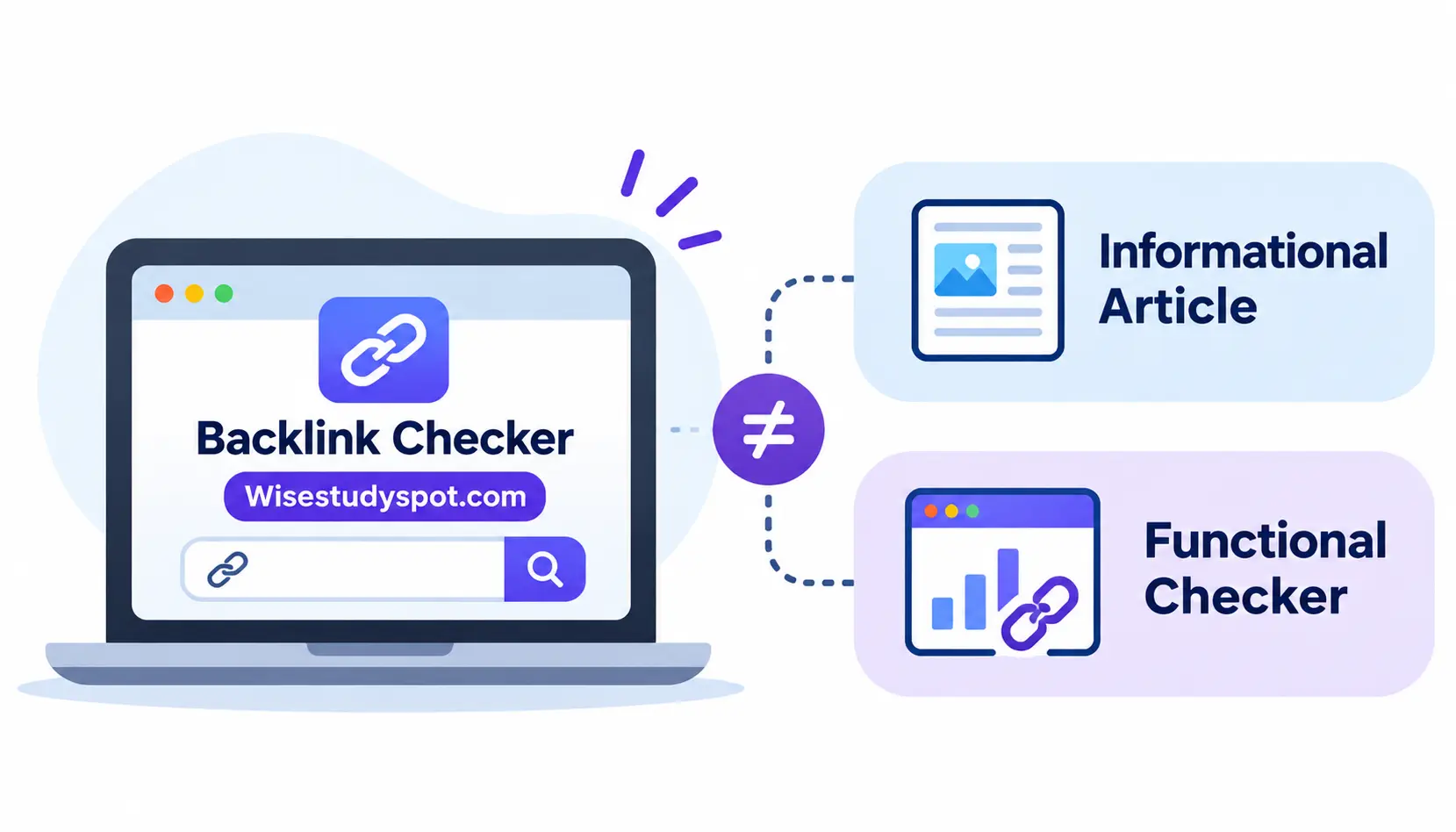
That leads to an important distinction. An informational article explains backlinks. A functional checker crawls the web, stores link data, and shows you a report. Those are very different things.
Does Wisestudyspot.com Have Its Own Backlink Checker?
The Wisestudyspot page tied to this search is an informational resource about backlink analysis. Building a real checker is expensive. It needs crawlers that scan billions of pages and a large database that updates constantly.
Before you trust any “checker” on a general content site, run one test. Enter a well-known domain and see whether it returns specific linking pages. If it only shows generic advice or sends you elsewhere, it is not a data tool.
In this guide, I do not present any third-party tool as a Wisestudyspot product. The tools below belong to their own companies.
What Can You Learn from a Backlink Checker?
A good backlink checker shows you who links to a site and how. Most reports include:
- Total backlinks: every link pointing to the domain or page.
- Referring domains: the number of unique websites linking to it.
- Linking pages: the exact pages that contain the links.
- Anchor text: the clickable words used in each link.
- Dofollow and nofollow attributes: hints about how the link is flagged.
- New and lost backlinks: links gained or removed over time.
What Is a Backlink Checker?
A backlink checker is an SEO tool that finds and lists the links from other websites that point to a domain or a specific page. It gives you a snapshot of a site’s link profile.
The tool does not read Google’s mind. It builds its own database by crawling the web, then shows you what it found. That is why two tools can give different numbers for the same site.
You can check at two levels. A domain-level check covers every link to the whole site. A URL-level check covers links to one page only. Use the domain view for a general audit and the URL view when you want to know why a single page ranks well.
How Does a Backlink Checker Work?
Behind the screen, the process has four stages:
- Crawling: bots visit web pages and follow links from one page to the next.
- Link discovery: when a bot finds a link, it records the source page, the target page, and the anchor text.
- Indexing: the tool stores that data and updates it when it re-crawls pages.
- Report generation: when you enter a domain, the tool pulls matching records and presents them.
There are limits. No crawler sees the whole web. Some pages are blocked, new links take time to appear, and old links may linger after they are removed. Treat every report as a strong estimate, not a perfect count.
Why Is Backlink Analysis Important for SEO?
Backlink analysis matters because links from other sites remain one of the signals search engines use to understand a page’s reputation. Wikipedia has a helpful general overview of backlinks if you want background on the concept.
In practice, analysis helps you:
- Understand how credible your site looks compared with others.
- Find link-building opportunities you would never guess.
- See what your competitors are doing right.
- Catch lost links before they hurt traffic.
- Notice sudden changes in your link profile.
Here is a scenario I see often. A small business owner notices traffic dropping on a popular guide. A backlink check shows that a high-quality blog removed its link to that guide two weeks earlier. One polite email restores the link, and the problem is solved. Without regular checks, nobody would have noticed.
How to Check Backlinks for Any Website
Checking backlinks takes about ten minutes once you know the steps. Here is the process I recommend.
Step 1: Choose a Backlink Checker
Pick a tool that fits your goal. Free tools work well for quick looks. Paid tools give deeper data, longer history, and bigger exports. If you are new, start free and upgrade only when you hit a real limit.
Step 2: Enter Your Website Domain
Type the domain, such as example.com, into the search box. Choose whether you want the whole domain, a subdomain, or one exact URL. Start with the full domain to get the big picture.
Step 3: Review the Total Backlinks
Look at the total first, but do not stop there. A large number can come from one site linking to you thousands of times through a footer or sidebar. The total is a starting point, not a verdict.
Step 4: Analyze Referring Domains
Next, check how many unique domains link to the site. Fifty links from fifty different websites usually say more than fifty links from one. Referring domains show the real breadth of a site’s support.
Step 5: Check Anchor Text and Link Attributes
Read the anchor text and look at each link’s attribute. Google recognizes rel=”nofollow”, rel=”sponsored” for paid links, and rel=”ugc” for user-generated content. Google treats these as hints, so they do not work like on/off switches.
Step 6: Identify New and Lost Backlinks
Compare the current report with an earlier one. New links show what content attracts attention. Lost links show what you may need to repair or reclaim.
Step 7: Export and Organize Your Report
Export the data as a CSV if the tool allows it. Open it in a spreadsheet and add columns for link quality, relevance, and action needed. A simple sheet beats a pretty dashboard when you need to make decisions.
Best Free Backlink Checker Tools to Analyze Any Website
The tools below are independent products. Features and free limits change often, so confirm current details on each tool’s own site before you rely on them.
Ahrefs Free Backlink Checker
Ahrefs is one of the best-known names in link analysis. Its free checker shows backlinks and referring domains alongside Domain Rating and Ahrefs Rank, plus some historical context. The free version limits how much data you can see. Full filtering and deep history sit behind paid plans.
SEO Review Tools Backlink Checker
This tool is useful for beginners who want a quick read on a backlink profile and some competitor insight. Check whether it asks you to create an account and how many reports you can run, since usage rules can change.
SEO SpyGlass
SEO SpyGlass is a dedicated backlink-auditing tool. It is known for analyzing anchor text, dofollow and nofollow balance, and overall link-profile health. That makes it a good fit when you want a closer audit rather than a quick glance.
Linkody Free Backlink Checker
Linkody’s free checker gives a quick view of referring domains and top backlinks, along with anchor text and link relationship details. It works well for fast reviews. Like most free tools, it limits how deep you can go.
Crawly Backlink Checker
Crawly focuses on link quality. It offers referring-domain analysis, quality ratings, an authority score, flags for potentially toxic domains, and CSV export. Remember that any “toxic” label is a tool’s opinion. Always review the flagged link yourself.
CrawlTide Backlink Checker
CrawlTide shows backlink and referring-domain totals, the dofollow share, and strong linking domains. It also supports competitor checks. Review its free usage limits before you plan any larger project.
Backlink Checker Tools Compared
| Tool | Main features to compare | Best suited for |
| Ahrefs | Backlinks, referring domains, DR, filters | General backlink research |
| SEO Review Tools | Backlink reports and competitor research | Beginners and quick checks |
| SEO SpyGlass | Anchor text and backlink profile analysis | Detailed backlink audits |
| Linkody | Referring domains and strongest backlinks | Quick backlink reviews |
| Crawly | Link quality, authority and exports | Backlink quality checks |
| CrawlTide | Backlinks, referring domains and usage limits | Quick domain and competitor checks |
Tip: Use two tools on the same site and compare the results. If both agree on the big picture, you can trust it. If they differ widely, dig into why.
Understanding the Main Backlink Checker Metrics
Total Backlinks
Total backlinks is the count of all discovered links pointing to a site. It can mislead because one site can create thousands of links through sitewide placements. Always read it next to referring domains.
Referring Domains
Referring domains count unique websites linking to you. This number shows how widely your content is referenced. It is usually a better health signal than raw link totals.
Domain Rating and Domain Authority
Domain Rating (DR) is an Ahrefs metric. Domain Authority (DA) comes from Moz. Both are third-party scores that estimate link strength. Google does not use them as ranking scores. Treat them as handy comparisons, not as targets.
URL Rating and Page Authority
These are the page-level versions. URL Rating (Ahrefs) and Page Authority (Moz) estimate how strong a single page’s link profile looks. They help you compare pages, but they are still estimates.
Anchor Text Distribution
Anchor text falls into a few common types:
- Branded: your name or domain.
- Generic: words like “click here” or “this site.”
- Exact-match: the exact keyword you want to rank for.
- Partial-match: a phrase that includes part of your keyword.
A natural profile mixes these, with plenty of branded and descriptive anchors. Using descriptive anchor text consistently across your website also supports a better on-page SEO strategy and helps users understand the content behind each link.
Dofollow and Nofollow Backlinks
A “dofollow” link has no special attribute. A nofollow link carries rel=”nofollow”. Google now treats nofollow, sponsored, and UGC as hints rather than strict commands. Nofollow links can still send visitors and build awareness.
New and Lost Backlinks
New links show growth. Lost links show risk. Tracking both over time helps you react quickly instead of finding problems months later.
Link Quality and Relevance
Quality depends on context. Ask yourself: is the link placed editorially inside useful content? Does the linking site cover a related topic? Would a real reader click it? Those questions matter more than any score.
How to Analyze a Website’s Backlink Profile
This is where a backlink checker turns from a number generator into a decision tool.
Evaluate Referring Domain Quality
Open a sample of linking sites and look for:
- Relevance: does the topic match yours?
- Editorial standards: is the content written with care?
- Genuine audience: does the site have real readers and activity?
- Credibility: would you trust it?
- Outbound link patterns: does it link out to everyone and everything?
Analyze Anchor Text Distribution
Sort anchors by frequency. Healthy profiles lean on branded and natural descriptive phrases. If one exact-match phrase appears again and again, that repetition can look unnatural and deserves a closer look.
Identify High-Value Backlinks
High-value links usually come from relevant editorial mentions inside helpful pages, such as a respected blog post citing your research. One link like that often beats dozens of random directory links.
Find New and Lost Backlinks
For each lost link, visit the old page. Was the page deleted? Was the link edited out? If the page moved, ask the owner to update the URL. If the link was removed, check whether your content became outdated. Regular monitoring also helps you understand whether backlink changes are affecting overall performance, so follow a consistent SEO tracking process to measure rankings, traffic, and referring domains.
Compare Your Backlink Profile With Competitors
Run your site and a rival through the same tool. Look for domains that link to them but not to you. That gap list is often your best source of realistic outreach targets.
How to Check Competitor Backlinks
Choose Relevant Competitors
Pick sites that compete for the same keywords and the same audience, not just the biggest names in your industry. A smaller, closer competitor gives more usable ideas.
Find Their Referring Domains
Enter the competitor’s domain into your backlink checker and open the referring domains list. Sort by relevance or authority, then scan for patterns such as guest posts, resource pages, or press mentions.
Identify Link-Building Opportunities
Look for relevant blogs, resource pages, industry publications, and editorial opportunities. Ask one question for each: what did this site see in my competitor’s content, and can I offer something genuinely useful?
Prioritize the Best Opportunities
Rank opportunities by relevance, audience, and editorial fit. Do not rely only on authority scores. A small niche site with an engaged audience can beat a large general site that never sends traffic.
Turn Backlink Data Into an Outreach Plan
A simple spreadsheet works well. Use these columns:
- Prospect domain
- Contact name and email
- Target page on your site
- Why they would care
- Outreach status (not started, sent, replied, linked)
- Follow-up date
Work through the list in small batches and personalize every message. Businesses looking to improve their backlink profiles can also explore professional SEO and link building services to identify relevant opportunities and build quality backlinks through outreach.
How to Identify Toxic or Suspicious Backlinks
Common Warning Signs
Watch for these red flags:
- Links from irrelevant websites.
- Link farms built only to pass links.
- Automatically generated or scraped pages.
- Manipulative anchor text repeated at scale.
- Paid links meant to influence rankings.
- Sudden, unnatural spikes in link patterns.
Are All Low-Authority Backlinks Harmful?
No. A low authority score alone does not make a link harmful. New sites, local businesses, and niche blogs often have low scores and still link naturally. Judge the link by its context and intent, not just the number.
When Should You Use Google’s Disavow Tool?
Google says most websites do not need to use the disavow tool. It is meant for cases with a large number of spammy or artificial links, especially when you have received a manual action or are likely to. If you only see a few odd links, ignore them.
How to Handle Suspicious Backlinks
- Investigate the source. Open the page and see where your link sits.
- Decide if it is manipulative. Was it placed to game rankings, or is it simply low quality?
- Try removal. Contact the site owner if a link looks clearly bad.
- Disavow only when justified. Follow Google’s criteria before you upload a file.
How Google Search Console Helps You Check Backlinks
Google Search Console is free and shows links Google has found to your own verified site. It is the safest place to start.
Find the Links Report
Open Search Console, choose your property, and select Links from the left menu. You will see external links and internal links summarized there.
Review Top Linking Sites
This list shows the domains that link to you most. Use it to spot your strongest supporters and any unexpected sources.
Find Your Most-Linked Pages
The top linked pages report shows which of your pages attract outside links. Study those pages. They reveal the type of content others want to reference.
Analyze Top Linking Text
This report lists the anchor text used to link to your site. It is a quick way to check whether your anchors look natural.
Understand Search Console’s Limitations
The Links report is useful but not complete. It is not a full backlink database, and it lacks many metrics that dedicated SEO tools provide. It also works only for sites you own or manage. Pair it with a third-party checker for a fuller view.
Common Backlink Checking Mistakes to Avoid
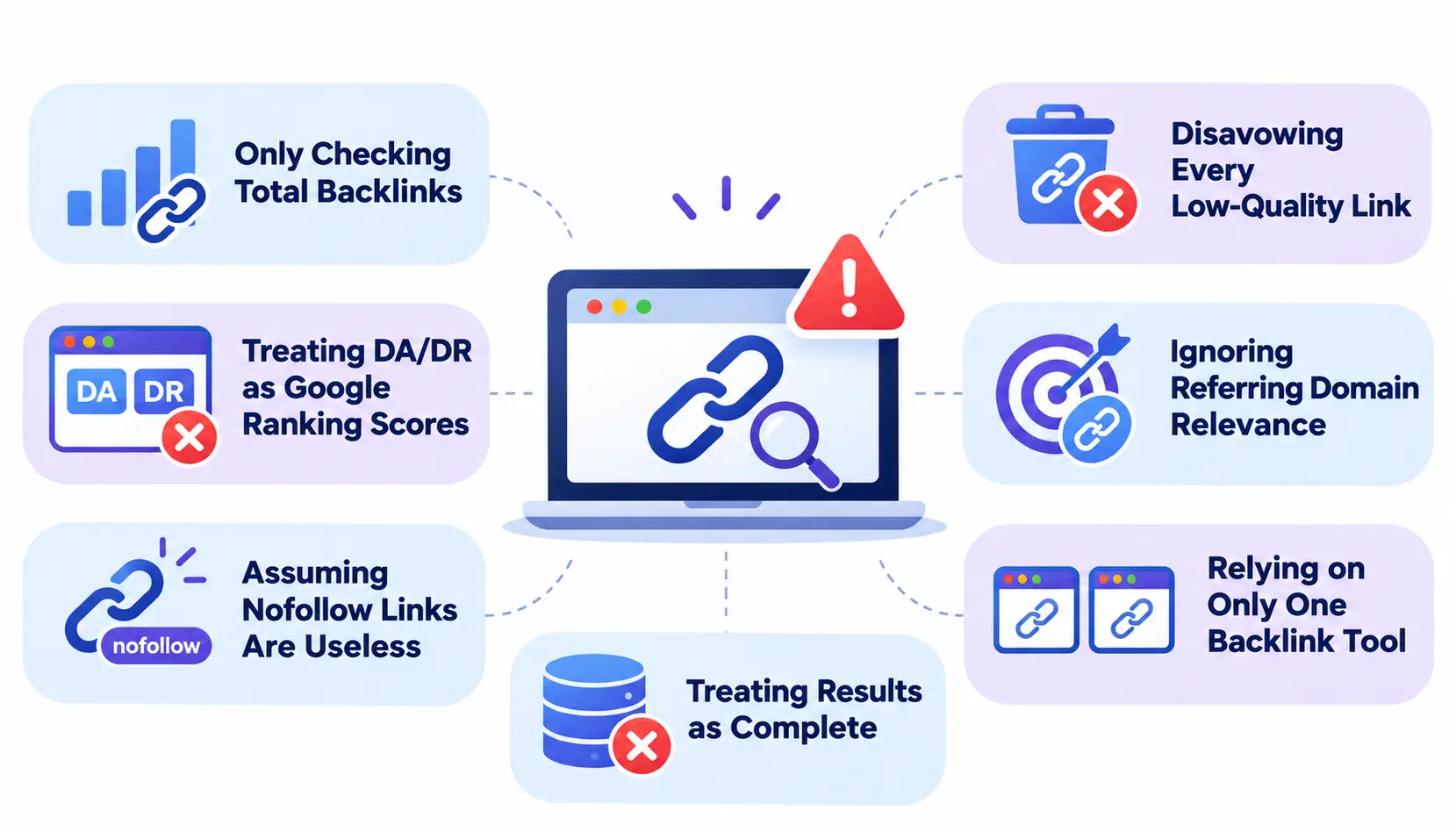
Focusing Only on Total Backlinks
Raw totals hide quality and variety. Look at referring domains and relevance too.
Treating DA and DR as Google Ranking Scores
These are third-party estimates. They are useful for comparison, but Google does not rank pages using them.
Assuming Every Nofollow Link Is Useless
Nofollow links can drive traffic, build trust, and make a profile look natural. Do not ignore them.
Disavowing Every Low-Quality-Looking Link
Over-disavowing can remove links that were harmless or even helpful. Use the tool sparingly.
Ignoring Referring Domain Relevance
A link from a related site usually carries more meaning than one from an unrelated source, no matter the score.
Depending on Only One Backlink Tool
Every tool has its own crawler and gaps. Compare at least two sources.
Treating Backlink Database Results as Complete
No database covers the whole web. Use reports as guides, not as exact totals.
Best Practices for Maintaining a Healthy Backlink Profile
- Monitor regularly. A monthly check catches problems early.
- Focus on relevant websites. Relevance beats volume.
- Earn editorial mentions. Create content people cite on their own.
- Build link-worthy resources. Original research, tools, and clear guides attract links.
- Study competitor opportunities. Use gap analysis to find realistic targets.
- Watch lost backlinks. Reclaim valuable links quickly.
- Use proper link attributes. Google recommends rel=”sponsored” for paid placements, and it accepts nofollow as an alternative. Use rel=”ugc” for user-generated links.
- Follow Google’s link spam policies. Avoid buying or exchanging links to manipulate rankings.
Frequently Asked Questions About Backlink Checker Wisestudyspot.com
1. What Is Backlink Checker Wisestudyspot.com?
It is a search phrase for finding backlink-analysis information connected to Wisestudyspot.com. It refers to a topic and guide rather than a confirmed standalone software product.
2. Does Wisestudyspot.com Offer a Free Backlink Checker?
The Wisestudyspot page behind this search is informational. Confirm directly on the site whether a working tool is available. For live data, use established tools like Ahrefs, Linkody, or Google Search Console.
3. How Can I Check Backlinks for Free?
Use Google Search Console for your own site and a free checker such as Ahrefs’ free tool or Linkody for any domain. Enter the domain, then review backlinks, referring domains, and anchor text.
4. Can I Check a Competitor’s Backlinks?
Yes. Third-party backlink checkers let you enter any public domain. Search Console only shows data for sites you have verified, so it will not work for competitors.
5. What Is the Difference Between Backlinks and Referring Domains?
Backlinks are individual links pointing to your site. Referring domains are the unique websites those links come from. One domain can send many backlinks.
6. Which Free Backlink Checker Is Best?
There is no single best tool. Ahrefs suits general research, SEO SpyGlass suits detailed audits, and Linkody suits quick reviews. Compare two tools for a more reliable picture.
7. Does Google Search Console Show All Backlinks?
No. Its Links report does not claim to be a complete backlink database, and it offers fewer metrics than dedicated SEO tools. Use it as a trusted starting point.
8. Are Nofollow Backlinks Valuable?
Often, yes. Google treats nofollow as a hint, and these links can still bring visitors, brand mentions, and a natural-looking profile.
9. How Do I Find Toxic Backlinks?
Run a backlink report and look for irrelevant sites, link farms, auto-generated pages, and repeated exact-match anchors. Check each suspicious link manually before acting.
10. Should I Disavow Spammy Backlinks?
Usually not. Google says most sites do not need to disavow. Consider it only when you face a large volume of artificial links and a manual action, or are likely to.
11. How Often Should I Check My Backlink Profile?
A monthly review works for most sites. Check more often during a link-building campaign or after a sudden traffic drop.
Final Thoughts on Backlink Checker Wisestudyspot.com
Backlink Checker Wisestudyspot.com is best understood as a doorway into the topic of backlink analysis. The Wisestudyspot page offers information, while the heavy data work happens in dedicated tools with their own crawlers and databases.
The real skill is not running a report. It is reading one well. Look past total counts, study referring domains and relevance, compare at least two sources, and act only on links that truly matter.
Start with Google Search Console, add one free checker, and build a simple monthly routine. Small, steady habits protect and grow your link profile far better than one big audit.