

There are more online tools than anyone can sensibly test. Finding one that fits a task, a budget, and a privacy standard takes time, and search results rarely help, because the same name is often described in very different ways.
“Latest online tool guide Zardgadjets” is a good example. Some pages describe it as a gadget blog. Others call it a tool directory or imply a software platform with accounts and AI features. This guide separates what the supplied research supports from what it does not, then shows how to use any online tool guide well.
You will learn what Zardgadjets appears to be, which kinds of online tools guides like it cover, how to evaluate and choose tools, and how to protect your data.
What Is the Latest Online Tool Guide Zardgadjets?
Based on the supplied research, ZardGadjets.org describes itself as a blog covering gadgets and online tools. The “latest online tool guide Zardgadjets” is informational content about digital tools, not a standalone application. The tools it discusses are third-party products.
A caution: reports about the site disagree on its identity, and the site header and article titles use slightly different spellings (“ZardGadjet” and “ZardGadjets”). Treat the site’s own About page as the starting point and verify it yourself.
Understanding the Purpose of Zardgadjets
The stated purpose is to publish information about gadgets and online tools. Its About page reportedly lists guide-style titles such as “Latest Online Tool Guide ZardGadjets” among the content it publishes. In practice, that makes it a reading resource that helps people learn what kinds of tools exist and how to think about choosing them.
Is Zardgadjets an Online Software Platform or an Informational Website?
Based on the supplied research, it is an informational website. Some competing articles claim subscriptions, centralized accounts, integrated dashboards, or AI-powered recommendations. The research supplied for this article does not verify those claims, so this guide does not repeat them. If you see them elsewhere, check the official site before believing them.
Who Can Benefit From the Zardgadjets Guide?

Anyone comparing digital tools can benefit: students looking for study and organization tools, freelancers managing clients, business owners exploring automation, content creators, and digital marketers. Beginners get orientation on categories. More experienced readers can use the material as a starting list to research further.
What Types of Online Tools Are Covered in the Zardgadjets Guide?
Tool guides in this space typically organize online tools by function. The categories below are the ones the research identifies. The example products are independent companies; they are not confirmed to be owned or operated by Zardgadjets.
| Category | What it does | Independent examples |
|---|---|---|
| Productivity and task management | Organizes tasks, notes, schedules | Notion, Trello |
| AI and automation | Assists with content and repetitive work | Zapier (automation) |
| Writing and editing | Grammar, editing, readability | |
| Design and creative | Images, graphics, video, presentations | Canva |
| SEO and marketing | Keyword, backlink, site audits | Semrush, Ahrefs |
| Communication and collaboration | Meetings, chat, file sharing | Google Drive (file sharing) |
| File management and utilities | Conversion, compression, calculators | |
| Security and privacy | Passwords, authentication, encryption | Bitwarden |
Productivity and Task Management Tools
These tools handle task lists, note-taking, scheduling, and project organization. They suit readers whose main problem is keeping track of work. Notion and Trello are examples of independent products in this area.
AI and Automation Tools
This category covers AI assistants, content generation, workflow automation, and handling repetitive tasks. Zapier is an example of an automation product. Treat AI output as a draft that needs your review, and check how any AI tool handles the data you give it.
Writing and Editing Tools
Writing tools cover grammar checking, text editing, content organization, and readability improvement. They help most when you already have a draft and want it cleaner, not when you need accurate facts.
Graphic Design and Creative Tools
These include image editing, graphic design, video editing, and presentation creation. Canva is an example of a design product. They let non-designers produce usable visuals without installing specialist software.
SEO and Digital Marketing Tools

SEO tools support keyword research, backlink analysis, website auditing, and performance monitoring. Semrush and Ahrefs are examples. Check current plans on the provider’s own site, since pricing and limits change.
Communication and Collaboration Tools
This group covers video conferencing, team messaging, file sharing, and shared workspaces. Google Drive is an example of cloud storage used for sharing files. Look first at whether the tool connects to the apps your team already uses.
File Management and Online Utility Tools
Utility tools include PDF converters, image compressors, file format converters, and online calculators. They are convenient for one-off jobs, but they are also where readers are most tempted to upload sensitive files to unfamiliar sites. See the security section below.
Security and Privacy Tools
This category includes password managers, multifactor authentication, encryption utilities, and privacy protection. Bitwarden is an example of a password manager. These tools protect your accounts, so choose them with extra care.
Key Features of a Useful Online Tool Guide
A good tool guide helps you decide, not just browse. The features below describe what to look for in any guide. They are standards for judging guides, not confirmed features of Zardgadjets.
Organized Tool Categories
Clear categories let you jump to the task you care about instead of scrolling an undifferentiated list.
Simple Explanations for Beginners
Plain definitions of terms like web application or SaaS keep beginners from guessing.
Practical Tutorials and Usage Instructions
Steps that show how a tool is actually used are more useful than a feature list.
Tool Comparisons and Alternatives
A guide that names alternatives and explains the trade-offs lets you compare before committing.
Information About Features and Pricing
Pricing details should name the plan and the date checked. Without that, treat any price as unverified.
Regularly Updated Recommendations
Software changes often. Look for visible update dates, and confirm details on the provider’s website.
How Can Online Tools Help With Everyday Tasks?
Online tools reduce manual work by moving routine tasks into the browser. The examples below are hypothetical illustrations, not reported results.
Improving Productivity and Time Management
A task manager or calendar tool gives one place to see deadlines, which reduces the chance of missed commitments.
Simplifying Academic Work and Research
Note-taking and organization tools help students keep assignments and research in one place.
Supporting Freelancers and Remote Workers
Freelancers can track client work and deadlines, and share files without email attachments.
Managing Business Operations
Business owners can use automation tools to connect applications and cut repetitive steps.
Improving Content Creation and Digital Marketing
Creators can design graphics and edit video in the browser, while marketers use SEO tools to research keywords and monitor sites.
| User | Example application (hypothetical) |
|---|---|
| Student | Organizing assignments and research |
| Freelancer | Managing clients and deadlines |
| SEO professional | Keyword and backlink research |
| Content creator | Designing graphics and editing videos |
| Business owner | Automating repetitive workflows |
What Are the Main Benefits of Using Online Tools?
The main benefits are less manual work, access from several devices, and lower upfront cost than some installed software. The size of these benefits depends on the tool and your use. The research supplied does not include statistics on them, so no figures are given here.
Saving Time and Reducing Manual Work
Automating or templating repeated tasks removes steps you would otherwise do by hand.
Improving Work Efficiency
Keeping tasks, files, and notes in fewer places reduces time spent searching.
Accessing Tools From Different Devices
Browser-based tools can usually be used from any device with a browser, though mobile support varies by product.
Reducing Software Expenses
Many online tools offer free plans, which can lower costs. Free plans often have limits, covered in the pricing section.
Supporting Remote Collaboration
Shared workspaces and file sharing let people work on the same material without passing copies around.
Learning New Digital Skills
Trying tools for specific tasks builds familiarity with categories like design, analytics, and automation.
How to Choose the Right Online Tool for Your Needs
Choose a tool by starting with the problem, then comparing features, pricing, usability, compatibility, and security, and testing before you commit.
| Factor | What to check |
|---|---|
| Functionality | Does it solve the intended problem? |
| Usability | Is the interface easy to understand? |
| Pricing | Are the features you need available for free? |
| Security | Does it explain how user data is handled? |
| Compatibility | Does it work across the devices you use? |
| Integrations | Can it connect with applications you already use? |
| Support | Is reliable customer assistance available? |
Identify the Problem You Want to Solve
Write one sentence describing the task. If you cannot, you are not ready to compare tools.
Compare Essential Features
List the features you must have and ignore the rest. Popularity is not a feature.
Check Pricing and Free Plan Limitations
Open the provider’s pricing page and read what the free plan excludes.
Evaluate Ease of Use
If the interface slows you down in the first session, it will likely keep doing so.
Review Compatibility and Integrations
Confirm it works on your devices and connects with your existing applications.
Check Security and Privacy Policies
Read what data is collected and how it is stored and deleted.
Test the Tool Before Committing
Use a free plan or trial on a real task before paying.
The selection flow is simple: define the problem, shortlist two or three tools, test each on a real task, check security and pricing, then decide.
Free vs. Paid Online Tools: Which Option Is Better?
Neither is better in general. Free tools often fit light or occasional use, while paid plans tend to suit heavier or team use. Actual features depend on the provider and the plan.
Advantages of Free Online Tools
They cost nothing to try, which lets you test before spending.
Limitations of Free Plans
Usage limits and fewer advanced features are common.
Benefits of Paid Subscriptions
Paid plans commonly offer higher limits, more features, and expanded collaboration.
When Should You Upgrade to a Paid Tool?
Upgrade when a specific limit blocks real work, not before.
| Comparison factor | Free tools | Paid tools |
|---|---|---|
| Basic functionality | Often available | Available |
| Usage limits | May be restricted | Usually higher |
| Advanced features | Limited | More options |
| Team collaboration | May be restricted | Often expanded |
| Customer support | Varies | May include priority support |
Is the Latest Online Tool Guide Zardgadjets Reliable?
The research supports one thing: ZardGadjets.org describes itself as an informational blog. Beyond that, reliability depends on what you can verify. No independent testing, user reviews, or pricing claims were supplied, so none are made here.
What Third-Party SEO Data Shows
An Ahrefs overview of zardgadjets.org, captured on 26 November 2026, supports the blog description. The pages it lists as ranking are articles and guides, plus a homepage and a contact page. None of the listed pages is a tool directory, a sign-in area, or a pricing page.
The same report gives these estimates:
- About 6,200 monthly visits across 25 pages, with the site’s own tool guide drawing the largest share (about 3,800 visits, or 61%).
- Eight organic keywords, all branded, and no paid keywords or paid traffic.
- A Domain Rating of 34, with 840 backlinks from 748 referring domains, about 91% of them nofollow.
- Estimated organic traffic that peaked mid-2026 and has since settled at a lower level.
Treat these figures as third-party estimates, not the site’s own analytics. They show which pages rank, not what the site contains in full, and they do not replace reading the About page yourself.
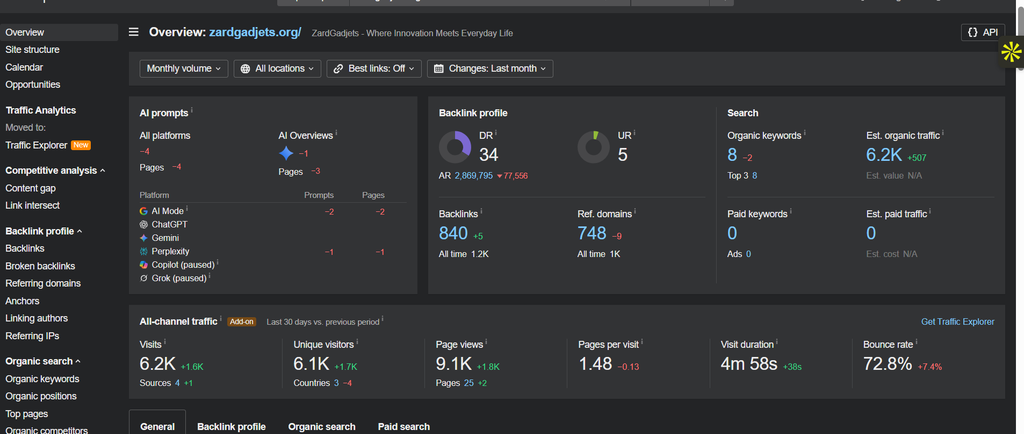
Figure 1. Ahrefs overview of zardgadjets.org (26 Nov 2026): backlink profile, organic keywords and all-channel traffic. Source: Ahrefs.
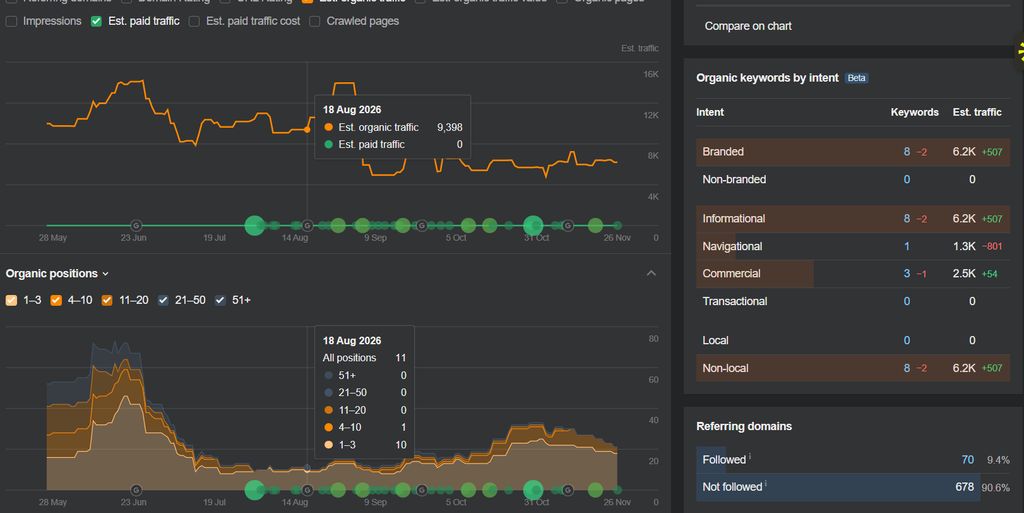
Figure 2. Estimated organic traffic over time, ranking positions, keywords by search intent and referring domains. Source: Ahrefs.
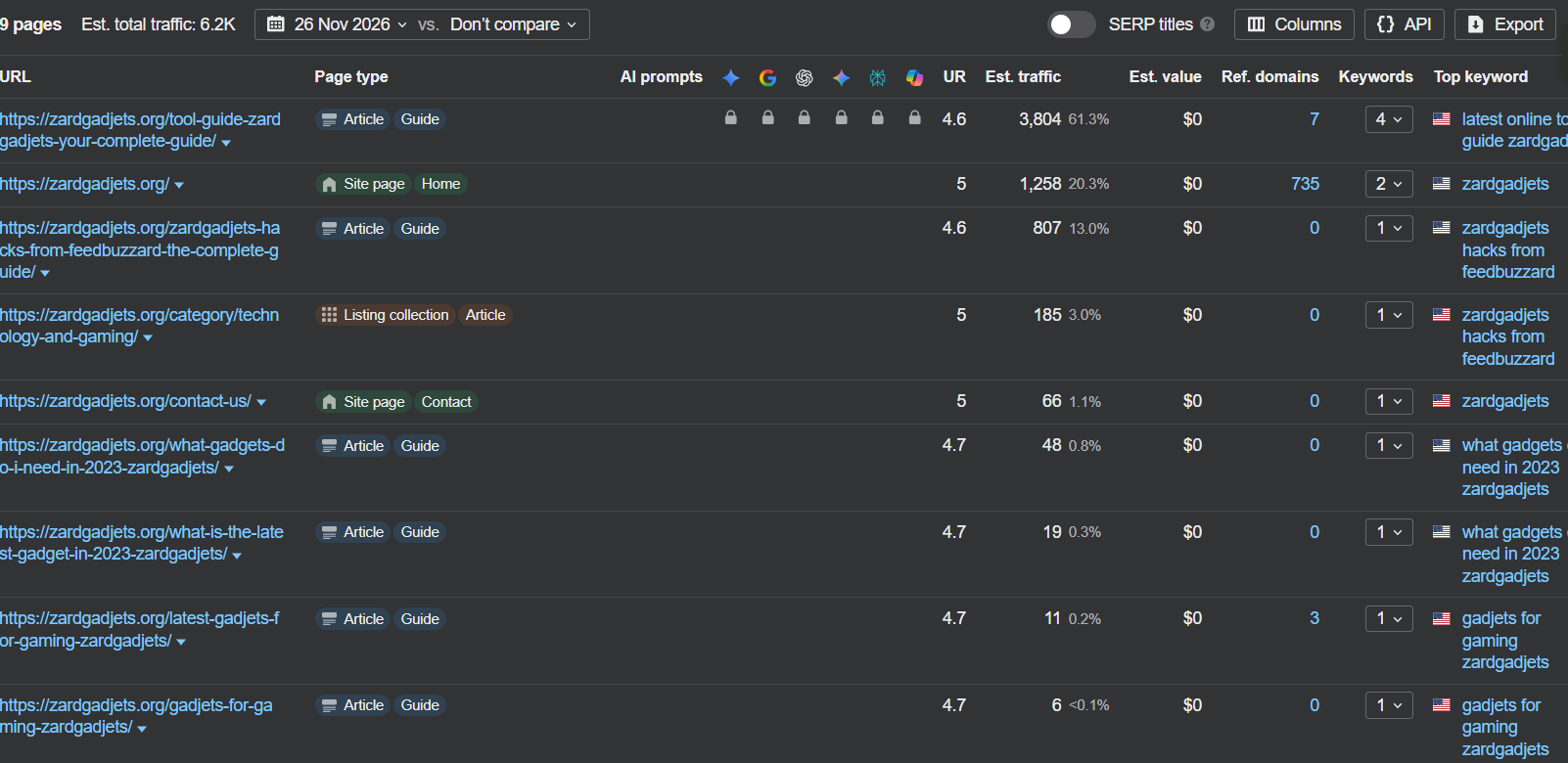
Figure 3. Top pages report: the ranking pages are articles and guides, plus the homepage and a contact page. Source: Ahrefs.
How to Verify the Official Zardgadjets Website
Visit the site directly and read its About, Terms and Conditions, and Privacy Policy pages. Note the exact domain and spelling, because similarly named sites exist.
How to Distinguish Verified Information From Promotional Claims
Verified information points to documentation, dates, and named sources. Promotional claims use general praise and give no way to check them.
Why Independent Tool Reviews Matter
A guide shows what a tool is meant to do. An independent review shows how it performs.
How to Verify Third-Party Tools Before Using Them
Go to the provider’s official website, read its documentation and privacy policy, and download only from official sources.
What Information Should You Check Before Trusting a Recommendation?
- Publisher identity
- Article update dates
- Evidence of hands-on testing
- Independent user reviews
- Official software documentation
- Transparent affiliate disclosures
Security and Privacy Considerations When Using Online Tools
Before using any online tool, find out what data it collects, avoid uploading sensitive files to sites you cannot verify, and protect your accounts. CISA’s Secure Our World and NIST’s cybersecurity resources are reasonable places to read further.
Understand What Data an Online Tool Collects
Read the privacy policy for the data collected and who it is shared with.
Avoid Uploading Sensitive Files to Unverified Platforms
Utility sites that convert or compress files receive your files. Do not upload contracts, IDs, or financial documents to a site you have not verified.
Use Strong Passwords and Multifactor Authentication
Use a unique password per account, ideally with a password manager, and turn on multifactor authentication where offered.
Review Application Permissions
Grant only the permissions the tool needs, and review them periodically.
Check Data Storage and Deletion Policies
Confirm whether you can export and delete your data, and how to cancel your account.
Recognize Suspicious Downloads and Payment Requests
Be cautious of unexpected installers, urgent payment demands, and requests for payment outside the official site.
What Are the Limitations of Online Tool Guides?
A tool guide is a starting point, not a verdict. It cannot test a tool for your situation.
| Limitation | Why it matters |
|---|---|
| Recommendations may become outdated | Features and prices change; verify on the provider’s site |
| Not every tool suits every user | Needs differ by task, budget, and skill |
| Some reviews may lack hands-on testing | Check for evidence of real use |
| Free tools may have usage restrictions | Limits can block real work |
| Specialized software may do more | Online tools may not match advanced installed software |
Practical Tips for Getting the Most Out of Online Tools
Start With One Specific Requirement
Solve one problem first, then expand.
Avoid Using Multiple Tools for the Same Task
Overlapping tools add cost and make information harder to find.
Compare at Least Two Alternatives
A second option shows what the first one lacks.
Monitor Subscription Costs
List your subscriptions and renewal dates so nothing renews unnoticed.
Review Your Digital Toolkit Regularly
Remove tools you no longer use, and recheck the privacy settings of those you keep.
Frequently Asked Questions About Latest Online Tool Guide Zardgadjets
What Is the Latest Online Tool Guide Zardgadjets?
It is informational content from ZardGadjets.org, which describes itself as a blog covering gadgets and online tools. It is a guide to tools, not a tool itself.
Is Zardgadjets a Real Online Tool?
Based on the supplied research, no. It is described as an informational blog. Claims that it is a software platform are not verified here. A third-party Ahrefs report from 26 November 2026 lists only articles, guides, a homepage, and a contact page among its ranking pages, which is consistent with a blog.
Is Zardgadjets Free to Use?
The research does not mention subscriptions or fees for reading the blog. Pricing claims on other sites are unverified. [NEEDS SOURCE]
What Categories of Tools Does Zardgadjets Cover?
Guides in this space typically cover productivity, AI and automation, writing, design, SEO, communication, file utilities, and security tools, as described above.
Who Should Use Online Tool Guides?
Students, freelancers, business owners, content creators, and marketers who want to compare tools before choosing.
Can Beginners Benefit From Online Tools?
Yes. Beginners can start with one task and a free plan, then compare alternatives.
Are Online Tools Safe to Use?
It depends on the tool. Verify the provider, read the privacy policy, avoid uploading sensitive files to unfamiliar sites, and use multifactor authentication.
What Is the Difference Between Online Tools and Desktop Software?
Online tools run in a browser and are usually accessible from different devices. Desktop software is installed on a device. Specialized installed software may offer more advanced features; check each product.
How Can I Find the Best Online Tools for My Needs?
Define the task, compare two or three tools on features, price, usability, compatibility, and security, and test before paying.
Final Thoughts on the Latest Online Tool Guide Zardgadjets
Based on the supplied research, the latest online tool guide Zardgadjets is informational content from a blog about gadgets and online tools, not a software product. The tools it discusses belong to independent providers.
Choose tools by your own requirements, not by popularity. Verify recommendations against official provider pages, check pricing and privacy before you commit, and favor usability, security, and value.
SEO Metadata
SEO Title (54 characters): Latest Online Tool Guide Zardgadjets: A Complete Guide
Meta Description (155 characters): Discover the latest online tool guide Zardgadjets, explore digital tool categories, understand their benefits, and learn how to choose useful tools safely.
Suggested URL Slug: latest-online-tool-guide-zardgadjets
Primary Keyword: latest online tool guide zardgadjets
Secondary Keywords: online digital tools, free online tools, web-based applications, digital productivity tools, online tool recommendations, secure online applications, digital tools for students
Editor’s Evidence Note
- Facts about Zardgadjets come from your outline and from secondary web sources that quote its About page. I could not open the About page directly, so please verify the wording before publishing. An Ahrefs overview (26 Nov 2026) supports the blog identity: its ranking pages are all articles and guides. Those figures are third-party estimates and do not confirm the About page text.
- Every tool name is an independent product used only as an example. No pricing, features, or statistics are claimed.
- Items marked [NEEDS SOURCE] need a verified example or answer.
- The outline asks for original screenshots, expert quotes, statistics, and a decision flowchart. None were supplied, so none were invented.