Dijkstra Algorithm helps SEO by finding shorter paths between connected pages on a website. Since websites work like networks of linked pages, this approach can reveal pages that are too deep, difficult to reach, or disconnected from the rest of the site.
By creating shorter and clearer pathways, websites can:
- Reduce crawl depth
- Help search engines discover pages faster
- Improve access to important content
- Strengthen internal link flow
- Make navigation easier for users
This approach becomes more valuable on large websites with hundreds or thousands of pages where manual internal linking becomes difficult.
Why Some Website Pages Never Get Enough Traffic
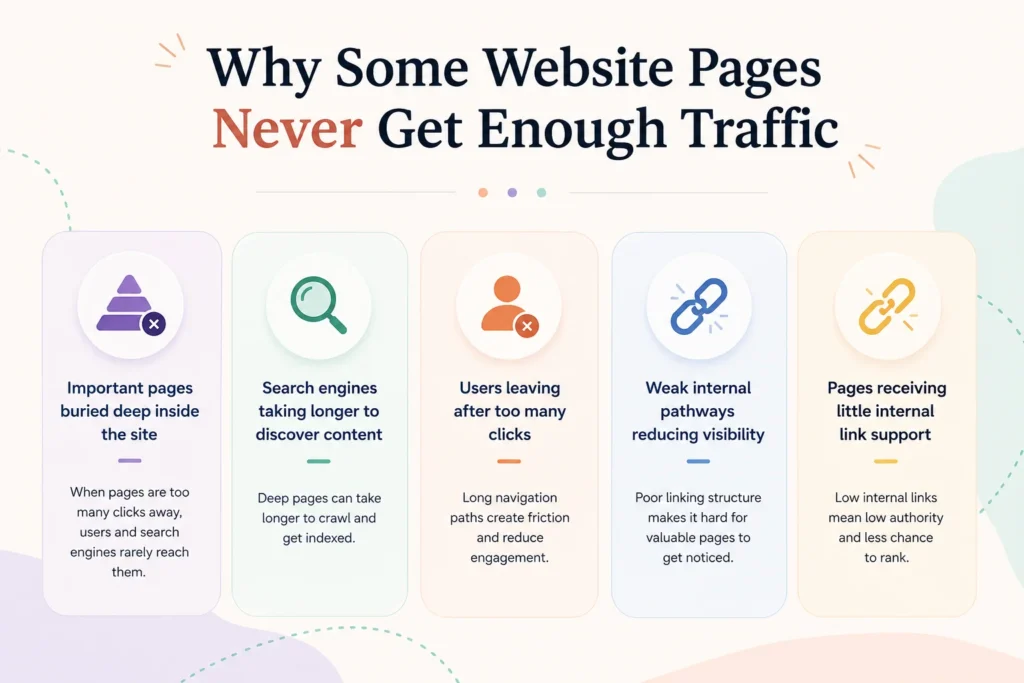
Many websites publish good content but still struggle to get traffic to certain pages. The problem is not always content quality. In many cases, the issue is how pages are connected inside the website.
When important pages sit too far from the homepage or require several clicks to reach, both users and search engines may have difficulty finding them.
Common issues include:
- Important pages buried deep inside the site
- Search engines taking longer to discover content
- Users leaving after too many clicks
- Weak internal pathways reducing visibility
- Pages receiving little internal link support
For example, imagine this structure:
Home → Blog → Category → Archive → Subcategory → Article
Now compare it with:
Home → Category → Article
The second path gives users and search engines a much shorter route.
Common Website Structure Problems
| Website Structure Problem | Possible SEO Effect |
|---|---|
| Too many clicks | Lower page discoverability |
| Orphan pages | Difficult for search engines to find |
| Broken pathways | Lost internal link value |
| Poor structure | Weak navigation experience |
| Deep page hierarchy | Reduced crawl efficiency |
Quick Insight
Pages hidden several clicks away often receive less visibility and weaker internal support. Improving page pathways can help users reach content faster and make websites easier to crawl.
What Is Dijkstra Algorithm? (Without the Technical Jargon)
Dijkstra Algorithm is a method used to find the shortest or most efficient path between connected points. It was created to solve routing problems where multiple paths exist and the goal is to reach a destination using the best route.
Instead of checking every possible path, the algorithm compares available routes and selects the most efficient one.
You already use this idea in everyday life without noticing it.
Examples include:
- Navigation apps finding the fastest route
- Network systems moving data efficiently
- Delivery systems planning routes
- Digital maps calculating directions
Think of opening Google Maps before driving somewhere. You enter a destination and see several possible routes. Some roads may be longer, have more turns, or take more time.
Google Maps evaluates different paths and recommends a better route.
Dijkstra Algorithm follows a similar idea. It looks at connected paths and determines which route reaches the destination with the least distance or effort.
Simple Analogy
Imagine you need to reach a coffee shop.
Route 1: Home → Main Road → Market → Coffee Shop
Route 2: Home → Side Street → Coffee Shop
Most people would choose the shorter path.
Websites can work in a similar way. Instead of roads and destinations, websites contain pages connected through links. Finding shorter pathways can make content easier to reach for both users and search engines.
Quick Takeaway
Dijkstra Algorithm is not an SEO tool by itself. It is a path-finding method that can help identify better routes across connected website pages.
Understanding Websites as Networks Instead of Pages
Most people think of a website as a collection of separate pages. Search engines, however, often process websites more like connected networks where every page links to another page through different pathways.
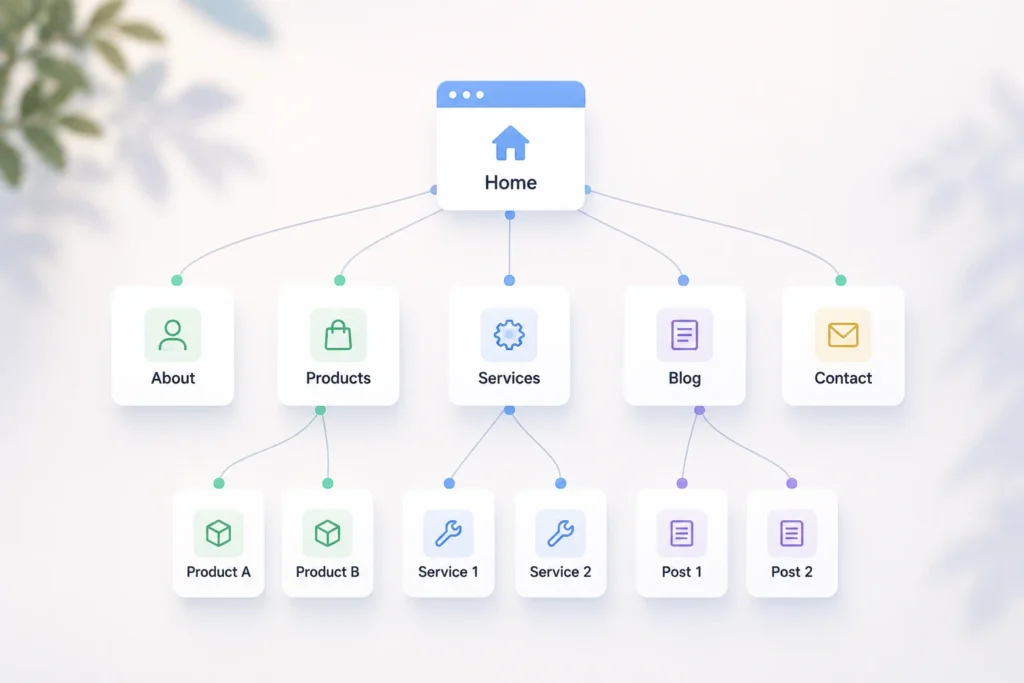
Looking at a website as a network makes it easier to understand why some pages receive attention while others stay hidden.
Pages Become Nodes
In a website network, each page acts like a point in a map.
Examples:
- Homepage
- Service pages
- Blog posts
- Product pages
- Category pages
Each page becomes a connected location rather than an isolated document.
Internal Links Become Connections
Internal links create the connections between pages.
Examples:
- Homepage linking to service pages
- Blog articles linking to related guides
- Category pages linking to products
Without these connections, search engines and users may struggle to discover content.
Navigation Creates Pathways
As pages connect through internal links, they create pathways users and search engines follow.
Simple example:
Homepage
↓
SEO Services
↓
Technical SEO
↓
Guide Article
This route requires several steps before reaching the final page.
Now compare it with:
Homepage
↓
SEO Services
Guide Article
The destination becomes easier to reach.
Why Long Paths Become a Problem
Long pathways can create several SEO issues:
- Important pages become buried deep inside the site
- Users may leave before reaching the content
- Search engines can take longer to discover pages
- Internal link value gets diluted across many steps
- Some pages receive less visibility than they should
As websites grow, these pathways become more complicated. A structure that works for 20 pages can become difficult to manage with hundreds or thousands of pages.
This is why SEO teams often analyze websites as connected networks rather than viewing pages one by one.
How Dijkstra Algorithm Applies to Internal Linking
Now comes the practical part. You do not need to build a custom algorithm or write code to use this idea. The goal is to apply the same thinking behind Dijkstra Algorithm: find shorter and more efficient paths between important pages.
When a website grows, some pages naturally become difficult to reach. Internal link analysis helps uncover those weak pathways and improve them.
Mini Process Flow
Website crawl → Structure analysis → Path evaluation → Link improvements
This process helps identify pages that are buried too deep and creates better routes for users and search engines.
Step 1: Create a Map of Your Website
Start by understanding how your pages connect.
You can use tools such as:
- Screaming Frog
- Ahrefs Site Audit
- Sitebulb
- Internal crawl reports
The goal is to create a complete picture of:
- Homepage
- Categories
- Service pages
- Blog posts
- Product pages
- Existing internal links
Think of it as drawing a road map for your website.
Step 2: Measure How Far Pages Are From Important Sections
Next, check how many clicks it takes to reach important pages.
For example:
Home → Blog → Category → Archive → Article
The article page sits several steps away.
Questions to ask:
- Can users reach it quickly?
- Is it close to key sections?
- Does it require unnecessary navigation steps?
Pages that sit too far away may become harder to discover.
Step 3: Identify Pages Hidden Deep Inside the Site
Large websites often contain pages that are technically published but rarely reached.
Watch for:
- Orphan pages
- Pages more than 3–4 clicks deep
- Low-traffic content
- Pages with very few internal links
These pages may receive less attention from both users and search engines.
Step 4: Find Shorter Paths
This is where Dijkstra-style thinking becomes useful.
Look for ways to create shorter routes.
Example:
Before
Home → Blog → Category → Archive → Article
After
Home → Category → Article
The destination now requires fewer steps.
Small pathway improvements can create noticeable changes across large websites.
Step 5: Add Strategic Internal Links
After finding weak routes, add internal links that improve navigation naturally.
Examples:
- Link related articles together
- Add links from high-authority pages
- Create topic hubs
- Connect service pages with supporting content
- Add contextual links inside articles
Avoid adding links randomly. Each link should help users reach relevant content faster.
Quick Reminder
The goal is not to create more links. The goal is to create better pathways between pages. Shorter and clearer routes often improve website structure more than simply increasing link count.
Example: Improving Internal Links on a Large Website
Understanding the concept becomes easier with a real-world example.
Imagine an ecommerce website with:
- 10,000+ pages
- Product categories
- Individual product pages
- Blog content
- Buying guides
- Help and support pages
As websites grow, page structures often become more complicated. New sections get added over time, categories expand, and content builds up. Eventually, important pages can become buried deep inside the site.
A product page may follow a path like this:
Before Optimization
Home → Category → Tag → Archive → Product
Users and search engines must pass through several layers before reaching the page.
Now imagine the site owner reviews internal links and identifies unnecessary steps.
After Optimization
Home → Category → Product
The path becomes shorter and more direct.
Instead of forcing users through extra pages, the website creates a cleaner route to important content.
Structure Comparison
| Before Optimization | After Optimization |
|---|---|
| 5 clicks | 2 clicks |
| Longer routes | Shorter paths |
| Slow page discovery | Faster access |
| Deep page hierarchy | Easier navigation |
| More navigation steps | Reduced friction |
Why This Matters
On a website with a few pages, adding extra clicks may not create noticeable problems.
On a website with thousands of pages, small inefficiencies can spread across the entire structure.
When product pages, guides, or important resources sit several levels deep:
- Search engines may take longer to discover content
- Users may abandon navigation midway
- Internal link value passes through more layers
- Important pages may receive less visibility
Reducing unnecessary steps creates cleaner pathways across the site and helps important pages become easier to reach.
SEO Benefits of Smarter Internal Link Paths
Smarter internal linking is not only about connecting pages. The way pages connect can influence how users move through a website and how search engines discover content.
Shorter and clearer pathways can make a website easier to understand, easier to crawl, and easier to navigate.
Reduced Crawl Depth
Crawl depth refers to how many clicks it takes to reach a page from the homepage or another important section.
Example:
Home → Category → Subcategory → Archive → Article
Pages that sit several clicks away can become harder to reach.
Reducing unnecessary steps creates shorter paths and makes important pages easier to access.
Better Page Discovery
Search engines discover pages by following links.
When content sits deep inside a website or has very few internal links, it may take longer to be found.
Stronger internal pathways help search engines move through the site more efficiently and reach important pages faster.
This becomes especially useful on large websites with hundreds or thousands of pages.
Improved Website Navigation
Internal links also guide visitors.
When related pages connect naturally, users can move from one topic to another without extra searching.
For example:
Beginner SEO Guide
↓
Technical SEO Guide
↓
Internal Linking Guide
This creates a smoother browsing experience.
Stronger Internal Link Flow
Some pages naturally receive more attention and authority than others.
Examples include:
- Homepage
- Popular blog posts
- Service pages
- Category pages
Strategic internal links help distribute that value across the website and connect users with important content.
Better User Experience
Users generally prefer shorter pathways.
Reaching useful content in fewer steps can reduce frustration and help visitors continue exploring.
Long navigation chains often create unnecessary effort.
Shorter routes make websites feel simpler and easier to use.
Easier Access to Important Pages
Not every page has the same importance.
Some pages directly support business goals:
- Product pages
- Service pages
- Pricing pages
- Lead pages
- High-value blog content
When these pages become buried deep in the site structure, they can lose visibility.
Smarter internal links help surface important content and make it easier for both users and search engines to reach it.
Quick Takeaway
Good internal links do more than connect pages. They create clear pathways that help search engines discover content and help users reach important information faster.
Tools That Help Analyze Internal Link Structure
You do not need to build custom algorithms to understand website pathways. Several SEO tools can show how pages connect, reveal crawl problems, and identify pages hidden deep inside the site.
The goal is simple: understand how search engines and users move through your website.
1. Screaming Frog for Crawl Mapping
Screaming Frog crawls websites similar to how search engines do and helps create a complete map of pages and internal links. It is widely used for technical SEO audits and website structure analysis.
What it does
- Crawls website pages
- Shows internal link structure
- Finds broken links
- Measures click depth
- Identifies orphan pages
Why it matters
It helps reveal pages that sit too deep inside the website and exposes navigation problems that may affect discovery.
When to use it
Use it during technical audits, website redesigns, or internal linking reviews.
2. Ahrefs Site Audit for Internal Link Analysis
Ahrefs includes a Site Audit tool that scans websites and highlights SEO issues, including internal linking opportunities and crawl-related problems.
What it does
- Audits internal links
- Shows crawl issues
- Identifies weak pages
- Tracks site health
Why it matters
It helps locate pages that receive little internal support and shows how content fits into the overall structure.
When to use it
Helpful for regular SEO audits and larger websites with many sections.
3. Google Search Console for Discovery Issues
Google Search Console provides direct information from Google about indexing and page discovery.
What it does
- Shows indexed pages
- Reports crawl issues
- Highlights discovery problems
- Tracks page performance
Why it matters
If pages are not appearing in search results, Search Console can reveal whether Google is struggling to find or crawl them.
When to use it
Use it regularly to monitor page visibility and indexing health.
4. Sitebulb for Structure Visualization
Sitebulb visualizes website structures and makes large sites easier to understand.
What it does
- Creates crawl maps
- Displays page relationships
- Shows site hierarchy
- Visualizes click depth
Why it matters
Large websites become difficult to analyze manually. Visual maps often reveal hidden issues quickly.
When to use it
Useful for large websites and detailed structure analysis.
5. Gephi for Graph-Based Website Mapping
Gephi is a visualization tool used to analyze networks and connected systems.
What it does
- Converts websites into network maps
- Displays relationships between pages
- Creates graph visualizations
- Shows connection patterns
Why it matters
This tool closely matches the idea behind Dijkstra-style analysis because it allows websites to be viewed as connected networks instead of isolated pages.
When to use it
Useful for advanced website analysis and very large websites.
Quick Tip
Start with crawl tools first, then move to visual tools. Mapping the structure often reveals issues that are difficult to notice when reviewing pages individually.
Practical Internal Linking Improvements You Can Apply Today
You do not need advanced algorithms or a complete site rebuild to improve internal links. Small changes can make important pages easier to reach and create a cleaner structure for both users and search engines.
Start with practical improvements that can be applied immediately.
Fix Orphan Pages
Orphan pages are pages with little or no internal links pointing to them.
If a page has no clear pathway, users and search engines may struggle to find it.
To fix this:
- Link orphan pages from related content
- Add them to category pages
- Include them in navigation or resource sections
- Connect them from relevant high-traffic pages
Audit your site regularly to uncover hidden pages.
Reduce Unnecessary Click Depth
Important pages should not require several clicks before someone can reach them.
Example:
Less efficient
Home → Blog → Category → Archive → Article
Improved
Home → Category → Article
Try to keep valuable pages closer to major sections of your website.
Link to Important Pages Earlier
Pages that support business goals should be easier to access.
Examples:
- Service pages
- Product pages
- Pricing pages
- Key landing pages
- High-converting articles
Linking to these pages from important sections can improve visibility and navigation.
Build Topic Clusters
Group related content together instead of leaving articles isolated.
Example:
SEO Basics
↓
Technical SEO
↓
Internal Linking
↓
Site Structure Guide
Topic clusters help users continue exploring and create stronger content relationships.
Add Contextual Links
Contextual links appear naturally inside content.
Example:
An article about crawl issues can link to a guide about technical SEO.
These links help users discover related information at the moment they need it.
Avoid adding links only for the sake of adding more links.
Review Internal Links Regularly
Website structures change over time.
New pages are added, content gets updated, and older pathways may become less useful.
Review your internal links periodically to identify:
- Broken links
- Deep pages
- Weak pathways
- Missed linking opportunities
Small maintenance checks can prevent larger structure problems later.
Create Hub Pages
Hub pages organize related content under one main page.
Example:
Technical SEO Hub
- Crawlability Guide
- Internal Linking Guide
- Site Architecture Guide
- XML Sitemap Guide
Hub pages create stronger pathways and make navigation easier.
Quick Action Checklist
Fix orphan pages
Shorten unnecessary pathways
Add contextual links
Build topic clusters
Create content hubs
Review internal links regularly
Small improvements across many pages often create stronger results than changing a single page.
Dijkstra Thinking vs Traditional Internal Linking
Many websites build internal links manually. A page gets linked because it feels relevant or because someone remembers to add it during publishing.
That approach can work on smaller websites, but as websites grow, managing hundreds or thousands of pages becomes harder. Important pages can become buried, pathways become longer, and link patterns become inconsistent.
Dijkstra-style thinking approaches internal linking differently. Instead of relying only on assumptions, it looks at pathways between pages and asks a simple question:
Can users and search engines reach important content more efficiently?
The goal is not to create more links. The goal is to create better routes.
Comparison
| Traditional Method | Data-Driven Approach |
|---|---|
| Manual assumptions | Path analysis |
| Guess-based linking | Measured decisions |
| Fixed structures | Adaptive optimization |
| Links added page by page | Website viewed as a connected network |
| Problems found manually | Hidden pathways become easier to identify |
| Structure changes reactively | Improvements guided by data |
Example
A traditional approach may create this structure:
Home → Blog → Category → Archive → Article
The page exists, but reaching it requires several steps.
A path-focused approach may simplify the route:
Home → Category → Article
The content becomes easier to reach for both visitors and search engines.
Key Difference
Traditional internal linking often asks:
“Where should I add links?”
Dijkstra-style thinking asks:
“What is the shortest and clearest path to important pages?”
That shift in thinking becomes more useful as websites become larger and more complex.
Situations Where Dijkstra Algorithm Makes the Biggest Difference
Not every website needs advanced path analysis. A small website with 20–30 pages can often manage internal links manually without major issues.
The value becomes clearer as websites grow. More pages usually mean deeper structures, more pathways, and a higher chance of important content becoming difficult to reach.
Below are situations where Dijkstra-style thinking can make a bigger impact.
Ecommerce Websites
Ecommerce sites often contain:
- Product pages
- Category pages
- Filters and tags
- Buying guides
- Help pages
Over time, products can become buried behind several layers of navigation.
Example:
Home → Category → Subcategory → Tag → Product
Shorter pathways can help surface important products and reduce unnecessary navigation steps.
This becomes especially useful on stores with thousands of products.
SaaS Platforms
SaaS websites often publish multiple content types:
- Feature pages
- Landing pages
- Blog articles
- Documentation
- Pricing pages
- Support content
As new pages get added, internal pathways can become inconsistent.
Path analysis can help connect feature pages, educational content, and conversion pages more effectively.
Large Blogs
Blogs with hundreds of articles often develop content silos naturally.
Older content can become difficult to find even if it still provides value.
Common problems include:
- Articles buried deep in archives
- Weak links between related topics
- Important content receiving little internal support
Creating shorter pathways can make useful content easier to rediscover.
News Websites
News websites publish content continuously.
As articles move off the homepage, older stories often become harder to access.
Examples:
- Archived news stories
- Topic pages
- Category pages
- Evergreen content
Smarter internal pathways can help important stories remain discoverable beyond the initial publication period.
Knowledge Base Websites
Knowledge bases often contain many connected topics.
Users may move through:
Homepage
↓
Category
↓
Subcategory
↓
Documentation
↓
Support article
Long pathways can create frustration when users simply want quick answers.
Improved pathways help users reach solutions faster.
Enterprise Websites
Large enterprise websites often contain:
- Service pages
- Product sections
- Regional pages
- Documentation
- Resource centers
- Blogs
Managing internal links manually becomes difficult at scale.
Path-focused analysis helps uncover hidden structure problems and creates a clearer website architecture.
Quick Takeaway
The larger a website becomes, the harder it is to manage pathways manually. Dijkstra-style thinking becomes most useful when websites contain enough pages for structure complexity to become a real challenge.
imitations You Should Know Before Applying It
Improving internal pathways can strengthen website structure, but it is important to keep realistic expectations. Dijkstra-style analysis can help identify better routes between pages, but it is not a direct ranking method.
Website performance depends on many factors working together.
Internal Links Alone Do Not Improve Rankings
Better internal links can help search engines discover and understand content, but internal linking by itself does not guarantee higher rankings.
Other factors still matter, including:
- Content quality
- Search intent alignment
- Backlinks
- Page experience
- Technical health
- Relevance
A well-linked page with weak content can still struggle to perform.
User Intent Still Matters
Creating shorter paths is helpful only if users reach content that actually answers their questions.
For example:
A page may become easier to access, but if the content does not match what visitors are looking for, users may leave quickly.
Internal links should guide users toward useful and relevant pages, not simply create shortcuts.
Good structure supports content. It does not replace it.
Search Engines Use Many Signals
Search engines evaluate far more than website pathways.
Examples include:
- Content relevance
- Page quality
- User behavior signals
- Authority
- Freshness
- Mobile experience
- Technical factors
Internal linking is only one part of a larger SEO strategy.
Think of it as improving roads inside a city. Better roads help movement, but traffic still depends on many other conditions.
Small Websites May Not Need Advanced Analysis
A website with 20 or 30 pages usually does not require complex path analysis.
If users can already reach important content quickly, there may be little value in applying advanced models.
Smaller websites often benefit more from:
- Publishing stronger content
- Fixing technical issues
- Building clear navigation
- Creating useful topic connections
Advanced structure analysis becomes more useful when websites grow large enough for pathways to become difficult to manage.
Quick Takeaway
Dijkstra-style thinking should be viewed as a supporting method, not a complete SEO strategy. Better pathways help, but content quality, relevance, and user needs still play a larger role in long-term performance.
Frequently Asked Questions
1. Is Dijkstra Algorithm Used Directly in Google Search?
There is no public evidence showing that Google directly uses Dijkstra Algorithm for rankings or crawling. However, the idea behind it—finding efficient pathways through connected systems—can help explain how website structures and internal links influence content discovery.
For SEO, the practical takeaway is not whether Google uses the algorithm itself. The focus is creating shorter and clearer paths between important pages.
2. Can Internal Links Improve Rankings?
Internal links can support SEO by helping search engines discover pages and understand relationships between content.
They can also:
- Pass value between pages
- Surface important content
- Improve navigation
- Reduce crawl depth
Internal links alone do not guarantee higher rankings, but weak internal structures can limit the visibility of good content.
3. What Is Crawl Depth in SEO?
Crawl depth refers to the number of clicks required to reach a page from the homepage or another important page.
Example:
Home → Category → Blog → Article
In this example, the article page sits several steps away from the homepage.
Pages with shorter paths are usually easier for users and search engines to reach.
4. How Many Internal Links Should a Page Have?
There is no fixed number.
The right amount depends on:
- Page type
- Content length
- Website structure
- User experience
The goal is to add links naturally where they help users discover relevant content.
Adding dozens of unnecessary links often creates clutter instead of improving navigation.
5. Which Tool Shows Website Structure Visually?
Several tools help visualize website pathways and page relationships.
Common options include:
- Sitebulb
- Gephi
- Screaming Frog visualizations
- Ahrefs Site Audit reports
Visual maps often make hidden structure problems easier to spot.
6. Can Small Websites Benefit From Internal Link Optimization?
Yes, but the approach is usually simpler.
Small websites often do not need advanced pathway analysis.
Basic improvements may be enough:
- Fix orphan pages
- Add contextual links
- Build topic clusters
- Improve navigation
As websites grow, structure analysis becomes more valuable.
7. How Often Should Internal Links Be Audited?
There is no universal schedule, but regular reviews help keep website structures healthy.
General guidelines:
- Small websites: every 6–12 months
- Growing websites: every 3–6 months
- Large websites: ongoing monitoring
You should also review internal links after:
- Publishing large amounts of content
- Site redesigns
- Navigation updates
- Major content migrations
Small structure issues become easier to fix when discovered early.
Final Thoughts
Internal linking does more than connect one page to another. It creates pathways that help users move through your website and helps search engines discover content more efficiently.
A strong website structure can make the difference between content that gets found and content that stays hidden several clicks away.
The idea behind Dijkstra-style thinking is simple: make important pages easier to reach.
Instead of relying only on assumptions, reviewing page pathways and site structure can reveal opportunities that are difficult to spot manually. On larger websites, small improvements in navigation can create noticeable changes across hundreds or thousands of pages.
The goal is not to add more links everywhere.
The goal is to create shorter, clearer, and more useful pathways through your content.
Start with the basics:
- Fix pages buried too deep
- Connect related content naturally
- Reduce unnecessary navigation steps
- Review internal links regularly
- Focus on helping users reach important information faster
Good internal linking helps users first. Stronger SEO often becomes a result of making websites easier to navigate and easier to understand.